Computer vision-based app to change colors
We’ve created a simple solution that changes the colors of the chosen objects using computer vision.
Industry
Computer vision
Team
1 member
Launched
2020
Country
Ukraine
About a Project
ColorDetection is an open-source iOS app from Cleveroad that uses computer vision to detect real-world objects and recolor them in real time, straight from the phone camera.
Project idea
Create an open-source iOS app, based on Swift and OpenCV, that uses computer vision to track objects in the camera view and replace their color with one the user picks.
Project challenges
The main challenge was getting computer vision to detect the planes of a chosen object and track it in a live camera feed in real time, then recolor it accurately while preserving the object's natural shading and saturation, all using OpenCV within a native iOS app built with Swift and Objective-C++.
Results
Our team released ColorDetection on the App Store and open-sourced the full code on GitHub, where other developers can reuse it as a reference for OpenCV-based color detection on iOS. The final build ships with nine color presets and adjustable saturation.
How does computer vision work?
Computer vision uses pictures and videos to understand a real-world scene.
- Identify objects on images or videos.
- Track things that are moving.
- Measure the real-world size or estimate the distance from the camera.
- Detect objects even if they change size or orientation.
- Classify things on the video or photo.
- Image classification. Receiving many examples of the image class for computer vision machine learning.
- Object detection. Defining the objects in the image and labeling them.
- Object tracking. Following one or more moving objects in the scene.
- Semantic segmentation. Dividing the entire picture into groups of pixels that can be labeled and classified.
Main features of the project
A powerful backend of the app has transformed into two main features.
Changing object color
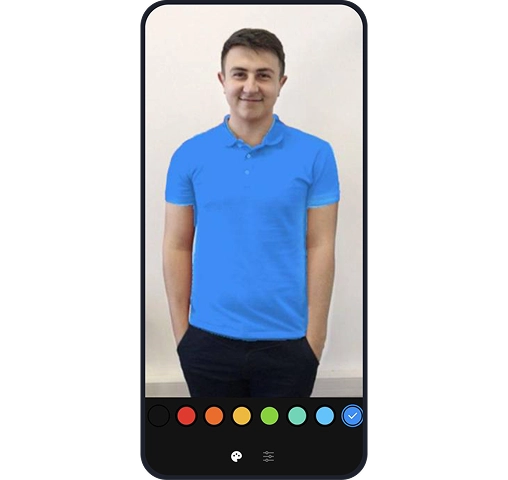
The main feature of ColorDetection is changing the color of the chosen object in a real-time mode. The user can choose from nine colors. It’s required to tap on the item and pick the color from the list.

Editing
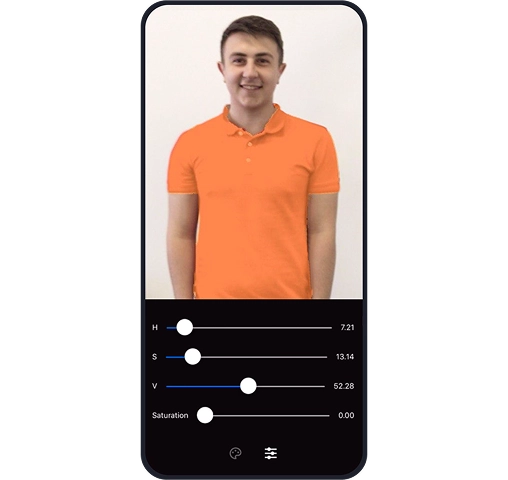
After picking the new color, the user can change the saturation of the picked color. Also, it’s possible to set the height, volume, and space of the object.

Technology stack
The following tools were used to develop ColorDetection App:
Mobile Architecture
Tools
Libraries
Visit our GitHub account to look through the open code of this library.
Feel free to read a detailed case study on how to develop computer vision features with OpenCV.
More Cases



Blockbuster
Cross-device Video on Demand Platform



AR Face Detection App
App Based on Open-AR with Facial Recognition