Church App Development: Main Features and Cost Estimation
Updated 12 Jan 2026
21 Min
4508 Views
A church app has become one of the most effective ways for congregations to stay connected with church members and extend their mission beyond physical walls. It enables live and on-demand sermons, simplifies donations, supports community engagement, and helps churches communicate consistently across digital channels.
Cleveroad has extensive experience in building scalable mobile applications for community-driven platforms. We build church networks for faith communities worldwide, covering church mobile apps for parishioners, event and service management platforms, donation and giving apps, sermon streaming and media libraries, prayer and communication tools, and internal management systems for church staff and volunteers.
Based on our experience, we've created this comprehensive guide to building a church app: step-by-step instructions, key benefits, current technology trends, essential features, and a realistic current cost overview.
Key takeaways:
- A church app in 2026 is no longer just a digital add-on but a core channel through which the church engages members across digital and offline touchpoints
- The most effective church apps combine sermons, events, donations, notifications, and community tools in one secure, easy-to-use platform
- Churches typically choose between app builders and custom development, but a custom app offers greater flexibility, security, and long-term value
- Development costs of the church app vary from $60,000 to $180,000+ and depend on feature scope, platform choice, integrations, and ongoing maintenance
What Is a Church App and Why You May Need It?
A church app is a digital tool designed to support daily activities and administrative tasks for modern religious communities. For many congregations, church applications are essential tools for communication and outreach. Digital tools help communities grow, strengthen engagement, and create your church presence beyond physical walls through interaction and shared experiences.
The church app helps pastors and church leaders manage content, communicate with church members, and support spiritual engagement by serving as a central digital hub for sermons, events, donations, and community interaction beyond regular services.
A church app typically supports several key user groups, each with specific needs:
- Members of your church use the app to watch live or recorded sermons, receive church news, make donations, view events, and stay connected with the community.
- Pastors and spiritual leaders rely on the app to share teachings, communicate with groups, manage ministries, and track participation across different church activities.
- Volunteers access schedules, receive reminders about charity and outreach events, coordinate tasks, and engage more actively in church initiatives.
- Administrators and church staff manage content, track attendance, oversee donations, organize events, and ensure smooth day-to-day operations.
By addressing the needs of all these roles within a single platform, a church app becomes a practical digital solution that strengthens communication, supports engagement, and helps churches grow sustainably in a technology-driven world.
Let’s disclose the benefits of building a church app in more detail.
Next level of communication
A digital church platform is an excellent option for staying connected with the congregation. Electroiq survey reports that 15% of responders regularly listen to religious podcasts. Also, the application can inform users about the latest church news and deliver invitations to upcoming church events.
Broad reach
Church apps offer users 24/7 access to sermons, videos, sacred books like the Holy Bible, and other religious material with just a few clicks. As for clerics and spiritual leaders, they can deliver the word of the Lord among people by applying modern OTT solutions with superior streaming quality.
Donations
A church app may include donation functionality and allow parishioners to share donation links on social networks. So, a church app can help you establish a convenient way to make donations, increasing their number and enhancing parishioners’ experience. According to EnterpriseAppsToday, 49% of all donations to churches come from credit cards or other electronic means.
Online sermons
Offering online sermons through a church app ensures that members can access spiritual guidance anytime, anywhere, without the feeling attached to specific conditions. This feature is especially valuable for those unable to attend in person, helping them maintain their connection to the church community and its teachings.
Charity and volunteering
Building a church app allows reminding parishioners about the forthcoming charity or volunteering events. Push notifications can be great helpers in involving more people in an event. It’s reasonable to add a photo library for events, let people comment on them, and make charity donations.
Community building
Build a church app fosters a stronger sense of community by providing a central hub for members to connect, share updates, and engage in church activities. By offering a shared digital space for interaction and participation, churches can create your ministry as an active, connected community that extends beyond weekly services.
Electroiq survey shows that 60% of virtual viewers stay loyal to one congregation. Such statistics confirm that a user-friendly digital tool such as a church app can improve members' commitment.
Core 3 Types of Church Apps
Church apps vary by purpose and audience. Some focus on engaging parishioners, others support internal operations, and some help coordinate volunteers and ministry teams. Understanding these differences helps churches define the right feature set, choose priorities, and avoid overbuilding.
Below are the three core types of church apps and how each one serves a specific group within the congregation more effectively.
Apps for parishioners
Apps for parishioners act as the primary digital touchpoint between the church and its members, especially outside regular services.
The core tasks of parishioner-facing apps include content delivery, communication, and participation. Typical features cover sermon streaming and archives, event calendars, push notifications, and digital donations. Many apps also include prayer request tools, small group updates, and access to religious texts or study materials.
The app allows parishioners to stay connected with the church, especially when they cannot attend in person, by providing continuous access to sermons, initiatives, and community life in a single digital space, without breaking their sense of belonging.
Solutions for staff and leaders
Solutions for staff and leaders support operational management with built-in church features and internal communication. These apps prioritize organization rather than public-facing engagement.
Main tasks of church staff’s applications include managing events, publishing content, sending announcements, and coordinating communication across groups. Church leaders often use these apps to upload sermons, schedule services, manage attendance, and communicate with ministry leaders or specific member groups.
Pastors and administrators rely on this type of app to reduce manual work, centralize information, and maintain visibility into church activities. By streamlining internal processes, staff apps help leaders focus on ministry rather than administrative overhead.
Apps for volunteers and ministry teams
Apps for volunteers and ministry teams focus on coordinating people and executing day-to-day church initiatives. They help organize volunteers supporting church activities, including charity events, outreach programs, and service operations.
The primary tasks of these apps include scheduling, task assignment, and real-time notifications. Volunteers use them to view upcoming events, confirm availability, receive reminders, and communicate with coordinators. Ministry leaders can assign roles, track participation, and share updates efficiently.
This type of app improves reliability and engagement among volunteers by reducing confusion and missed communication. It ensures that ministry teams stay aligned and informed, even when activities involve large groups or frequent schedule changes.
Together, these three types form the foundation of a complete church app ecosystem. Some churches choose to build separate apps for each group, while others combine all roles into a single platform with role-based access. The right approach depends on church size, organizational complexity, and long-term digital goals. The app provides schedules, reminders, and quick coordination in one place.
App Builder vs Custom Church App Development: What to Choose?
When planning a church app, you typically choose between two approaches: an app builder or custom development from scratch. Choosing between these options comes down to your long-term goals and the level of flexibility you need.
Church app builders: pros and cons
Church app builders are ready-made platforms that let churches assemble an app using prebuilt modules and church app templates. You typically choose formats and configure the features you need, such as sermons and donations. Then you can publish the app on the Google Play or Apple App Store with minimal engineering effort.
Pros:
- A church app builder makes fast launch possible
- Lower upfront cost than custom development
- Built-in basics such as sermons, announcements, and simple donation flows
- Little to no technical team required
- Supports no-code church app creation for simple use cases
Cons:
- Limited customization of design, user flows, and feature logic
- Vendor lock-in, since you depend on the builder’s roadmap and rules
- Integration limits, especially for accounting, CRM, or membership tools
- Performance and stability depend on the provider’s infrastructure
- Security and compliance options often stay generic and inflexible
Builders often work best when a church needs a simple digital presence quickly and can accept standardized functionality.
Custom church mobile app development: benefits and potential drawbacks
A custom mobile church solution built from scratch implies partnering with a vendor to develop a church app tailored to your exact needs. You define requirements, user roles, content structure, donation flows, and integrations. In this model, the church partners with an app development company to design, develop, test, and support the app as a long-term product.
Benefits:
- Full control over UX, branding, and feature set
- Stronger security options, including role-based access and data controls
- Reliable integrations with accounting systems, donation platforms, CRM, and analytics
- Better scalability for growing congregations, multi-campus churches, and new ministries
- Long-term ownership and flexibility to expand functionality
Potential drawbacks:
- Higher upfront cost than using a builder
- Longer time to launch, especially for feature-rich apps
- Requires active involvement from church stakeholders during discovery and testing
For churches that view the app as a core engagement channel rather than a one-time experiment, custom development usually delivers more value over the app’s lifetime.
How to choose between app builder and custom church app development?
Church app builders fit best when you need to launch quickly with a small budget, and you can rely on standard features without advanced integrations. It can also work as a temporary solution for early validation, such as testing demand for online sermons and basic notifications.
Custom church app development is the right choice when your goal is to launch a reliable, scalable platform designed for long-term growth rather than a short-term solution. This approach works best for churches that plan to expand digital engagement, add new ministries, or support multiple user roles over time. To achieve these goals, it is important to work with an experienced development company that can deliver a stable architecture, secure integrations, and a user experience aligned with your church’s structure and mission. In most long-term scenarios, custom development gives churches the control and flexibility required to support real engagement and operational needs.
| Option | Pros | Cons | Best for |
|---|---|---|---|
Church app builder | Fast launch, lower upfront cost, minimal technical effort | Limited customization, vendor lock-in, integrations, generic security | Small churches, tight timelines, simple feature needs, early validation |
Custom church app development | Full control, strong branding and UX, scalable architecture, secure integrations | Higher upfront cost, longer timeline, requires stakeholder involvement | Growing churches, multi-role apps, advanced donations, long-term digital strategy |
How To Develop an App for Church in 9 Steps
To help you understand how to build a church app, we have compiled a step-by-step guide on custom church app development from scratch:
Step 1. Define why you need a church mobile app
Start by identifying the main reasons your church wants to build a digital solution for its community. Maybe you need to improve communication within your congregation, making it easier for members to stay updated on events and sermons. Or, perhaps you're looking for a more convenient way to handle donations or want to reach a broader audience. For example, if your church often struggles with getting information out quickly, an app that sends push notifications could be a game-changer.
Step 2. Clarify your church app goals
Next, set some clear and achievable goals for your church or ministry app development. In other words, define what you want your church app to do. Maybe you want to boost engagement by having more members attend events or make online giving more inclusive and accessible. For example, if one of your goals is to increase online donations, having a secure and user-friendly donation feature will be the key. Defining these goals will help you prioritize key features over functionality that may be added later.
Step 3. Find an experienced vendor
Focus on looking for a church app development company with experience in creating similar solutions, especially for non-profits or religious organizations. The right software development partner should be able to translate your church’s vision, values, and community goals into a digital product that serves both parishioners and staff. A strong working relationship with your development partner helps streamline the process and ensures the final app truly supports your church’s mission.
When evaluating potential vendors, use the following criteria to identify a reliable long-term partner:
- Relevant domain experience. Look for vendors with proven experience in how to create church app, nonprofit platforms, or community-driven digital products.
- Verified delivery track record. Review case studies, client testimonials, and long-term partnerships to confirm consistent results and on-time delivery.
- Technical competence and scalability. Ensure the team can handle mobile development, cloud infrastructure, security, integrations, and future growth.
- Transparent processes and communication. A trustworthy vendor clearly explains timelines, responsibilities, risks, and progress throughout the project lifecycle.
- Security and compliance practices. The vendor should follow best practices for data protection, secure payments, and role-based access control.
- Post-launch support and maintenance. Long-term support is critical as your church app evolves and user needs expand.
Choosing a vendor based on these principles helps reduce project risks and increases the likelihood of building a stable, mission-aligned church app that delivers lasting value.
Step 4. Key features to include
Now, think about the features your app should have. Here are key features that are commonly included while planning to create an app for a church:
- Church information
- News
- Event calendar
- Push notifications
- Sacred books section
- Donations
- Social networks integration
- Media library
- Live streaming
- Community forums
- Contact feature
Note: The feature list may significantly vary depending on your church's and congregation's needs, so prioritize features that will best serve your community and support your church's mission. In this way, if you want to improve engagement, including a feature that lets members easily register for events could be very beneficial. Besides, engage with your congregation through surveys or focus groups. This will provide valuable insights into what features they would find most useful and what exactly they need to improve their experience within your organization.
If you need assistance with feature list, feel free to contact us for help.
Step 5. Choose a platform for your church app
Decide whether your solution will be a web and mobile church app, a native church app for iOS and Android, or a cross-platform church app that operates both on iOS and Android. Web apps are accessible from any browser, making them widely available without needing downloads. Native apps offer better performance and can use device-specific features but require separate development for iOS and Android. At the same time, utilizing cross-platform app development services can save on development costs by running on multiple platforms and stores with a single codebase, even its Android (Google Play) or iOS (App Store). While making this decision, consider your budget, timelines, and preferences of your congregation.
Step 6. Think about UI/UX design
Make sure your church app development provides a solution that is easy to navigate and visually appealing so members can find and use its features without frustration. Conduct usability testing with a small group from your congregation to gather feedback and make necessary adjustments. A positive user experience will ensure a functional app members return to. A professional UI/UX design services provider will help you create a custom visual identity for the application that aligns with your church’s brand identity and meets accessibility standards.
Step 7. Develop your church app
With a clear plan and design, your development team pulls into the app building and development process. The team will help you create a detailed timeline and roadmap, outlining each phase from coding to testing. At this stage, you’ll closely collaborate with your vendor, providing feedback to make sure the team’s effort aligns with the vision and goals you plan to achieve by how to build a church app. Regular check-ins and updates will help keep the project on track. Nevertheless, the church app development team will conduct iterative testing during development to catch and fix bugs early.
We provide robust mobile development services with the implementation of cutting-edge technologies, matching your church application with the latest trends
Step 8. Test and launch your church app
Before you publish your app, the development team conducts thorough testing to ensure it’s free of bugs, and the performance of your app is still high. This stage includes testing your church app functionality, usability, and scalability within different levels of user loads. Once testing is complete, you’ll need to plan your church app launch with your development team. From your side, inform your congregation about the new app through announcements during services, newsletters, and social media. Prepare the release for the app store and Google Play and once the app is available so users can easily find your app.
Step 9. Assess church app post-launch stage
After launching the app, the church app development company will monitor its performance and adjust it to growing app users loads. You can use analytics tools (Google Analytics, Firebase Analytics, etc.) to track user engagement, feature usage, and any issues that arise. Gather feedback from users to continuously update your app. The development team will update the church app to fix bugs, enhance performance, and add new features. Besides, promote the app within your community by highlighting new features and encouraging members to share it with others. By using the right church app, churches can strengthen engagement, streamline operations, and support long-term growth.
Key Features to Add in Church App
To build your own church app, you should first decide on the required features. Once it’s done, write down every idea you have to be able to provide clear requirements for the company that’ll create your church app. It’ll speed up the app development process and help bear everything in mind.
Now, let’s talk about features. First, let’s consider some basic features needed to create a church app that will be helpful for parishioners:
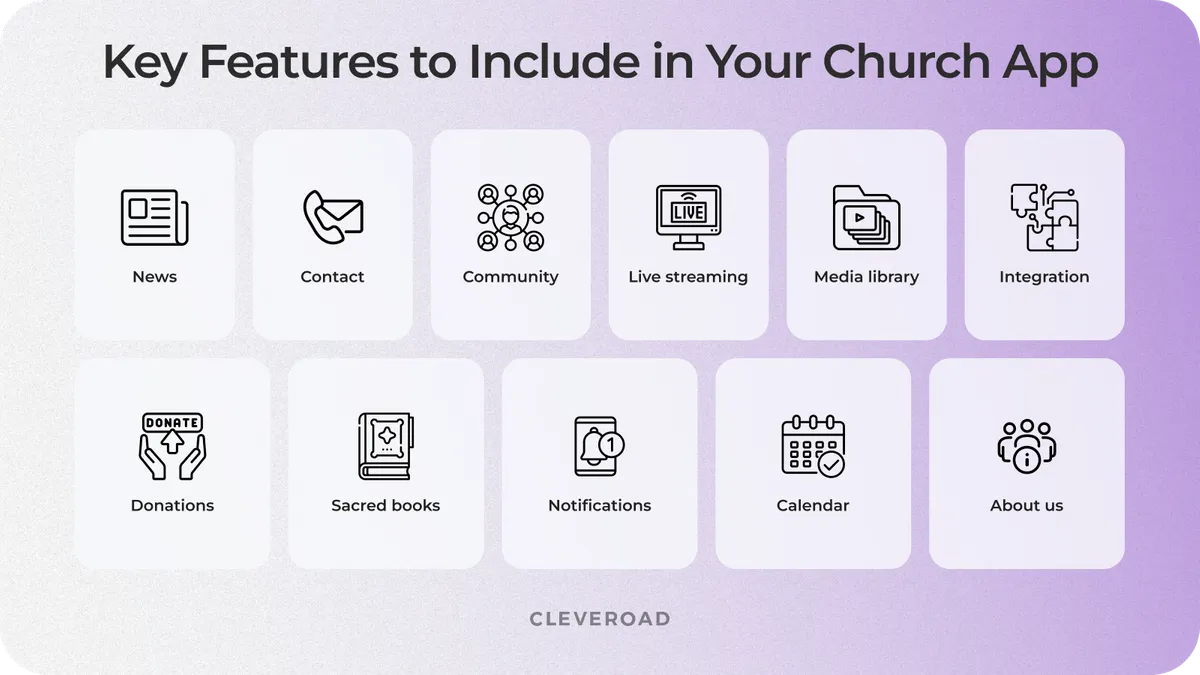
How to create a church app: features to include
Information about a church
That’s probably the first thing the app development process should contain. You may provide members with detailed information on church history, goals, clerics, and ministry programs. This section can include photos, videos, and testimonies to help new and existing members connect with the church's mission. A well-structured "About Us" section fosters transparency and trust among the congregation.
News
The news feed will make parishioners aware of all the upcoming church events. Church app development delivers the information panel where users will find regular updates on church activities, announcements, and special messages from church leaders that will keep members engaged. A categorized news section can help users find useful updates on services, outreach programs, and more.
Push notifications
The information in real-time with push notifications for your members is a vital part of your church app. Your development vendor should make a notification system that will analyze the members’ interests. Thanks to it, your users will get alerts for prayer requests, emergency notifications, and reminders of community services, which will facilitate communication and church experience in total.
Sacred books
A variety of users read religious books like the Bible on their mobile devices. So, you can provide them with such an opportunity to create church app. Do not forget about translations of the sacred books and members’ study notes, which will expand your audience with people from different countries and allow your members to understand religious scriptures better.
Donations
Donations are important for any non-commercial organization. Some churches collect donations during events. To organize it conveniently for parishioners, you can send notifications to remind them about the possibility of making donations. Secure payment options and real-time tracking of contributions can make giving easier. A section highlighting how donations are used can also encourage more participation.
Events calendar
Create a church app with an event calendar feature so that users can plan their time. You can also use app notifications to remind you of upcoming events. The calendar can enable the users to engage by RSVPing, reminders, and syncing the event with their calendars. Details for events, including venue, time, and guest speakers, will be easily available so that the members know.
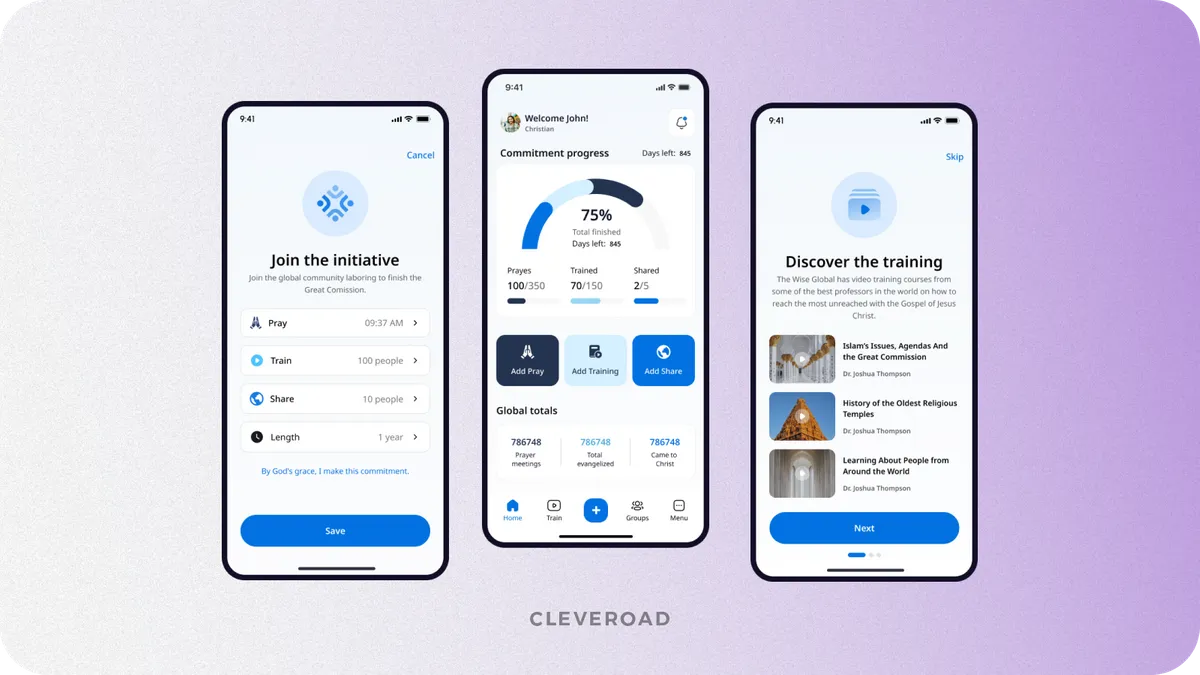
The event tracker feature on the platform for faith connections developed by the Cleveroad team
Social networks integration
You should think about the integration of social media when you want to create a church app. This step will provide you and your users with an opportunity to share different events on social networks using your church app tool. Thanks to it, social media integration enables the church to expand its audience and give better engagement and outreach.
Media library
You can connect websites like YouTube or Vimeo for placing/adding videos to your media library. You can also integrate audio sermons from iTunes or other audio stores, as well as create your own podcasts and downloadable audio files. A well-organized media library allows members to easily access past sermons, inspirational videos, and worship music anytime. Offline downloads can provide access to content even when an internet connection is unavailable.
Live streaming
By means of services like Live Stream or Ustream, you are able to conduct live broadcasts from your church app. This feature will help to keep up with events for those parishioners who cannot physically attend church services or certain events. Live streaming can also include interactive elements such as real-time comments, prayer requests, and virtual meet-and-greets. Automatic recording and playback options allow users to revisit past sermons and teachings at their convenience.
We at Cleveroad know how to develop reliable live-streaming functionality and have practical experience in this field.
We’ve developed a versatile video-on-demand platform that provides high-quality transactional video-on-demand (TVOD) to its customers. Our client was Blockbuster - a leading service company in the Nordic countries from Denmark with 500,000+ subscribers. They supply home entertainment solutions to local markets and other Nordic countries, including movie rental services.
See what Henrik Loop, CTO of Blockbuster, says about cooperation with Cleveroad:
Henrik Loop CTO Blockbuster, TDC gives feedback about cooperation with Cleveroad
Contact feature
You may allow your app's users to ask questions in chat, make calls, or contact the representatives of the church in any other convenient way. A dedicated contact section with quick links to email, phone, and social media ensures easy access to church representatives. A feedback form can also allow members to share their thoughts, suggestions, and prayer requests with church leaders efficiently.
Community features
Building a church app provides a great opportunity to create a friendly community among church members. Introduce features as group chats, that allow members to communicate, discuss the latest news, and prepare for upcoming events. Community forums, prayer groups, and mentorship connections can help strengthen relationships within the congregation. User profiles and interest-based groups can facilitate deeper engagement and interaction among members.
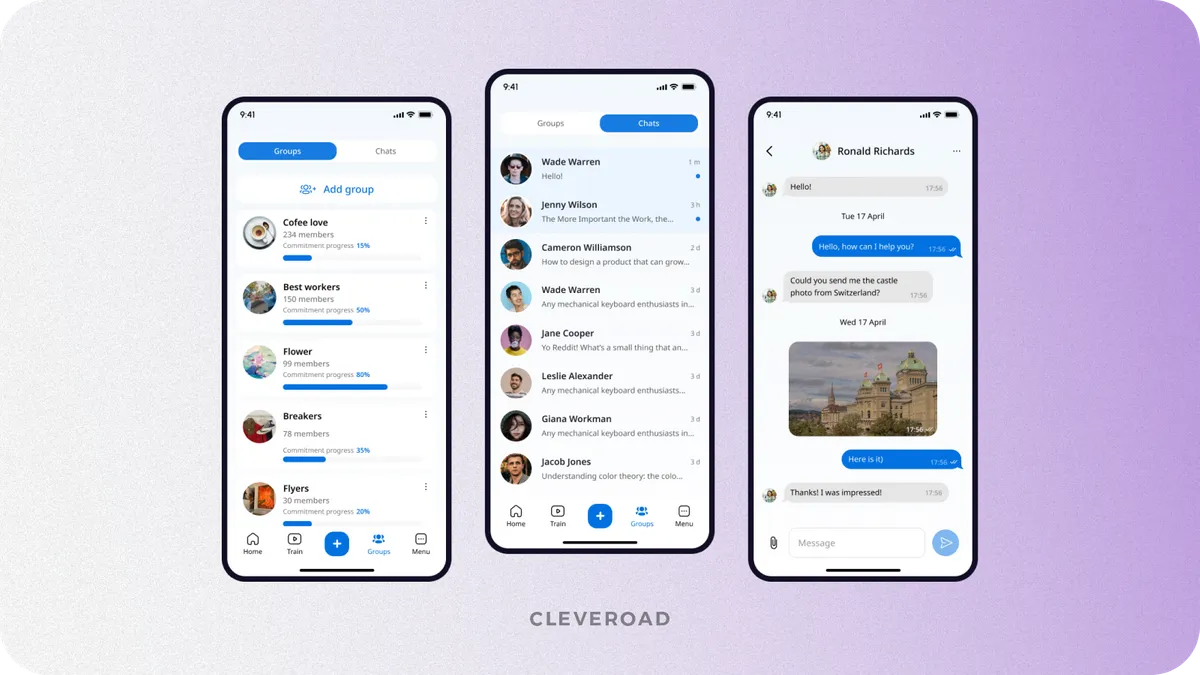
The chat feature on the platform for faith connections developed by the Cleveroad team
How Much Does It Cost to Develop a Church App?
There are a lot of factors affecting the final church app development cost, such as platform, features, design, integrations, and developers’ rates. So, regarding all factors, church app development costs approximately $60,000-$180,000+.
As we mentioned earlier, cross-platform solutions are more budget-friendly than native app development. That’s why our expert team has calculated how much to develop church app cost with Flutter based on the basic features.
How much does it cost to develop a church app? The price is based on the average hourly rate in our region (Estonia), which equals $50/h, and on development time in the table below:
| Church app's features | Development time (h) |
|---|---|
Registration | 71 hours |
Login | 64 hours |
Profile | 123 hours |
Settings | 23 hours |
Home screen | 24 hours |
Streaming | 55 hours |
Posts | 99 hours |
Mobile Bible | 75 hours |
Push notifications | 31 hours |
Admin panel | 325 hours |
Total development time | 890 hours |
Note: The estimation above doesn't include QA, BA, SA, DevOps, and UI/UX design services (the services of these specialists are counted separately) and estimates only features described in the article. Meaning those are approximate numbers.
For sure, church app development cost is significantly impacted by your development team's location.
| Church app specialists | CEE | Western Europe | North America | South America | Asia | Australia |
|---|---|---|---|---|---|---|
Software developers | $30-$100 | $50-$150 | $60-$180 | $30-$80 | $15-$70 | $40-$140 |
UI/UX designers | $40-$80 | $70-$120 | $80-$140 | $40-$70 | $20-$60 | $60-$100 |
Business analysts | $50-$90 | $80-$130 | $90-$150 | $50-$80 | $30-$70 | $70-$120 |
Solution architects | $60-$110 | $90-$160 | $100-$180 | $60-$90 | $40-$80 | $80-$140 |
QA engineers | $25-$70 | $40-$100 | $50-$120 | $30-$60 | $10-$50 | $30-$90 |
DevOps experts | $40-$90 | $60-$130 | $70-$150 | $40-$70 | $20-$60 | $50-$110 |
Project managers | $50-$100 | $70-$140 | $80-$160 | $50-$80 | $30-$70 | $60-$130 |
For example, if your destination is the U.S., hiring nearshore, like a team from Mexico or Canada, offers cultural and time zone advantages but can still be pricey.
Feel free to contact our experts and get a custom cost estimation of your church application!
Cleveroad's Expertise in Church Mobile App Development
Our team has proven expertise in church app development. Recently, we’ve helped a Christian missions training organization create a cross-platform social networking platform to connect people willing to share their faith in one digital community.
The Cleveroad team created a comprehensive ministry management app and a web admin panel from the ground up. This solution allows churches and ministries to initiate and monitor the progress of prayer training and evangelism efforts. The app includes features like video training, map services displaying outreach locations, and tools for tracking disciples' progress. It is fully compliant with GDPR regulations and provides access permissions control based on the administration’s role-based access control (RBAC) approach, catering to various denominations.
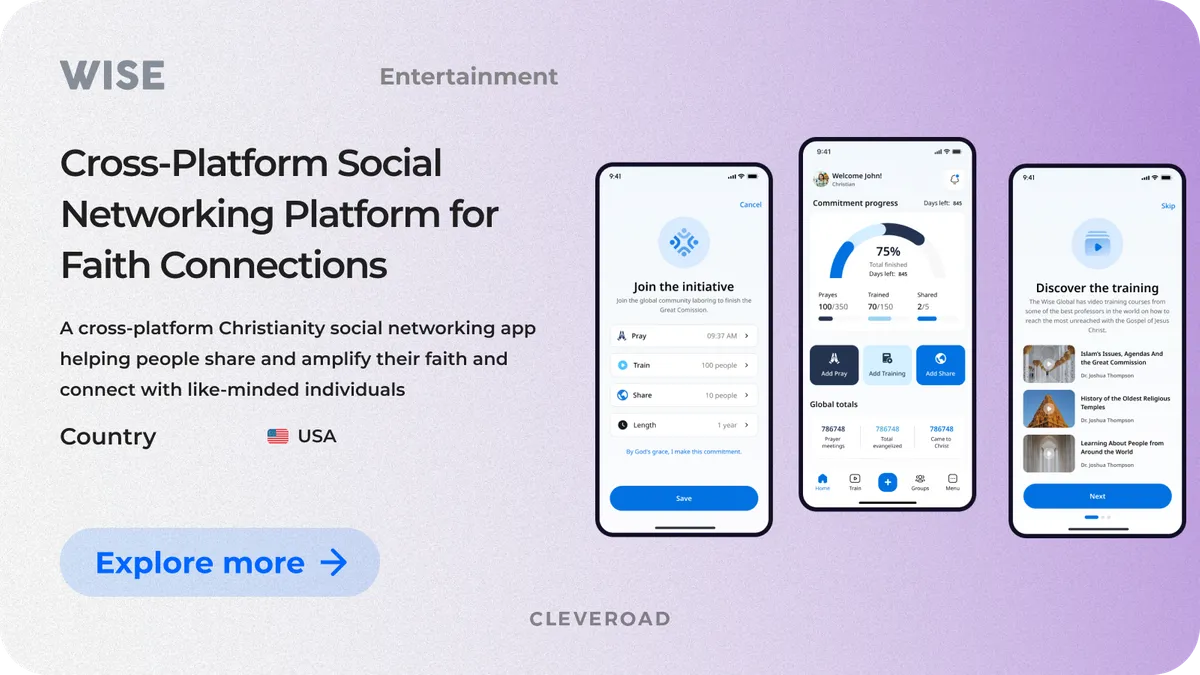
An interface of cross-platform social networking platform by Cleveroad
As a result, the new app attracted more users, leading to increased donations and financial support for their initiatives. Improved app performance and user experience helped retain members previously dissatisfied with the old app. Overall, the organization saw growth in its digital community, more efficient management of training programs, and increased participation and support for its missions.
See what our client says about their experience collaborating with the Cleveroad team during the creation of the church app:

 USA
USA


Now, let us tell you more about us and what IT services we offer to church committees. Cleveroad is an outsourcing app development company headquartered in Northern Europe, Estonia. Since 2011, we have assisted religious organizations in creating customized software development solutions to ensure church committees can enhance community engagement, streamline operations, and foster deeper connections with their congregations through innovative digital solutions. Besides, we provide a wide range of IT services, including web and mobile development from scratch, cross-platform app development, legacy software modernization, DevOps services, UI/UX design services, and much more.
Here’s why cooperating with us is beneficial in terms of delivering a digital product for your church:
- Wide range of on-demand app development services, including software development from scratch, legacy soft modernization, Discovery Phase services, UI/UX design services, and more.
- Full-service development, encompassing initial concept validation, product release, deployment, and support.
- Flexible cooperation models: Dedicated Team, IT Staff Augmentation, and Project-Based
- Tailored expertise in on-demand development and a smooth and efficient process by assembling the perfect team, backed by thorough documentation and a strong knowledge base
- Partnership with an ISO-certified company, implementing ISO 9001 quality management systems and ISO 27001 security standards
Ready to build a church app?
Get custom mobile church app development services from a reliable vendor with 15+ years of experience in the IT market
A church app is a mobile or web-based digital platform designed to support communication, engagement, and operations within a church community. It typically allows congregations to access sermons, receive announcements, make donations, view event calendars, and participate in community activities.
For church leaders and staff, a church app also serves as a management tool for content publishing, event coordination, attendance tracking, and internal communication. When built thoughtfully, a church app becomes a central digital hub that supports spiritual growth, community connection, and administrative efficiency.
To develop a church app you usually need to follow a structured, step-by-step process:
- Define goals and audience
- Outline core features
- Choose the development approach
- Select a technology partner
- Design UI/UX
- Develop and test
- Launch and iterate
A custom development approach provides the most control over functionality, integrations, and future growth. This structured approach simplifies development and speeds up getting your app ready for launch.
The cost of church app development typically ranges from $60,000 to $180,000+, depending on several factors:
- Feature complexity (streaming, donations, admin panels, community tools)
- Platform choice (iOS, Android, web, or cross-platform)
- UI/UX design requirements
- Integrations (payment systems, accounting software, analytics)
- Development team location and hourly rates
- Post-launch maintenance and support
Basic apps with standard features cost less, while feature-rich, scalable solutions with custom integrations require higher investment.
On average, developing a church app takes 3 to 6 months, depending on scope and complexity:
- A basic app with standard features may take around 3–4 months
- A custom, feature-rich app with integrations and admin panels may take 5–6 months or longer
The timeline includes discovery, design, development, testing, and launch. Ongoing improvements and new features usually continue after release.
Beyond initial development, churches should plan for additional costs that may not be obvious at first:
- Maintenance and updates to support new OS versions and fix bugs
- Hosting and cloud infrastructure, especially for streaming content
- Third-party services, such as payment gateways or live streaming platforms
- Security and compliance updates, including data protection measures
- Feature expansion as church needs grow
- App store fees and ongoing operational costs
Factoring these costs early helps avoid budget surprises and ensures long-term app stability.

Evgeniy Altynpara is a CTO and member of the Forbes Councils’ community of tech professionals. He is an expert in software development and technological entrepreneurship and has 10+years of experience in digital transformation consulting in Healthcare, FinTech, Supply Chain and Logistics
Give us your impressions about this article
Give us your impressions about this article