How to Create a Location-Based App: Development Roadmap and Ways to Avoid Main Pitfalls
Updated 27 Mar 2026
17 Min
20376 Views
How to make a location-based app? Now it’s hard to find an app that doesn’t use geolocation. People track deliveries, order rides, and find nearby services with just a few taps, and won’t ever go back. At the same time, building a location-based app for your business is a smart move to boost engagement, improve the customer experience, and increase conversions.
Cleveroad is a software development vendor with 15+ years of experience in delivering digital solutions with geolocation functionality. In this extensive guide, we’ll help you understand how to boost your business efficiency by creating a location-based app, explore the key benefits and app types, and offer practical tips to ensure a smooth development process, all backed by a clear, step-by-step roadmap.
See a concise location-based app development roadmap that we will examine in more detail throughout the article:
- Step 1. Find a reliable IT vendor
- Step 2. Define app requirements and use flow
- Step 3. Choose the right tech stack
- Step 4. Design an intuitive UI/UX
- Step 5. Develop a location-based app
- Step 6. Launch and gather feedback
What is Geolocation in Apps and How Does it Work?
Overall, geolocation in apps is the technology that allows a mobile application to determine a user’s location using tools such as GPS, Wi-Fi, cell towers, or Bluetooth. It powers everything from ride-hailing and food delivery to dating and navigation apps.
Let’s discuss why businesses need geo-dependent apps through their core functions:
- Marketing function. Geolocation enables targeted campaigns, location-based offers, and geofencing to boost user engagement and conversions.
- Information function. This function allows users to get real-time information about the nearest places or objects within a precise location.
- Communication function. Companies can put places on the map to collect customer feedback on select services, allow customers to attach their own content, etc.
- Social function. Enable location check-ins, friend discovery, or sharing to increase in-app activity and brand visibility.
How does geolocation in apps work?
Geolocation in apps relies on a combination of technologies to determine a user’s position with varying levels of accuracy and power consumption. Modern apps usually go with a hybrid approach that selects the most efficient data source based on the context, device capabilities, and environment. Here are the main tech solutions that power location based mobile app development:
GPS
Uses satellite signals to calculate precise outdoor location. Offers high accuracy but consumes more battery and may struggle indoors
Wi-Fi positioning
Determines location based on nearby Wi-Fi networks and their known positions. Works well indoors with accuracy and lower power usage
Cell tower triangulation
Estimates location using signals from nearby cell towers. Provides broader, less accurate positioning but is fast and energy-efficient
IP address geolocation
Identifies the approximate location based on the device’s internet connection. Commonly used for region-based content, but lacks precision
Sensor fusion
Combines GPS, Wi-Fi, cellular, and device sensors to improve accuracy and efficiency. Automatically switches between sources to optimize performance
Types of Geolocation Apps: How to Decide Which One You Need?
Geolocation apps help any service-based business to connect with users in real time. They are not limited to taxi services or to searching for the nearest store. Navigators, guides, social media with geotagged pictures, route planners, and fitness apps that track speed are examples of location-based services.
Let’s explore the core purpose of each type of geolocation app and take a closer look at standout success stories from the most dynamic niches.
Maps and navigation
Maps and navigation apps form the backbone of location-based technology, helping users move through unfamiliar spaces with ease. These solutions go far beyond offering directions by providing real-time traffic insights, suggesting optimal routes, and connecting users with nearby points of interest such as gas stations, restaurants, and hotels. Businesses also integrate these APIs to power their delivery, ride-hailing, or logistics operations.
On-demand services
Location-based app development for on-demand service are based on a user’s real-time location to match service providers with nearby users. This category includes ride-hailing, food delivery, home services, and more. Location-based data ensures prompt service and higher user satisfaction, key components for user retention and business growth in this competitive space.
On-demand app development is a solid location-based app concept. Check out our detailed guide to learn about its cost, development specifics, and more
E-commerce
Geolocation helps e-commerce businesses customize user experiences based on local preferences, offer region-specific deals, and streamline last-mile delivery. For example, customers can see products available in nearby warehouses or schedule same-day delivery. Businesses use this data to optimize inventory distribution and localize marketing campaigns.
Travel apps
Location-based travel app development personalizes journeys by suggesting nearby attractions, enabling map-based accommodation searches, etc. Businesses in this domain benefit by offering tailored promotions and increasing user engagement through location-specific insights.
At Cleveroad, we provide mobile app development services. With 15+ years of experience, we build all types of apps and seamlessly integrate geolocation to boost service efficiency and elevate the user journey
Fitness apps
Fitness apps use location tracking to log runs, bike rides, and outdoor workouts, offering visual progress tracking and location sharing. Users can join local challenges, compare stats with nearby athletes, or explore trails in real time. For your business, these features increase app stickiness, foster communities, and open up sponsorship and subscription revenue.
| Location-based app type | Purpose | Real-world examples |
Maps and navigation | Provide directions, traffic info, nearby places | Google Maps, Waze |
On-demand services | Match users with nearby service providers | Uber, DoorDash |
E-commerce | Offer local deals, show nearby stores | Amazon, Instacart |
Travel apps | Suggest attractions, plan routes, guide trips | TripAdvisor, Airbnb |
Fitness apps | Track workouts using GPS, map routes | Strava, Nike Run Club |
How to Make a Location-Based App
If you have a concept for a location based app development and are exploring how to bring it to life for your business, our team is ready to help you turn it into a fully functional solution. Below, we’ll walk you through a comprehensive roadmap for developing location-based mobile applications using our proven Software Development Life Cycle (SDLC).
Step 1. Find a reliable IT vendor
To create a location-based app that’s competitive and user-ready, you’ll need to select a trusted software development partner with solid experience in mobile app development with geolocation integration. Besides, make sure the chosen candidate has a proven track record in your specific business domain and a strong, intuitive portfolio you can review. Also, it may be useful to check out platforms like Clutch and Goodfirms. There, you can assess the vendor’s past clients' reviews, highlighting their cooperation strategy, communication, and real-world deliverables.
At Cleveroad, we have extensive experience in location-based app development and would like to briefly introduce one of our recent projects.
Cleveroad helped our client, a UK-based business, create El Tab – a mobile application offering a unique subscription-based service for drinks at bars and pubs across London. This is a cross-platform solution designed to deliver seamless, location-based subscription experiences for users and partners alike.
Here’s what Cleveroad’s team delivered throughout the collaboration:
- Built with Flutter for efficient cross-platform performance
- Drink subscription model for partner pubs
- Geolocation to identify nearby venues
- Apple Pay and Google Pay for seamless payments
- Admin panel for managing users and partners
- Subscription activity tracking and analytics
As a result, our client gained a scalable, user-friendly location-based marketplace for bars and pubs that boosted client engagement and helped partner venues attract a wider audience.
Here’s what Oliver Carew, founder of el Tab, says about collaboration with us:
Oliver Carew, founder of el Tab, provides feedback about collaboration with Cleveroad
Step 2. Define app requirements and user flow
Once you’ve found ‘the one’, you’ll work with a Business Analyst and Solution Architect to strengthen your location app concept, shape core functionality, and logic. At Cleveroad, in tight cooperation with you, our experts define precise user journeys: how users find nearby services, what permissions they grant, and how data flows. We also help you clarify your use cases and plan for features such as map displays, real-time tracking, and location-triggered notifications.
Step 3. Choose the right tech stack
At this stage, we select the right technologies for location-based app development, a decision that directly impacts performance, scalability, and development speed. Our choice depends on the platforms you want to target (iOS, Android, or both), expected user load, scalability requirements, domain-specific needs, and your budget.
Based on that, we might use native tools such as Swift or Kotlin, or cross-platform frameworks such as Flutter or React Native. Once the tech stack is defined, our UI/UX designers craft user-friendly interfaces that seamlessly integrate geolocation features, including interactive maps, real-time routing, and distance indicators. Through design sprints and user feedback, we ensure intuitive navigation and smooth user flows before moving to development.
Step 4. Design an intuitive UI/UX
Our UI/UX designers craft user-friendly interfaces that seamlessly combine geolocation elements like interactive maps, real-time routes, and distance indicators with intuitive controls. We create prototypes of varying fidelity from basic wireframes that outline the app’s visual structure to fully clickable demos that simulate the complete user experience without backend integration. You’ll be involved through design sprints and feedback loops to fine-tune layout, colors, and flows before development.
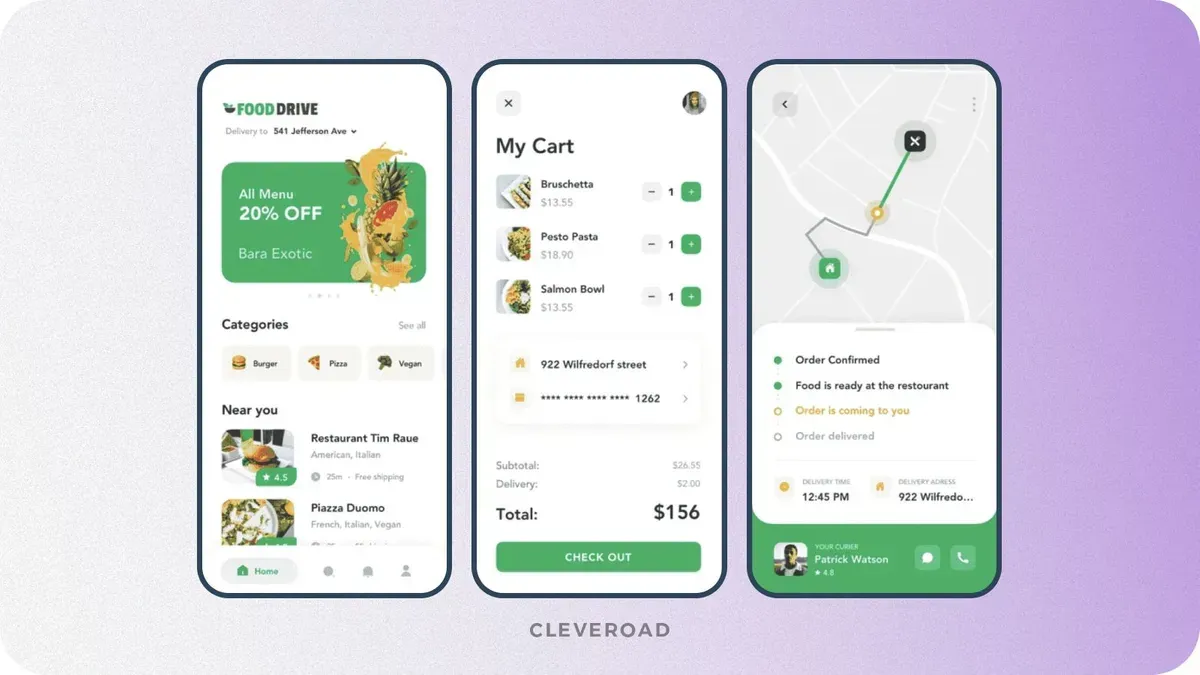
Interface of a food delivery app delivered by Cleveroad. Source: Dribbble
Step 5. Develop a location-based app
Location-based app development process involves implementing geolocation features, integrating APIs, and ensuring performance, scalability, and accuracy. At Cleveroad, we follow Agile software development methodology, which means that our developers build the app in two-week sprints. Such an approach allows us to establish a well-structured development flow and iterative feedback loops. During each sprint, we build and deliver specific parts of your app’s functionality, including location-based features. This iterative approach ensures steady progress and transparency.
We start by implementing core features such as real-time tracking, routing, and geofencing. Then we connect your app to external APIs and location services (such as Google Maps or Mapbox) to ensure precise tracking, route optimization, and location-aware triggers. If needed, we also enable offline access and cache location data to keep your app functional even with limited connectivity.
Before release, our QA engineers conduct thorough end-to-end testing across a wide range of devices, operating systems, network conditions, and geographic regions. This ensures the accuracy and responsiveness of location tracking, the correct behavior of geofencing and routing logic, and reliable integration with third-party services such as mapping or GPS APIs. We simulate real-world usage scenarios to detect edge cases, minimize latency, and guarantee seamless performance under varying loads.
Step 6. Launch and gather feedback
We help you ensure a smooth launch of location-based apps through final QA testing across devices, networks, and real-world geolocation scenarios to verify GPS accuracy, geofencing, and map integrations. We handle App Store and Google Play prep, ensuring compliance with location-access policies, setting up CI/CD pipelines, and integrating analytics tools such as Firebase. After release, we monitor performance, user behavior, and provide hotfixes or updates as needed, ensuring stable scaling and value delivery from day one.
Once your location-based mobile application is live, we help you monitor user behavior using analytics platforms such as Firebase or Mixpanel. Based on these insights, we assist you with post-launch iterations, scaling, and new feature rollouts to keep your solution aligned with market demands.
Location-Based App Development Technologies
How to build a location-based app? Usually, it all starts with two core components: geolocation services and interactive maps. At the same time, geolocation services fall into two categories: indoor and outdoor. Let’s explore their differences and applications below.
Outdoor technologies
Outdoor navigation, like Google Maps, helps users locate themselves, see accurate routes, and reach their destinations without trouble. This navigation type is based on satellite imagery and GPS signals. Let’s talk about it in more detail.
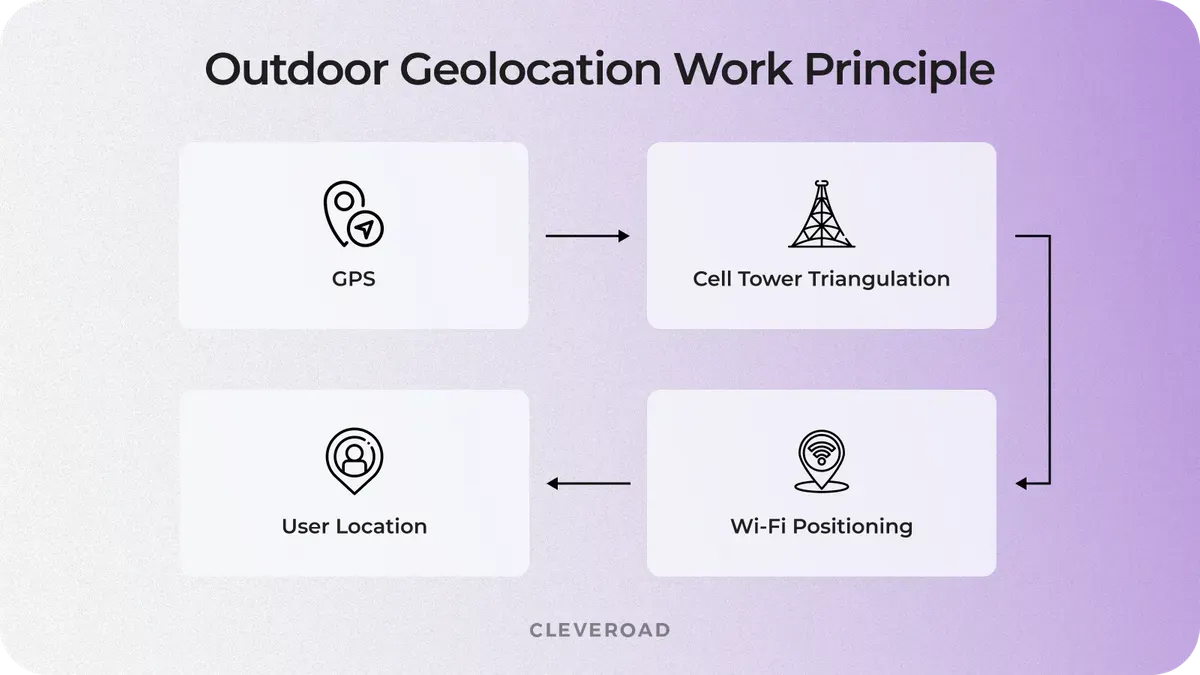
Example of how outdoor geolocation works
GPS
All today’s mobile devices have an in-built GPS module, so GPS is by far the most popular way to locate a device outdoors. GPS receives signals from the satellite, and it’s highly precise (down to 15 meters/49 feet), works almost everywhere, and doesn’t require an Internet connection. But there’s a con – GPS is a huge battery drainer.
A-GPS
A-GPS stands for Assisted GPS Service. Location-based mobile application that incorporates locating technology combining both GPS and Cell ID features, allowing it to submit a high level of accuracy. It generates merged data from both the server and the satellite and transfers it over the Internet, using Wi-Fi or a cellular connection. The core benefits are good speed, enhanced responsiveness in “problem areas,'' and economical battery power usage.
Cell ID
If a GPS signal is unavailable for some reason, the device’s location can be determined using nearby cell towers. It's a good solution for megapolises with a huge number of cell towers, but being less accurate than GPS, it depends on how close the base transceiver station is.
Wi-Fi positioning
Wi-Fi positioning collects data from the Internet and offers high accuracy (down to 25-50 meters) due to the maximum range of Wi-Fi access points. It works well in high-density urban areas and drains the battery more slowly than GPS. But here you should always have access to a nearby Wi-Fi spot.
Indoor technologies
We’ve sorted out the outdoor location, but how can you track a device inside a building?
Like when a customer enters your store, and you need to start guiding them the same moment they walk in the door. Or when you analyze users’ locations and send them the most relevant offers or ads based on that.
That’s what indoor positioning system apps exist for – to build more accurate navigation inside buildings. Let’s take a look at the popular indoor location technologies.
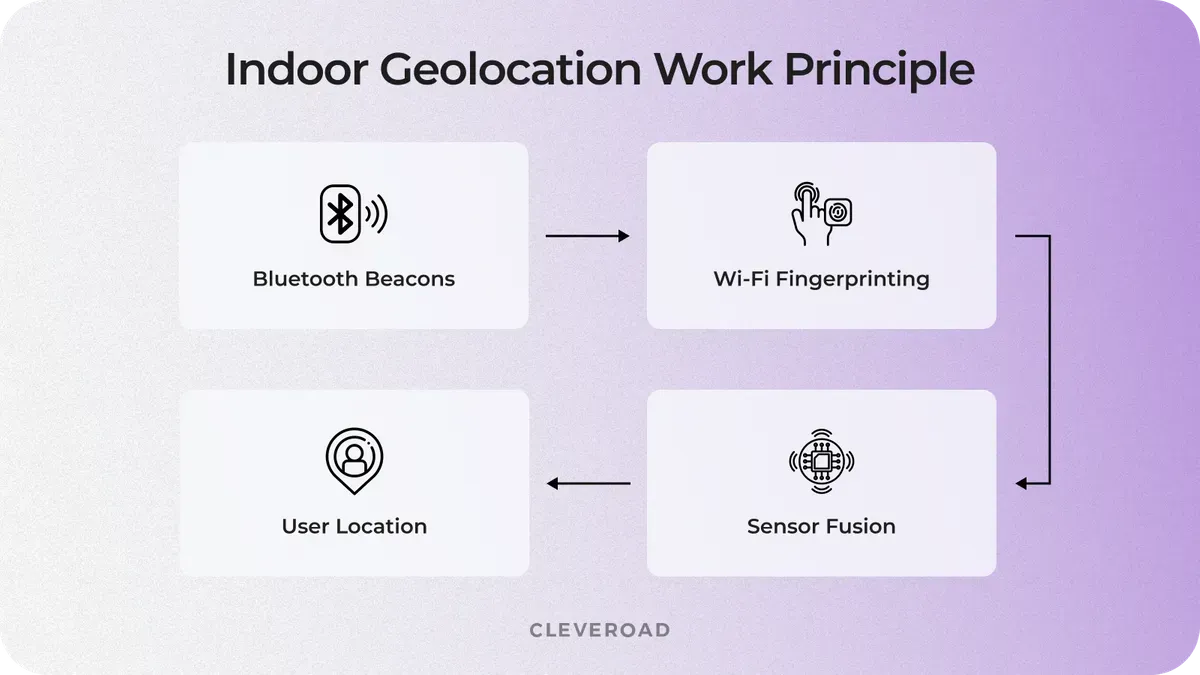
Example of how indoor geolocation works
Geofencing
Geofencing is a location-based marketing technique that works with a combination of GPS, cellular, and Wi-Fi data. Geofencing in location-based mobile applications is less accurate when you need to see your current location, but it's a helpful tool for bringing people to the store from the street and is commonly used in parking app development. Amazon's Alexa app allows us to set up routines or reminders that trigger when we enter or exit a geofenced location, like turning off the lights when we walk out the door. For best results, the minimum radius should be set to 100-150 meters. When the device is connected to Wi-Fi, location accuracy is between 20 and 50 meters.
There are three types of geofencing action triggers:
- Static – based on the position relative to a particular place
- Dynamic – user’s position relative to dynamic changes
- Peer-to-peer – user’s position relative to other users
iBeacon and Eddystone
iBeacon was developed by Apple, and Eddystone is one of Google’s services. Both iBeacon and Eddystone use BLE (Bluetooth Low Energy) for indoor positioning. And they share the working principle – not delivering offers by themselves but sending out the identifiers. In turn, these identifiers trigger actions in custom-designed mobile apps for iBeacon/Eddystone.
For example, in a retail automation, a beacon might prompt an app to show an in-store offer when a customer walks by a specific display. Both technologies are widely used in indoor navigation, smart retail, and proximity-based marketing.
When Location-Based App Development Becomes Complex (And How to Manage It)
Location-based features often look straightforward at the idea stage, but complexity quickly emerges as the product scales or even expands geographically. Geolocation implementation isn’t usually a great challenge itself, but more about balancing accuracy, performance, cost, and user experience under real-world loads and conditions.
Let’s look at the key moments when location-based app development becomes a strategic decision point, and how to approach them without compromising your product.
Accuracy vs. user experience
As your user base grows or your use case becomes more precision-dependent (e.g., delivery, ride-hailing), even small GPS inaccuracies can lead to failed interactions, incorrect routing, or misplaced services. What initially worked for basic navigation may no longer meet user expectations.
This creates a trade-off between high location accuracy and device resource consumption. Over-optimizing for precision can drain battery and slow performance, while under-optimizing risks user frustration.
Business impact: Poor accuracy directly affects trust, leading to churn in apps where location is core to the value.
How to manage it:
- Combine GPS with Wi-Fi and cellular positioning (hybrid approach)
- Apply adaptive accuracy (high precision only when needed)
- Use geofencing to reduce constant location polling
Mission-critical real-time tracking
If your app relies on live updates, such as tracking drivers, couriers, or nearby services, latency and update frequency become critical factors. What works in periodic updates may fail when users expect instant feedback.
Here, the trade-off lies between real-time responsiveness and backend/system load. Frequent updates improve accuracy but increase server pressure and battery consumption.
Business impact: Delayed or inconsistent updates reduce user trust and can disrupt time-sensitive operations (e.g., deliveries, on-demand services).
How to manage it:
- Use event-driven updates instead of constant polling
- Implement batching and throttling for location data
- Leverage WebSockets or streaming for efficient real-time communication
Region scaling complexities
Expanding your app to new cities or countries introduces challenges with map data quality, API coverage, localization, and regulatory requirements. A solution that works in one region may not perform equally well elsewhere.
This creates a trade-off between global coverage and operational costs and complexity. Some mapping providers offer better accuracy in specific regions but come with higher pricing or limitations.
Business impact: Poor map performance or inaccurate data in new regions can block market expansion and increase operational costs.
How to manage it:
- Choose mapping providers based on regional strengths (e.g., combine APIs if needed)
- Implement fallback mechanisms for map services
- Optimize API usage to control costs at scale
Infrastructure load affecting performance
As the number of users and location requests increases, your backend must handle large volumes of geospatial data, real-time updates, and route calculations. Without proper architecture, performance bottlenecks appear.
The trade-off here is between system responsiveness and infrastructure cost. Scaling aggressively improves performance but increases expenses.
Business impact: Slow performance leads to dropped sessions, poor UX, and higher churn, especially in apps where speed is critical.
How to manage it:
- Use geospatial databases (e.g., PostGIS) for efficient queries
- Introduce caching layers for frequently accessed data
- Design scalable, cloud-native infrastructure (auto-scaling, load balancing)
Battery consumption as a user concern
Continuous location tracking can significantly impact battery life, especially in apps running in the background. This becomes more noticeable as users engage with the app over longer periods.
This introduces a trade-off between continuous tracking and energy efficiency. High-frequency tracking improves accuracy but reduces usability due to battery drain.
Business impact: Excessive battery usage leads to app uninstalls or disabled permissions, limiting your app’s functionality.
How to manage it:
- Optimize update intervals based on user activity
- Use background location updates selectively
- Implement motion detection to trigger tracking only when needed
Cleveroad is an IT vendor certified with ISO/IEC 27001:2013 and ISO 9001:2015, proving our ability to delivering high-quality, secure solutions
Cost to Build a Location-Based App
Building a location-based app isn’t a one-size-fits-all investment. On average, you can expect costs to range from $40,000 to $250,000+, depending on how advanced your features are, how many users you plan to support, and how “real-time” your product needs to be. A simple map-based app will cost far less than a platform handling live tracking, route optimization, and multi-region scaling.
Here’s a rough location-based app development cost breakdown by complexity:
- Basic location apps ($40,000-$70,000): simple geolocation, maps, minimal logic
- Mid-level location apps ($70,000-$150,000): real-time tracking, user flows, integrations
- Complex location apps ($150,000-$250,000+): scalable systems, analytics
Also, based on our experience in location app development, we created a short cost breakdown for the basic functionality:
| Location app feature | Approximate cost ($) | Approximate time (h) |
User accounts | $3,000-$7,000 | 40-80 hours |
Geolocation (GPS) | $5,000-$12,000 | 80-140 hours |
Maps integration | $6,000-$15,000 | 100-160 hours |
Real-time tracking | $10,000-$25,000 | 160-240 hours |
Payments | $5,000-$12,000 | 80-140 hours |
Notifications | $2,000-$5,000 | 30-60 hours |
Admin panel | $6,000-$15,000 | 100-180 hours |
The cost depends less on the features themselves and more on how well they need to work in real conditions. Factors such as accuracy, response speed, scalability, and overall user experience have the greatest impact on the final budget.
If you’re looking for a precise estimate rather than general ranges, it makes sense to consult a team with hands-on experience in similar solutions. Contact us to get a clear, tailored breakdown based on your idea, goals, and future growth.
How Cleveroad Can Help You Build a Reliable Location-Based App?
Cleveroad is a custom software development company with over 15 years of experience delivering cutting-edge mobile and web solutions. As a proficient map-based app development provider, we help startups, SMBs, and enterprises create reliable, scalable, and user-focused location-based platforms tailored to their specific business goals.
Here’s how you’ll benefit from collaborating with us:
- End-to-end development as we support you from initial concept and business analysis to geolocation technology integration, testing, deployment, and ongoing maintenance.
- Experienced engineering teams (75% senior/mid-level) skilled in geolocation logic, GPS/BLE technologies, and location-aware app logic for both outdoor and indoor use cases.
- Certified IT expertise with ISO/IEC 27001:2013 for information security and ISO 9001:2015 for quality management, ensuring your app is high-quality and secure.
- Flexible engagement models, including IT staff augmentation, dedicated team, and project-based models, to meet your budget and timeline requirements.
- Advanced integrations with mapping tools, navigation systems, payment gateways, real-time tracking APIs, and wearable devices to enhance UI/UX and drive business growth.
To demonstrate our expertise within location-based development, we’d like to show you one of our recent projects – P2P Ridesharing Solution called MoveUp that links drivers with nearby passengers.
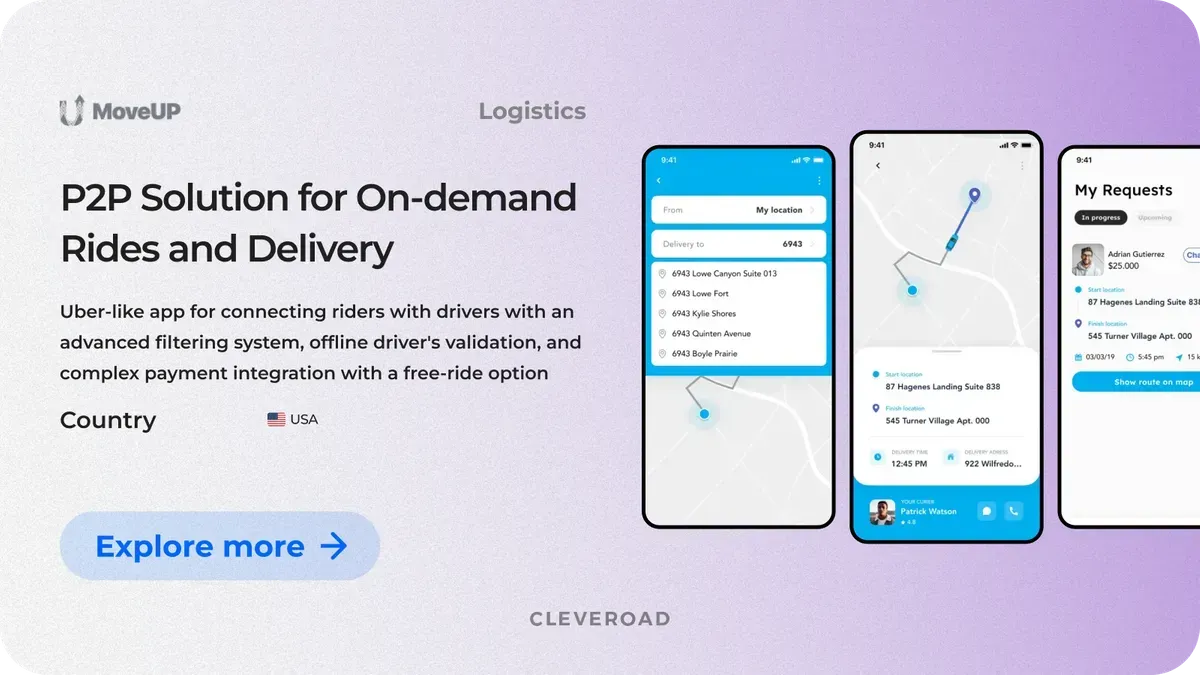
MoveUp: P2P ridesharing solution designed by Cleveroad
For our US client, we developed from scratch a peer-to-peer ridesharing platform tailored to serve users with disabilities and special medical needs. Unlike typical ride-hailing apps, it emphasizes inclusivity by allowing riders to connect with drivers who can provide personalized transportation services.
Our developers included geolocation features that match users with nearby drivers based on their current location, tracked via GPS and mapping technologies. Cleveroad also integrated complex payment features, including a “free ride” capability, ensuring flexibility and convenience for both riders and partners.
As a result, the client got a ready-to-use, scalable mobile app that perfectly supports their business goals. The app’s location-based features ensure precise route planning and quick rider-driver matching, leading to improved user satisfaction and smoother service.
Here’s what John Salmon, owner of MoveUp thinks about collaboration:

 USA
USA


Create a robust location-based app
Contact us. With over 15 years of experience in IT, our team is here to help you create a high-quality location-based app that’s intuitive, attractive for users, and generate profit
A location-based mobile app, often described as an app like coordinate, is a geolocation application that uses a device’s positioning technologies, such as GPS tracking, Wi-Fi, cellular networks, or Bluetooth, to determine the user location accurately or approximately. These technologies are a crucial part of geolocation app development, enabling apps to provide context-aware services like navigation, delivery, social interactions, and personalized recommendations based on where the user is physically located. By leveraging GPS tracking and other location signals, an app like coordinate can deliver real-time updates, interactive maps, and notifications tailored to the user location, helping businesses create dynamic experiences that respond to the environment and user behavior.
To create a location-based app, follow this roadmap:
- Step 1. Find a reliable IT vendor
- Step 2. Define app requirements and use flow
- Step 3. Choose the right tech stack
- Step 4. Design an intuitive UI/UX
- Step 5. Develop a location-based app
- Step 6. Launch an gather feedback
Many types of apps use location-based services to deliver their core functionalities, including:
- Navigation and mapping apps that use GPS and map integration to guide app users efficiently.
- Ride-sharing and food delivery apps that depend on users’ location to connect drivers with customers and track orders.
- Dating apps and other services that enhance user experience by incorporating a user’s geographic context.
More broadly, any app aiming to improve user experience through location needs location-based application features.
Developing a location-based app involves gathering geographic data from multiple sources embedded in smartphones or devices. Most apps use GPS, along with Wi-Fi triangulation, cellular tower signals, and Bluetooth beacons for precise indoor positioning. This data is then processed and integrated using Apple and Google's map integration or geofencing APIs to deliver real-time updates, notifications, navigation, or customized content based on the app user’s position. The development journey requires a skilled team to ensure smooth project execution and successful integration of location-based mobile app features. This careful approach ensures your app's success by providing timely, relevant location services that businesses can use to boost engagement and conversions.

Evgeniy Altynpara is a CTO and member of the Forbes Councils’ community of tech professionals. He is an expert in software development and technological entrepreneurship and has 10+years of experience in digital transformation consulting in Healthcare, FinTech, Supply Chain and Logistics
Give us your impressions about this article
Give us your impressions about this article
Comments
1 commentsThanks to the author for this article!