AI for Legacy Code Modernization: Process and Tools Explained
Updated 17 Jun 2026
17 Min
114 Views
Legacy code modernization using AI has become more urgent as digital modernization efforts expose weak architecture, undocumented logic, brittle integrations, and slow release cycles. AI accelerates legacy modernization by helping engineering teams analyze legacy systems faster and plan modernization with lower delivery risk.
Key facts:
- McKinsey reports that generative AI can accelerate IT modernization timelines by 40–50% and reduce costs associated with technical debt by about 40%.
- Technical debt can consume 40–50% of total IT investment, making legacy code modernization a budget priority rather than just a technical task.
- In a recent Proprio Cloud Solutions engagement, Cleveroad's AI-assisted team used Claude Code to increase sprint output by 30–40% with no extra headcount and no rise in defect rates.
- On the same project, automated testing replaced three days of manual regression testing per release.
In this article, you'll learn how AI-driven modernization changes legacy applications from a slow manual process into a more controlled engineering workflow. Based on our experience, we'll explain where AI helps most and how to move from code audit to refactoring, testing, migration, and long-term maintenance without putting the core system at risk.
What AI Can Do in Legacy Code Modernization
AI for legacy code modernization is most useful when it helps engineers understand the system before they change it. AI models can analyze legacy code, extract business logic, prepare documentation, translate code, and generate tests.
AI can suggest modernization paths, but senior engineers must still approve architecture choices, service boundaries, security, and business-rule changes before those outputs affect production code.
This boundary matters because legacy systems often contain years of hidden business logic and mission-critical workflows. MITRE's research on Legacy IT Modernization with AI shows that large language models can turn legacy system logic into intermediate representations such as code comments, UML diagrams, requirements documents, and summary descriptions.
In practice, AI works best as an engineering accelerator. It helps teams understand legacy code faster, prepare documentation, create test coverage, and plan safer refactoring. Senior engineers, solution architects, QA specialists, and domain experts then review AI outputs before the team uses them in production changes.
Code analysis and dependency mapping
The first step in practical modernization should be to understand how the legacy codebase works. AI can shorten this audit by scanning thousands of lines of code, tracing execution paths, detecting connected modules, and flagging refactor candidates faster than manual review alone.
Dependency mapping is a low-risk first AI pilot because it improves system visibility before the team changes production code. At this stage, AI helps engineers answer core audit questions and identify early modernization challenges:
- Which modules depend on each other?
- Which functions contain duplicated or outdated logic?
- Which modules create the highest change risk?
- Which low-risk components can the team refactor first?
- Which dependencies may block migration to a newer architecture?
Human review still defines the final result. AI can surface dependency chains and suggest refactor candidates, but engineers must decide whether each dependency supports active business logic, belongs to an obsolete workflow, or can be safely removed as technical debt. Also, AI-generated documentation can miss edge cases, simplify logic, or misunderstand domain-specific rules. Engineers and subject matter experts should treat AI-generated documentation as a first draft and verify that each explanation aligns with the codebase, runtime behavior, and business context before using it as a reference for modernization.
Language and syntax translation
AI legacy code modernization can help to translate COBOL to Java, RPG, or other outdated languages into modern programming languages while preserving the original logic. This helps modernization teams reduce manual translation effort, support the automation of code translation, and move legacy systems closer to modern code and cloud-ready architectures.
This capability works best when the source code has repetitive patterns, clear business rules, and enough context for the model to interpret dependencies correctly. For example, AI can help convert procedural code into object-oriented structures, rewrite outdated syntax, or suggest equivalent constructs in Java, C#, Python, or JavaScript.
The safest approach is to treat AI translation as a draft, not a production-ready result. Senior developers should review the generated code, compare behavior against the original system, run regression tests, and validate critical business rules before any new code goes live.
Documentation generation
AI-generated documentation helps engineers understand old legacy code faster before they refactor, test, or migrate it. It can explain undocumented legacy logic in plain language, so developers can work on systems they have never seen before. A 2024 arXiv study supports this: comments that LLMs generated for MUMPS and IBM mainframe Assembly Language code were generally hallucination-free, complete, readable, and useful compared to ground-truth comments, though Assembly remained more challenging.
This documentation support is especially useful when original docs are outdated, incomplete, or missing. It also helps when the codebase depends on niche technologies or domain-specific workflows. AI can help generate:
- Module summaries
- Function-level comments
- Business-rule explanations
- Code snippets for onboarding and review
- Data flow descriptions
- API and integration notes
- Onboarding materials for new engineers
This reduces the time developers spend trying to understand how the system works before they can make safe changes.
Automated test generation
AI code modernization can generate regression test drafts from existing code, system behavior, acceptance criteria, and user stories. These tests help teams verify that the modernized system still behaves like the legacy version after refactoring, migration, or architectural changes.
Regression coverage is the safety net for the whole modernization process. Without it, teams may rewrite code that looks cleaner but breaks pricing rules, approval logic, billing flows, or reporting calculations. AI-assisted test generation helps QA teams create this coverage faster.
AI can support QA teams by generating:
- Unit test drafts for isolated functions and code changes
- Regression test cases for critical user flows
- Integration test scenarios for connected services
- Edge-case checks based on acceptance criteria
- Playwright scripts for browser-based testing
- Test data variations for repeated validation
At Cleveroad, engineers used AI to generate Playwright scripts from acceptance criteria, which helped QA specialists prepare automated checks faster. QA specialists still reviewed the scripts, corrected expected results, and checked whether each test covered the right business behavior.
Need AI-assisted modernization done for you? Cleveroad's legacy software modernization services help audit and migrate legacy systems safely
The Step-by-Step Process to Modernize Legacy Code With AI
A legacy code modernization AI workflow should be incremental and human-controlled. The approach to modernization should not start with a one-shot rewrite. The goal is to understand your existing system first, protect its current behavior with tests, and only then change selected parts of the system with controlled risk.
Below, you'll see the playbook Cleveroad uses to modernize legacy code with AI while keeping engineers in control of every production-impacting decision. Each step shows what happens to your system, how AI speeds up the work, and where our delivery team validates the results before deployment to production.
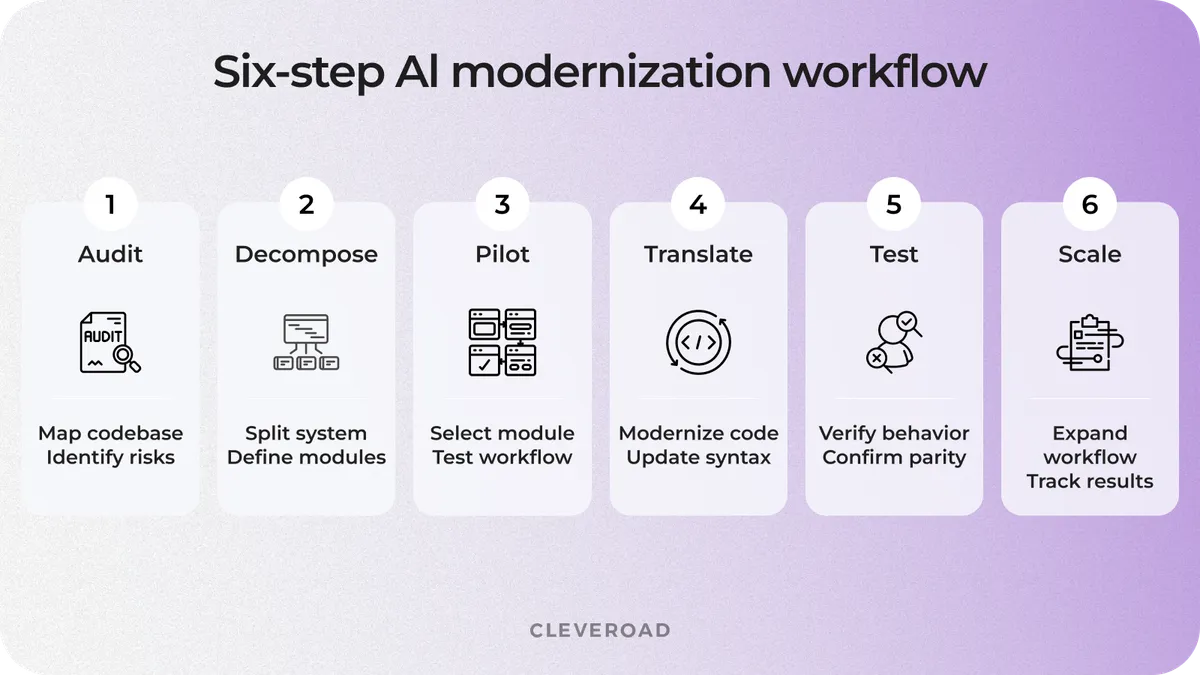
Six-step AI legacy code modernization workflow
Step 1. Audit and map the codebase with AI
Before changing lines of legacy code, we create a technical map of how the system works today. We use AI code modernization analysis to identify dependency chains, risky modules, unused code paths, and logic that appears in several places. This helps us understand how your legacy system works before we decide which parts need modernization and which should remain stable.
This audit-first approach aligns with the 2026 research "Modernizing Complex Enterprise Landscapes: A Cross-Industry Framework for Legacy System Transformation." The paper defines baseline assessment as a means of understanding the current architecture, integrations, data flows, technical debt, modernization hotspots, and dependency risks before the modernization effort begins.
At this stage, we also rank modules by technical risk and business value. The safest modernization pilot is rarely the scariest part of the monolith. We usually start with an isolated component that has low delivery risk and a clear business payoff.
Our team uses this audit to define:
- Which modules depend on each other
- Which code paths no longer support active workflows
- Which components create defects or delivery delays
- Which areas need more test coverage before refactoring
- Which modules can become the first modernization candidates
AI speeds up the analysis, but our engineers validate every important finding. A dependency may look unused in code while still supporting a rare business scenario or compliance workflow. This is why we pair AI-driven modernization analysis with engineering review and business logic validation. When needed, we also use insights gathered during code audit services to establish a reliable technical baseline before modernization begins.
Step 2. Decompose the system into AI-sized modules
After the audit, AI for legacy code modernization works best when we split your legacy system into business modules that are narrow enough for AI analysis and complete enough to preserve context. This matters because AI gives better results when it sees the full business logic of a module, not disconnected code fragments.
We usually group code around a legacy core capability, such as billing, reporting, inventory sync, or approval logic. Each module becomes a separate analysis unit, where the model can trace inputs, outputs, dependencies, and edge cases within a single, meaningful area.
Claude Code's large context window can help our team analyze an entire business module at once rather than reviewing isolated lines of code one by one. As a result, AI can reason about how functions, scripts, services, and data structures work together inside that module.
Our engineers still define the module boundaries. AI can suggest logical clusters, but our solution architects define the final split based on delivery risk, business value, and the target architecture. This keeps modernization focused and prevents the team from starting with a huge monolith that is too risky to change in one pass.
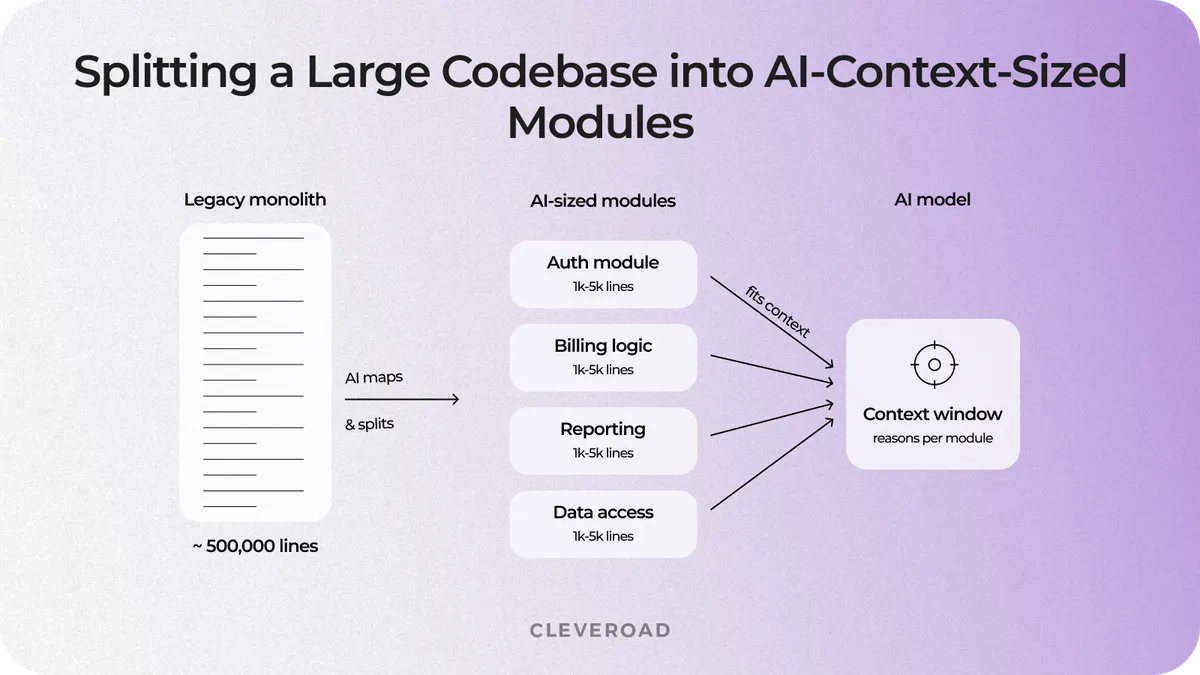
Splitting a large codebase into AI-context-sized modules
Step 3. Start with a low-risk pilot module
A low-risk pilot lets you test the AI-driven legacy modernization workflow on one self-contained module before scaling it across the system. The pilot module should have clear boundaries and limited dependencies, while still producing a visible business result.
During the pilot, we measure whether cloud-based AI and engineering review improve delivery without weakening quality:
- Time saved during analysis, documentation, and refactoring
- Defect rate during AI-assisted changes
- Review the effort required from senior engineers and QA specialists
- Test coverage added before and after modernization
- Behavior parity between the old and updated modules
This gives you real evidence instead of promises. The pilot shows whether AI actually reduces delivery effort without increasing defects or review overhead. If the pilot shows faster delivery, stable defect rates, and manageable review effort, we can safely expand the process to more complex modules. If the pilot exposes risk, we adjust the prompts, review rules, test coverage, or module choice before expanding the legacy modernization journey.
A pilot also helps build stakeholder trust. Product and engineering stakeholders can see how AI supports modernization on a real component before they approve a broader rollout.
Step 4. Translate and refactor with human review
AI can draft translated or refactored code, but code reviews decide what gets merged. Every output must pass business-rule validation, architecture review, security checks, and regression testing before it reaches production.
Our engineers never hand the AI a vague instruction like "modernize this module." Instead, they write short, context-rich prompts that spell out the module's purpose, dependencies, expected behavior, edge cases, and review criteria. This gives AI enough context to produce useful code snippets instead of generic code suggestions.
Our internal rule is strict: AI may draft, explain, translate, and refactor code, but it never changes security-sensitive paths without two-engineer review. This applies to areas such as authentication, payment logic, personal data handling, and audit logs.
Cleveroad used Claude Code to trace SuiteScript and SuiteQL on the Orion project and reached productive work in two weeks with no prior NetSuite background (see the Proprio case study below).
Step 5. Generate tests to lock in behavior
After AI helps draft or refactor code during AI legacy code modernization, we validate the result in a controlled sequence: clean the code, generate tests, and compare behavior with the legacy system. The goal is to confirm that the modernized code produces the same business results as the original one before it reaches the next delivery stage.
This step matters because parity bugs often hide in edge cases. Common examples include leap-year logic, financial rounding, timezone shifts, permission exceptions, and rare approval scenarios.
Step 6. Validate, integrate, and scale
We integrate the modernized module into the target cloud-native environment and confirm behavior parity in staging before production release. We validate the module through regression tests, integration checks, performance review, and business-critical workflow checks.
We also integrate automated tests into CI/CD, so regression checks run on every deployment and catch behavior changes before release.
After the module proves stable, we apply the validated workflow for modernizing legacy systems to progressively larger components. We scale on proof, not optimism. Each next modernization wave uses the previous wave's metrics, test coverage, review rules, and migration findings.
If legacy application modernization includes infrastructure changes, we also carefully plan the cloud path. We apply the same validation-first approach and, where relevant, follow proven practices for migrating a legacy system to the cloud to reduce migration risks.
Which AI Tools Fit Legacy Code Modernization?
No single GenAI tool covers every legacy modernization task, so the right choice depends on what you need to modernize first. Some tools act as coding assistants, some help with mainframe modernization, and others support API-based integration with multi-step AI workflow orchestration.
At Cleveroad, we use Claude Code as a primary AI engineering tool for tasks that require codebase analysis, dependency tracing, refactoring support, or test generation across larger modules. Other tools can support specific parts of the workflow depending on your stack, legacy system type, and modernization goal.
| Tool | Best-fit task | Notes |
|---|---|---|
Claude Code | Whole-module analysis, translation, refactoring, and test generation | Large context window reads a full business module at once; fits GenAI agents and review-gated workflows like Proprio |
GitHub Copilot | In-editor refactoring, syntax updates | Strong for incremental, developer-led edits |
IBM Watsonx Code Assistant | Mainframe / COBOL modernization | Enterprise mainframe focus |
OpenLegacy | API layering over legacy systems | Exposes legacy logic without a full rewrite |
LangChain | Orchestration, context management | Manages context across multi-step transformations |
Tool choice should follow the modernization workflow, not the other way around. Choose tools after the audit shows whether your first bottleneck is code understanding, refactoring, mainframe modernization, API exposure, or test coverage. Then use AI only where it speeds up the workflow while keeping human review in control.
How Cleveroad uses Claude Code on real projects
Cleveroad uses Claude Code inside a controlled AI-driven modernization workflow, not as an unchecked code generator. When the module size allows it, we load a full business module into Claude Code's context. Then we use the tool to analyze logic, trace dependencies, draft refactoring options, prepare test drafts, and support code conversion, all within a single workflow.
Every output from cloud-based AI still passes human review. Engineers check code and architecture decisions, QA specialists validate generated tests, and project managers use AI-assisted summaries to track delivery progress and unresolved risks. This lets Claude Code speed up AI code modernization while Cleveroad remains responsible for code quality and production safety.
Need AI support across your engineering workflow? Cleveroad's AI-assisted development services help teams speed up coding, testing, documentation, and modernization with human-reviewed AI outputs
What Are the Risks of Using AI to Modernize Legacy Code?
The biggest risk in generative AI is not speed. AI for legacy code modernization can produce confident outputs that still misread business logic, architecture constraints, or production behavior. AI can speed up modernization work, but speed only helps when every output passes review before it changes code, tests, or architecture. Cleveroad's guide on AI-assisted legacy code modernization explains how to use AI for codebase analysis and equivalence validation without losing business logic.
Below, we break down the main AI modernization risks and show which controls reduce them before they reach production.
Hallucinated or misread business rules
A legacy code modernization AI tool can produce code that appears correct while altering pricing logic, approval behavior, compliance checks, or other business-critical rules. This risk grows when old code contains undocumented exceptions, rare approval paths, pricing formulas, or compliance-driven behavior.
This is why every translated or refactored module needs human validation and the behavior-parity tests created in Step 5.
MITRE's research on legacy IT modernization with AI supports this caution: LLMs can assist modernization work, but mission-critical systems need highly supervised use. In practice, AI can support analysis and code drafting, but it cannot approve business logic.
Lost context in large files
When AI receives oversized inputs with thousands of lines of code, it can miss dependencies, lose track of shared state, or generate changes that no longer match the full system logic. This risk grows when the team sends large files to the model without defining where one business workflow ends and another begins.
We reduce this risk with the modular decomposition from Step 2, supported by a large-context tool such as Claude Code. Our engineers split the system into business modules with clear inputs, outputs, dependencies, and expected behavior. Then they load enough context for the AI to reason about the whole unit rather than isolated code snippets.
New technical debt from AI output
AI code modernization output can compile and pass a narrow test yet still become technical debt on day one if it lacks clear intent, consistent structure, or a fit with the target architecture. New code may work in isolation but still pose maintenance risks if it duplicates patterns, hides business logic, or ignores the target architecture.
We reduce this risk by making engineers accountable for every AI-assisted change: code style, architecture fit, test coverage, and merge readiness. At Cleveroad, AI may draft code, refactor modules, or suggest fixes, but it never signs off on its own work.
How Cleveroad Modernizes Legacy Code With Claude Code: Proprio Case Study
Proprio Cloud Solutions is a US-based SaaS company that builds NetSuite-integrated platforms for the contract furniture industry. Its flagship platform, Orion, serves as a core system for furniture dealers, managing procurement, field operations, and service workflows within a complex ERP ecosystem.
Proprio needed a technical partner that could quickly understand its niche NetSuite environment while keeping Orion releases on schedule. The scope also included a Field Service mobile MVP and automated regression coverage across three client environments.
Cleveroad was a good fit for the project because a single team could cover NetSuite engineering, mobile development, QA automation, business analysis, and AI-assisted delivery within a review-controlled workflow.
During a 10-month engagement, Cleveroad embedded a five-person AI-assisted team that included a full-stack engineer with expertise in NetSuite and React Native, a manual QA engineer, an automation QA engineer, a business analyst, and a project manager.
Each specialist used Claude Code for a specific review-gated task during the legacy modernization journey. Engineers used it to parse the Orion NetSuite codebase, trace SuiteScript, SuiteFlow, and SuiteQL execution, and prepare pull requests with tests. QA engineers used it to generate Playwright scripts from acceptance criteria, while the project manager used it to summarize sprint progress, blockers, and delivery status.
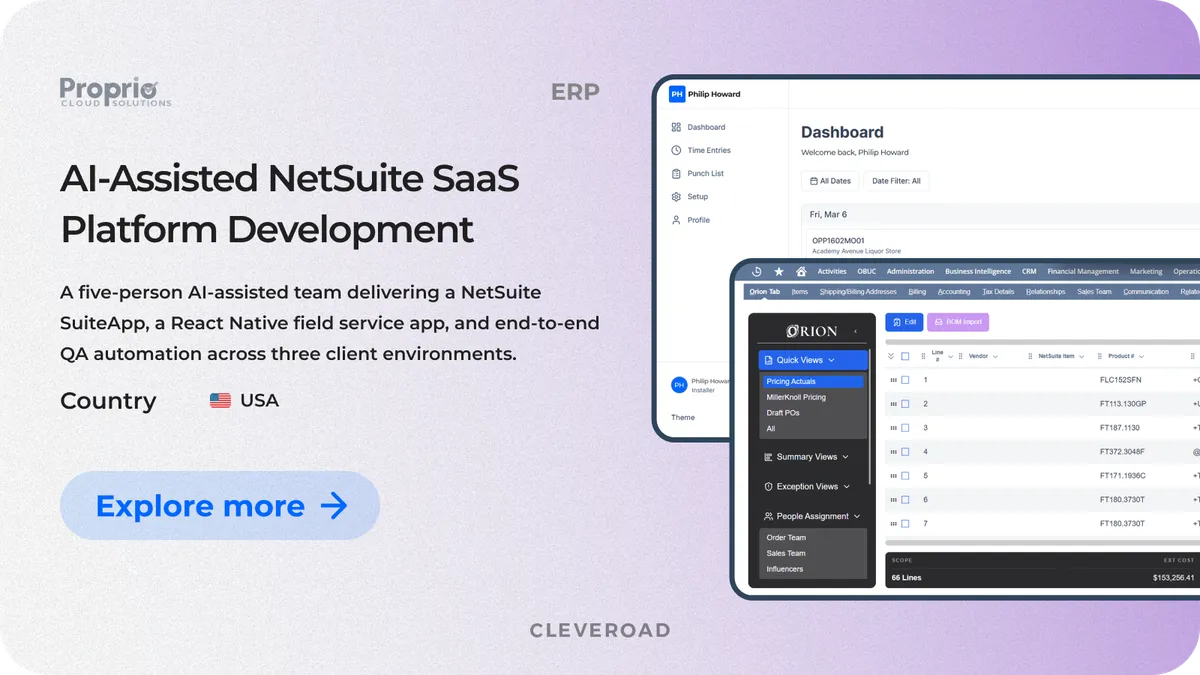
Proprio Cloud Solutions Orion platform interface
The workflow stayed safe because AI never approved its own work. Engineers reviewed pull requests, QA specialists validated scripts against test data, and the team checked acceptance criteria before stories moved into a sprint.The collaboration delivered measurable business and technical outcomes from AI-driven legacy modernization:
- Orion shipped four major releases on schedule.
- Automated QA coverage replaced manual regression testing across three client environments.
- Cleveroad helped launch a Field Service mobile MVP piloted by 12 technicians across 33 locations.
- The application synchronized approximately 280 field work orders during the pilot.
- The Field Service mobile MVP reached a 98% offline synchronization success rate.
- The team maintained delivery control with no missed deadlines and no scope reductions.
Cleveroad's work with Proprio Cloud Solutions shows what disciplined legacy code modernization using AI looks like in practice. Claude Code sped up code analysis, testing, documentation, and delivery tracking, while Cleveroad specialists kept control over quality, business logic, and release stability.
See what Luke Abbott, CTO at Proprio Cloud Solutions, says about working with Cleveroad on Orion platform enhancement and Field Service mobile MVP development.
Luke Abbott, CTO at Proprio Cloud Solutions: Feedback on Cleveroad AI-Assisted Development Services
Why Choose Cleveroad for AI Legacy Code Modernization?
AI-driven modernization of legacy systems needs more than a coding assistant. It needs a team that can understand old architecture, protect business-critical logic, and move changes through a controlled delivery process.
Cleveroad brings 15+ years of experience in building and modernizing complex digital systems across Healthcare, FinTech, and other domains where legacy software supports critical daily operations.
Cleveroad provides application modernization services for companies that need to update outdated code, improve architecture, migrate to the cloud, add test coverage, and reduce technical debt without disrupting core workflows.
Key benefits of working with Cleveroad include:
- AI-assisted development with Claude Code for code analysis, refactoring support, documentation, and test generation
- Full-cycle modernization support, from code audit to architecture redesign, QA automation, cloud-native migration, and support
- ISO-certified processes, including ISO 9001 for quality management and ISO/IEC 27001 for information security management
- Cleveroad also holds AWS Select Tier Partner status for cloud-ready modernization and infrastructure planning
- Flexible cooperation models, covering IT staff augmentation, dedicated development teams, and full-cycle modernization programs from audit to production rollout
We usually start with an AI modernization pilot so you can validate the workflow before scaling it across the whole system. This pilot helps you see how much time AI can save, how much review effort the process requires, and how safely AI-assisted modernization works in your environment. First, we assess your codebase, dependencies, architecture, test coverage, and business-critical workflows. Then we select a low-risk module with clear boundaries and measurable value.
Our human-in-the-loop guardrails directly address the risks covered earlier in this article:
- Every AI output passes engineering or QA review before shipping
- AI never signs off on its own work
- AI does not access or modify production data
- Security-sensitive paths require two-engineer review
- Engineers, QA specialists, and subject matter experts validate business rules
- Automated tests confirm behavior parity before release
- Solution architects keep ownership of architecture decisions
This approach gives you AI-driven acceleration without losing control over system correctness, security, or business continuity. AI helps our team move faster, but experienced Cleveroad specialists remain responsible for the final result.
Estimate your AI modernization timeline and cost
Want a realistic time-and-cost estimate for modernizing your legacy system with AI? Talk to Cleveroad's team.
Legacy code modernization using AI means using GenAI tools to accelerate the technical work of updating old software. AI can analyze legacy code, explain undocumented logic, map dependencies, draft documentation, generate tests, and support refactoring.
Engineers still control the final result. AI provides drafts and insights, while developers, QA engineers, architects, and domain experts decide what can safely move into production.
A safe modernization approach follows this sequence:
- Audit and map the codebase with AI
- Decompose the system into AI-sized modules
- Start with a low-risk pilot module
- Translate and refactor with human review
- Generate tests to lock in behavior
- Validate, integrate, and scale
This order helps your team validate the workflow on a controlled component before applying it to larger, riskier parts of the system.
Different tools fit different modernization tasks:
- Claude Code: whole-module analysis, code translation, refactoring, documentation, and test generation
- GitHub Copilot: in-editor edits, syntax updates, and smaller refactoring tasks
- IBM Watsonx Code Assistant: COBOL and mainframe modernization
- OpenLegacy: API layering over legacy systems without a full rewrite
- LangChain: context orchestration across multi-step AI workflows
The right choice depends on your codebase, target architecture, legacy stack, and modernization goal.
Cleveroad uses Claude Code inside a controlled engineering workflow. Our team loads a business module into Claude Code's context and uses it to trace logic, explain code behavior, draft refactoring options, generate Playwright scripts, and prepare documentation.
The workflow has clear review gates. Engineers check code, QA specialists validate tests, and architects keep ownership of architecture decisions. AI helps move faster, but human specialists approve the result.
Using GenAI can create savings in three main areas:
- Engineering time: faster code analysis, documentation, refactoring, and test generation
- QA effort: quicker regression script creation and broader automated coverage
- Technical-debt costs: fewer manual modernization tasks and better prioritization of high-risk modules

Evgeniy Altynpara is a CTO and member of the Forbes Councils’ community of tech professionals. He is an expert in software development and technological entrepreneurship and has 10+years of experience in digital transformation consulting in Healthcare, FinTech, Supply Chain and Logistics
Give us your impressions about this article
Give us your impressions about this article