Migrating Legacy Systems to Cloud: Strategies, Process, and Costs
01 May 2026
21 Min
120 Views
Enterprise systems built a decade ago are becoming business liabilities. Maintenance bills keep climbing, auditors keep flagging security gaps, and feature teams wait months for infrastructure changes that used to take days. Moving workloads from legacy systems to the cloud is often the way out, but the decision comes with real trade-offs in cost, timeline, and risk.
At Cleveroad, we have spent 15+ years building and modernizing software for enterprises in logistics, healthcare, field service operations, and financial services. In this guide, we walk through what migrating legacy systems to cloud infrastructure entails, which of the seven strategies (the 7 Rs) fit which scenarios, the full 7-step process we follow, where budgets typically go, and the pitfalls we most often see that derail projects.
Before we get into the details, here are the key takeaways:
- Legacy-to-cloud migration moves legacy applications to the cloud, including systems, data, and integrations, to a cloud environment such as Amazon Web Services (AWS), Azure, Google Cloud Platform (GCP), or a hybrid setup, using one of seven strategies known as the 7 Rs.
- Cloud migration can reduce IT operating costs by 20 to 30% once workloads are right-sized and unused infrastructure is retired.
- A mid-complexity enterprise migration typically runs for 6 to 18 months and costs $150,000 to $1,500,000, depending on data volume, compliance scope, and the amount of code the team rewrites.
- Cleveroad has delivered cloud migrations and modernization programs for clients across logistics, healthcare, field service operations, and FinTech, with two examples presented later in the article.
What Is Legacy System Migration to the Cloud?
Legacy system migration to the cloud moves an existing application, along with its data and integrations, from on-premises or outdated systems to a cloud-based platform in a public, private, hybrid, or multi-cloud environment. The goal is to keep the business function running while swapping out the underlying infrastructure for cloud computing, which is cheaper to run, easier to change, scale, and secure.
The scope of migration work typically covers:
- Legacy application code
- Legacy data and databases
- Integrations from the legacy environment
- User identity and access management systems
- Integrations with internal tools
- The runtime environment
A full rewrite of the application itself is a different engagement. That work is called rearchitecture or modernization, and it often runs alongside migration but should be planned as its own workstream.
How migration differs from modernization
Migration is a code migration and a hosting change for an existing legacy system. Modernization is a change of architecture, code, or both. The two often occur together on real projects, and the line between them is the source of most budget confusion.
A development team can migrate a Java monolith to Elastic Compute Cloud (EC2) virtual machines without touching a line of code. That is pure migration. If the existing architecture limits scalability or slows down feature delivery, companies often consider monolith to microservices migration as part of a broader modernization strategy. The same team can take that monolith and break it into microservices on Amazon Elastic Kubernetes Service (EKS) as part of a modernization effort. Treating these as a single workstream tends to stretch timelines and blow past the original estimate because the testing, rollback, and communication plans differ for each.
The diagram below contrasts the two approaches side by side, showing the changes that occur during a migration versus a modernization.
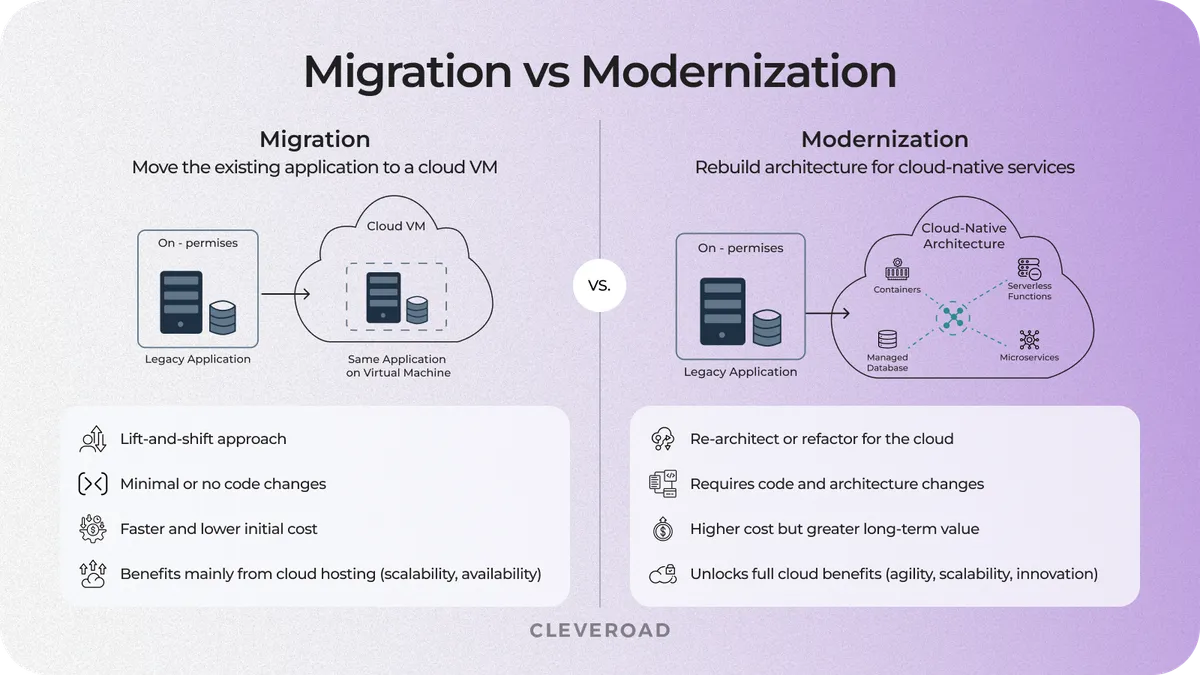
Migration vs. modernization
Signs a legacy system is ready to move
Signals tend to show up together when a system is approaching the point where migration pays off:
- Vendor support for legacy hardware, operating systems, or runtime, database, or other components is ending within the next 18 months.
- The yearly maintenance bill for hardware and on-premises licenses is climbing faster than the value the system delivers.
- Product teams keep requesting integrations that the platform cannot support, such as Representational State Transfer (REST) APIs, webhook triggers, and identity federation.
- Auditors have flagged security or compliance gaps that cannot be closed on the current stack.
- The next hardware refresh would require capital expenditure comparable to a full migration.
- Downtime incidents keep increasing even when traffic is flat.
When three or more of these appear in the same quarter, many legacy systems are shifting from assets to liabilities.
Migration and modernization often run in parallel, and our legacy systems modernization services cover both.
Why Move Legacy Systems to the Cloud? Core Business Outcomes
Four business outcomes consistently justify the cost of legacy application migration and adopting a cloud solution: lower infrastructure spend, on-demand scaling, a stronger security posture, and access to modern data and AI services. Not every enterprise gets all four, and the relative weight depends on the starting architecture and the target cloud provider.
Cost reduction in infrastructure and licensing
Most enterprises see a 20-30% reduction in infrastructure costs after migrating legacy systems to cloud platforms, according to a 2024 McKinsey analysis. The drivers are consistent: retiring on-premises hardware, consolidating licenses, and adopting consumption-based pricing that matches spend to actual use.
One caveat. Poorly sized cloud workloads can increase costs rather than reduce them. Teams that lift and shift without right-sizing or shutting down idle environments often overspend in the first year. The savings come from optimization work, not from the move itself.
Scalability without capacity planning overhead
Auto-scaling groups, managed cloud services, and cloud technology absorb traffic spikes that would overwhelm an on-premises system. A retail platform running on fixed hardware must provision for Black Friday peaks year-round. In the cloud, the same platform scales up for the weekend and scales back down on Tuesday morning.
This matters for more than peak handling. A Software as a Service (SaaS) product launching a new feature can handle a sudden spike in sign-ups without ordering hardware. Capacity becomes a config change supported by automation, not a procurement cycle.
Updated security and compliance posture
Modern cloud providers offer advanced security features at rest and in transit, identity federation, Security Information and Event Management (SIEM) integration, and detailed audit logs that most legacy stacks never had. Named services like AWS Key Management Service (KMS) and Azure Key Vault provide primitives that would take a large internal security team to build on-premises. For regulated industries, the cloud aligns well with HIPAA, GDPR, SOC 2, and PCI DSS when the provider and region are selected appropriately.
One important caveat. The provider secures the infrastructure. The customer still owns application security and Identity and Access Management (IAM) configuration, and most cloud incidents in 2024 and 2025 came from customer-side misconfiguration rather than provider failure (Source: Gartner).
Access to AI, analytics, and modern integration layers
Once legacy data moves to cloud-based solutions, teams can plug in managed analytics, machine learning services, REST or GraphQL integrations, and event streaming pipelines that the on-premises system blocked. A product team that used to wait three months for a new data export can query live data through a managed warehouse within days.
This is where migration often pays for itself on the product side. A forecasting feature that would have taken two quarters to ship against a legacy database can land in weeks against a cloud data platform. Several of our logistics and healthcare clients build their first machine-learning features in the months immediately after cutover, using the new data layer as the foundation.
Many teams launch their first AI or ML initiatives after cloud migration, and our AI development services help build solutions on the new data platform.
Not every cloud migration captures all four outcomes. A FinOps-focused lift-and-shift might deliver 25% infrastructure savings and nothing else. A full rearchitecture might shift the product roadmap in a way no straight migration could. Clarifying which of the four outcomes matters most before the first line of work keeps the business case aligned with the technical plan.
The 7 Rs: Cloud Migration Strategies and When Each Fits
Seven strategies define the migration approach for almost every cloud migration for legacy systems scenario. The right one depends on business urgency, application criticality, and source code maintainability. Some workloads move to the cloud without any code changes. Others get a full rearchitecture along the way. Many real projects use two or three strategies across different applications in the same wave.
The seven strategies are rehost (lift-and-shift), replatform (lift, tinker, shift), refactor, rearchitect, repurchase, retain, and retire. Each strategy below explains how the approach works and when to use it. The comparison table that follows highlights the key differences in effort, cost, timeline, risk, and cloud-native benefits.
Rehost (lift and shift)
Rehost moves the existing application to cloud virtual machines without changing code. It is the fastest and cheapest of the seven strategies. The trade-off is that the application does not gain much from being in the cloud, because it still runs the same way it did on-premises.
Best fit: short deadlines, data center exit programs, monolithic systems where a rewrite would cost more than the business value, and applications that are candidates for later refactoring once they are stable in their new environment.
Replatform (lift, tinker, shift)
Replatform applies a phased approach to legacy systems with minimal changes along the way. The team swaps a self-managed database for a managed service such as Amazon RDS or Google Cloud SQL, replaces message queues with managed equivalents, or moves containers to a managed Kubernetes service.
Best fit: teams that want early cloud wins without funding a full refactor. Replatforming captures a share of the benefits of cloud-native while requiring far less effort and cost than a full refactoring.
Refactor
Refactor updates to parts of legacy applications to the cloud to leverage cloud-native services. Authentication moves to managed identity, file storage moves to object stores, and batch jobs move to serverless functions. The code keeps most of its original shape, but the integrations change.
Best fit: systems where the business case supports six or more months of engineering work, and where the team wants lower operating costs and more product flexibility over a two-to-three-year window.
Rearchitect
Rearchitect is a full redesign. A monolith becomes a set of microservices. Tight coupling becomes event-driven. Request-response becomes asynchronous. This is the highest-effort strategy and carries the most execution risk, because the team is building a new system while retiring the old one.
For a reference on how to decompose a monolith into cloud-native components, AWS publishes a detailed 10-step guide to monolith modernization that aligns with how we run rearchitecture projects.
Best fit: systems that must scale beyond what the current architecture can support, platforms that will integrate AI or advanced analytics as core features, and products where the architecture itself is the blocker to the next phase of the business.
A full cloud-native rebuild goes beyond migration, and our cloud application development services cover end-to-end rearchitecture.
Repurchase
Repurchase replaces the in-house system with a SaaS product. Instead of migrating the custom HR tool to the cloud, the company moves to Workday. Instead of migrating the CRM, it moves to Salesforce.
Best fit: non-differentiating workloads where a competitive SaaS product already covers the use case. Common candidates are HR, finance, CRM, and generic document management.
Retain
Retain keeps the application on-premises for now. This is the right answer more often than teams expect. A system that was replaced three years ago at significant expense usually stays where it is. A workload with strict data residency that the chosen cloud does not yet cover in the right region stays where it is. An application scheduled for retirement in 18 months usually stays where it is.
Best fit: recent infrastructure investments, strict data residency constraints, and short-horizon retirement candidates.
Retire
Retire decommissions the application entirely. Most migration audits uncover 5 to 15% of applications that nobody actively uses, or that duplicate functionality from another tool already in the estate.
Best fit: unused applications, duplicates, and modules that a consolidated replacement already covers. Retiring them before migration reduces both migration costs and long-term cloud bills.
The table below compares all seven strategies across effort, cost, time to migrate, business risk, and long-term cloud benefit.
| Strategy | Effort | Cost range | Time to migrate | Business risk | Cloud-native benefit |
|---|---|---|---|---|---|
Rehost | Low | $50,000-$200,000 per app | 2-4 months | Low | Low |
Replatform | Medium | $100,000-$400,000 per app | 3-6 months | Medium | Medium |
Refactor | High | $300,000-$1,000,000+ per app | 6-12 months | Medium | High |
Rearchitect | Very high | $500,000-$2,000,000+ per app | 9-18 months | High | Very high |
Repurchase | Medium | SaaS subscription | 1-4 months | Medium | N/A |
Retain | None | $0 | N/A | None | None |
Retire | Low | $10,000-$50,000 | 1-2 months | Low | N/A |
How Do You Migrate a Legacy System to the Cloud Step by Step?
A working migration process follows seven steps in a specific order. Skipping any of them tends to surface as a problem during cutover, when it is most expensive to fix. The sequence below is the one we use for every legacy system-to-cloud migration, regardless of strategy or target cloud provider.
The diagram below shows stages, from application audit through post-migration optimization.
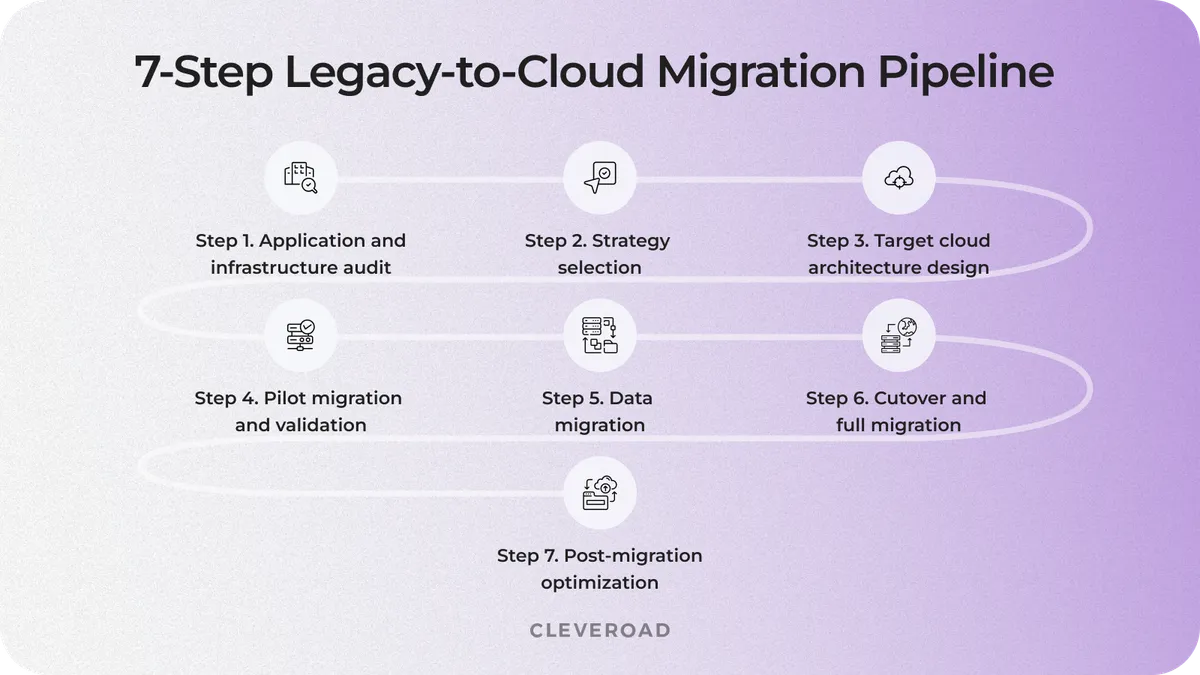
Seven-stage cloud migration process diagram
Step 1. Application and infrastructure audit
The audit reviews existing systems, application components, and dependencies. It covers the application code, data stores, integrations, dependencies, compliance constraints, and runtime performance. The deliverable is a single document that lists every component in scope, every external dependency, and the current state of each.
At Cleveroad, we run a formal code audit at this stage. Engineers review source code quality, security posture, and architectural debt against a fixed checklist. The output feeds directly into strategy selection in Step 2, because the choice between rehost and refactor depends heavily on how clean the source is.
Alex Penzov
CTO at Cleveroad
The audit is the step teams skip most often, and it is the one that decides whether the project comes in on budget. A clean inventory reveals hidden integrations and compliance constraints that would otherwise surface two months before cutover. An incomplete inventory guarantees a scope change.

Step 2. Strategy selection (choose from the 7 Rs)
Each application in the inventory gets matched to one of the seven strategies. Decision criteria are business criticality, source code quality, regulatory deadlines, and remaining useful life.
The output of this step is a migration wave plan. It specifies the strategy for each application, the order of waves, and the dependencies between waves. Critical workloads usually move in later waves, after the team has rehearsed the migration pattern on lower-risk apps.
Step 3. Target cloud architecture design
Architecture design selects the cloud provider, network topology, identity model, observability stack, and data layer. The deliverable is an architecture diagram plus a list of the managed services the new system will use.
This is also the right point to explicitly set out the shared-responsibility model. The cloud provider secures the infrastructure. The customer secures the application, the IAM policies, and the data handling. Getting this on paper prevents the security gaps that typically surface during the final audit before go-live.
Step 4. Pilot migration and validation
The pilot moves a low-risk workload first. The team validates performance against the old system, cost against the business case, security against the target policy, and user experience against real traffic.
Deliverables are the pilot runbook, the rollback plan, and a go/no-go signal for the rest of the migration. A failed pilot usually means the plan needs revision before further workloads are moved, not that the migration itself is wrong.
Step 5. Data migration
Data migration handles legacy data transfer within the phases of legacy system migration, ETL (Extract, Transform, Load) pipelines, consistency checks, and cutover rehearsal. The work is divided into static data (reference tables, user records with low change rates) and active data (transactions, session data, and anything that updates during the cutover window).
This is the step that carries the highest single risk in most projects: data loss or data drift during cutover. A 2025 study in Cogent Business & Management on socio-technical aspects of legacy cloud migration identifies data integrity as one of the three most common failure modes across the surveyed migrations. Mitigations such as dual-write with reconciliation and full data rehearsals catch most issues before the actual cutover.
Step 6. Cutover and full migration
Cutover is the execution window. The team runs either a blue-green deployment (both systems live, traffic switched once) or a parallel run (both systems live, traffic split and gradually shifted).
Deliverables include the cutover runbook, active monitoring on both sides of the cutover, and a user communication plan. Cutover windows range from a few hours for a small workload to a full weekend for a complex system. Anything longer than a weekend usually signals that the plan is underspecified.
Step 7. Post-migration optimization
Within the first 30 to 90 days after go-live, validate results across the legacy system rollout. The team right-sizes instances, tunes costs through FinOps (financial operations) reviews, fixes performance hotspots that surface only under real load, and fully retires the old environment. In some cases, legacy app modernization with Gen AI is used to surface technical debt and suggest targeted improvements in remaining legacy components after migration.
Teams that skip this phase routinely overspend by 25 to 40% in the first year of cloud operation. The savings were in the plan, but were never realized.
What Are the Main Challenges of Legacy-to-Cloud Migration?
Five failure modes consistently derail legacy systems cloud migration projects. Most are predictable once you know what to look for, and each has a concrete mitigation that fits into the seven-step process above.
Data integrity and loss during cutover
Why it happens: poorly documented schemas, custom stored procedures written years ago, inconsistent data between the old system and the target, and cutover plans that assume clean data.
Mitigation: run dual-write and reconciliation during the pilot window. Use automated row-count and checksum validation at every cutover rehearsal. Keep a rollback plan that does not depend on the new system being online.
Downtime and business continuity
Why it happens: big-bang cutovers underestimate edge cases, and teams discover data flows no one documented in the middle of the switch.
Mitigation: run blue-green or rolling cutovers with clear rollback criteria. Decide in advance what triggers a rollback and what triggers a forward fix. Rehearse both at least twice.
Cost overruns from hidden dependencies
Why it happens: the legacy system has integrations that were not in the original inventory. The cloud bill balloons because workloads are oversized or because idle environments were left running.
Mitigation: build the dependency map in Step 1, not in Step 6. Run a FinOps review in Step 7 with right-sizing, reserved capacity, and idle shutdown as concrete actions.
Security misconfiguration in the new environment
Why it happens: teams apply on-premises controls to cloud primitives such as IAM policies, S3 bucket policies, and security groups. Most cloud incidents in 2024 and 2025 stemmed from customer-side misconfigurations rather than provider failures.
Mitigation: run a cloud security baseline review before go-live. Use IaC tools such as Terraform or AWS CDK to enforce the baseline and prevent configuration drift after deployment.
Skill gaps in cloud-native engineering
Why it happens: the on-premises team has never operated Kubernetes or managed identity at scale. They can deliver the migration, but struggle to run the new environment reliably.
Mitigation: either pair with an experienced partner for the migration and the first six months of operation, or provide dedicated training and a structured handover plan before the pilot. A staff augmentation engagement covering DevOps and cloud security is the fastest way to close the gap.
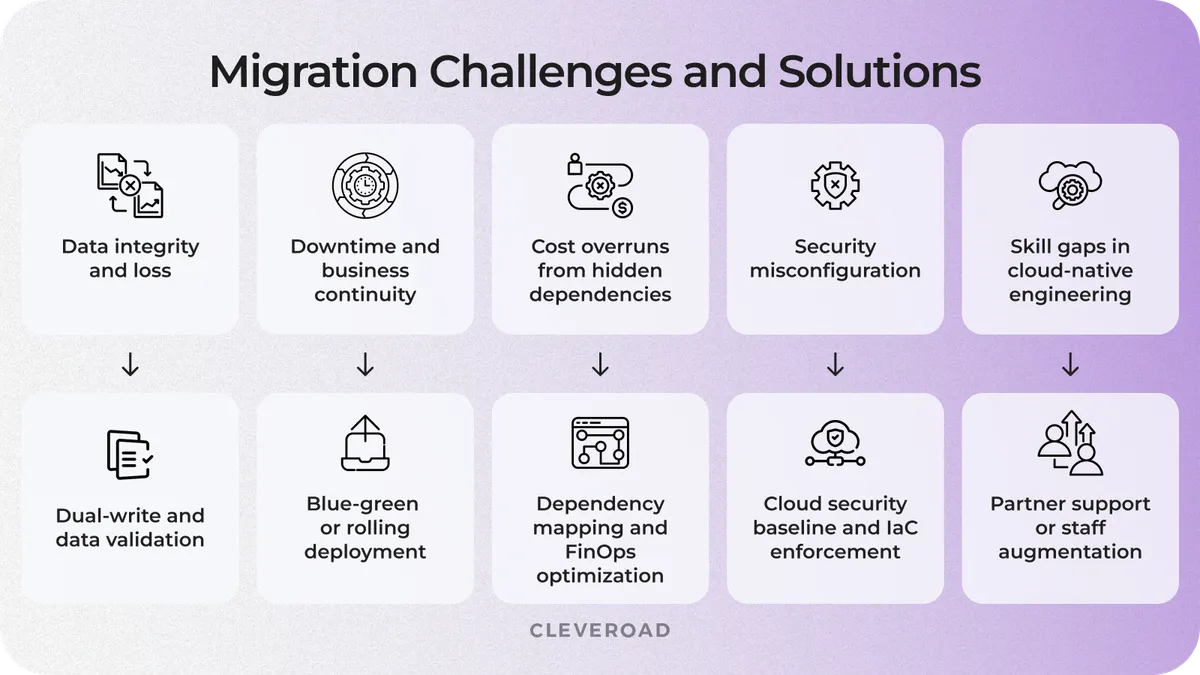
Common challenges of legacy-to-cloud migration
Cloud Migration for Legacy Systems: Cost and Timeline
A typical enterprise legacy migration runs for 6 to 18 months and costs $150,000 to $1,500,000+ in professional services, not counting cloud infrastructure spend. The spread is driven by five concrete factors, and almost every budget overrun traces back to one of them.
The table below breaks down the cost range per factor, along with the main driver that pushes a project toward the top of each range.
| Cost factor | Low range | High range | Main driver |
|---|---|---|---|
System complexity | $50,000 | $600,000 | Number of apps and integrations |
Migration strategy | $50,000 per app (rehost) | $1,000,000 per app (rearchitect) | Depth of code changes |
Data volume | $20,000 | $300,000 | Volume, structure, regulatory constraints |
Compliance scope | $30,000 | $400,000 | HIPAA, GDPR, PCI DSS, and SOC 2 additions |
Post-migration support | 15% of the project | 25% of the project | Complexity of steady-state operation |
System complexity and number of applications
More applications mean more engineering hours. A single-application migration with 2 or 3 external integrations lands near the low end of the range. A 10-application wave with shared databases and tangled dependencies sits near the top, because coordination across waves is its own workstream.
Migration strategy (lift-and-shift vs. refactor)
A rehost can run $50,000 to $200,000 per application. A refactor runs $300,000 to $1,000,000 or more, and a full rearchitecture can exceed $2,000,000 for a complex system.
Rehost saves less but is cheap and fast. Refactoring costs more upfront but captures most of the cloud-native benefits for a fraction of the cost of a full rearchitecture. Teams that pick rehost for every workload often end up paying for new technology migration strategy two years later anyway.
Data volume and complexity
Data size, structure, and regulatory constraints drive ETL and validation work. A migration under 1 TB with clean schemas can be delivered within weeks. A multi-terabyte migration involving mixed transactional and analytical data, combined with regulatory requirements for data residency, takes months and requires a dedicated team.
Compliance and industry scope
HIPAA, PCI DSS, GDPR, and SOC 2 each add requirements for audit logging, encryption, cloud-region constraints, and documentation. A healthcare migration under HIPAA usually adds 20 to 30% to the timeline and a comparable amount to the budget, because every integration point must pass a compliance review.
Post-migration support and optimization
The first year of cloud operation typically adds 15 to 25% of the project cost in FinOps work, hypercare, and steady-state DevOps coverage. Most RFPs (Requests for Proposal) leave this line out, and the teams that skip it report the highest first-year overspend.
How Cleveroad Migrated Legacy Systems to the Cloud: Our Clients’ Success Stories
Two projects illustrate the pattern we apply across industries. Both started with a full discovery, moved through strategy selection and pilot, and included a structured post-migration support phase. Both retired legacy platforms had been blocking the business for years.
Field service management system: enterprise workflow moved to a cloud platform
Our client, a Europe-based cacao trading and processing company operating across global supply chains, relied on fragmented processes to manage the purchasing, tracking, and reporting of cacao beans. Field managers worked in remote areas with limited connectivity, making it difficult to track yields, manage cash flow, and maintain consistent reporting across the organization. At the same time, the client’s in-house team lacked mobile expertise to deliver a field-ready solution.
The Cleveroad team developed a cross-platform mobile application from scratch and integrated it with the client’s Back Office system. The solution enables field managers to track purchases, manage lots, record quality data, and monitor transactions directly from mobile devices, even in low-connectivity environments, thanks to offline mode support. All field data synchronizes with the central system once the connection is restored, ensuring accurate reporting and full transparency across trading operations. Cleveroad also provided a dedicated Flutter development team to extend the client’s in-house capabilities and accelerate delivery.
As a result, the client received a fully operational mobile platform for managing cocoa trading and supply chain processes, integrated with their Back Office system. This led to improved operational efficiency, greater cash-flow transparency, and more accurate real-time reporting, while enabling faster delivery through seamless team augmentation without additional in-house hiring.
- Explore the field service management system case in more detail.
The UI screenshot below shows the dispatcher view with the live job map, technician availability, and the active work order queue.
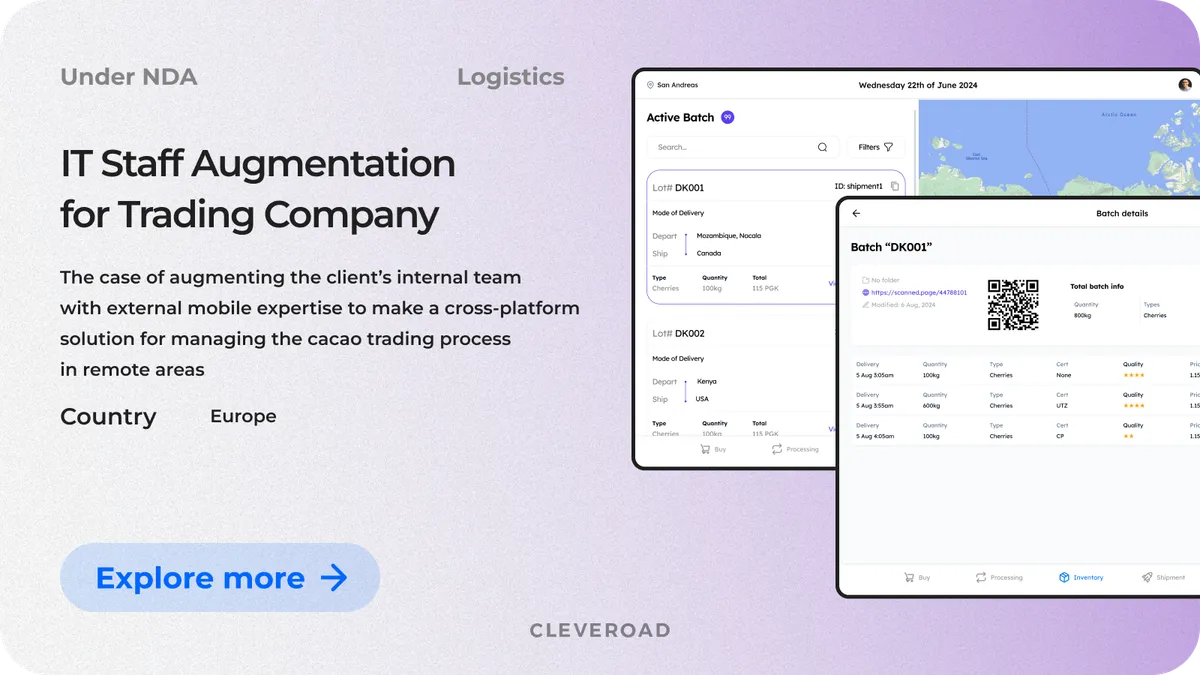
Field service management system dispatcher view
Transportation management system: logistics operations migrated to cloud-native architecture
Our client, a US-based logistics provider offering warehousing, long-distance transportation, and last-mile delivery services, relied on disconnected systems for route planning and fleet management. Manual routing processes led to delays, higher operational costs, and limited visibility across delivery workflows, while integrations with warehouse and CRM systems required additional manual effort.
The Cleveroad team developed a custom transportation management system (TMS) with automated route planning, fleet control, and delivery workflow management. The platform includes a driver mobile app for navigation and real-time updates, along with dispatcher tools for route adjustment and delivery monitoring. The solution was fully integrated with the client’s warehouse management system (WMS) and CRM, ensuring seamless data flow and real-time synchronization across all logistics operations.
As a result, the client received a unified transportation management platform covering all logistics processes in a single system. This led to optimized delivery times, a 27–36% reduction in operational overhead, and an increase in return per vehicle through better fleet utilization and route efficiency.
- Check out how we built the transportation management system in more detail.
The UI screenshot below shows the TMS dispatcher console with the live fleet map, route optimization suggestions, and per-vehicle delivery status.
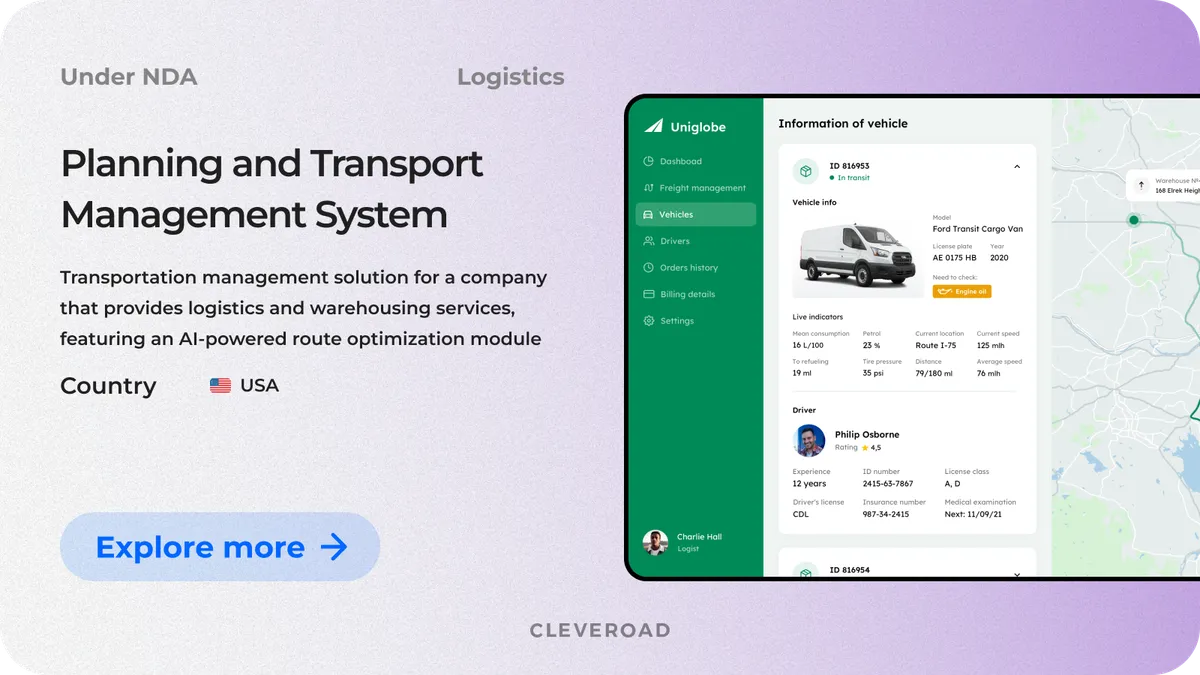
TMS dispatcher console with live fleet map
Both projects followed the same seven-step process described earlier: discovery, strategy selection, target architecture, pilot, data migration, cutover, and post-migration support. The strategies differed by workload. For the field service platform, we used a mix of refactoring and re-architecting. For the TMS, we used refactor with a managed Kubernetes target and an event-driven integration layer.
A similar DevOps-heavy modernization engagement with Penneo A/S, a Danish FinTech platform, shows how we deliver cloud-native operations in practice. See what Hans J Skovgaard, Head of DevOps at Penneo, says about collaborating with Cleveroad’s DevOps engineers on their cloud platform rebuild:
Hans Jørgen Skovgaard, CTO at Penneo: Feedback on Cleveroad's Cloud Infrastructure Services
Partnering With Cleveroad for Your Legacy-to-Cloud Migration
Cleveroad is a custom software development company with 15+ years of experience in building and modernizing enterprise software. Our team includes 280+ in-house engineers and a 2,100+ strong external tech-expert talent network, operating from R&D centers in Estonia, Poland, Ukraine, the US, and Norway. We hold ISO 9001 and ISO 27001 certifications for quality and information security, and AWS Select Tier Partner status within the AWS Partner Network.
For legacy system-to-cloud migration and modern system implementation, we cover the full end-to-end engagement: discovery, architecture design, pilot migration, data migration, cutover, and post-migration DevOps support. Our engineers work across AWS, Azure, and Google Cloud, so the cloud decision stays technical rather than partner-driven.
If you are evaluating a legacy system to cloud migration, talk to our team before the scope is fully defined. That conversation is where we catch the hidden dependencies that would otherwise show up in Month 3.
Migrate your legacy system with a proven cloud partner
With 15+ years in software development and deep cloud expertise, Cleveroad delivers secure, scalable cloud migrations aligned with your business goals, on time and within budget.
Legacy system cloud migration is the process of moving an on-premises or outdated application, along with its data and integrations, into a cloud environment such as AWS, Azure, or Google Cloud, using one of the seven strategies known as the 7 Rs.
A working legacy-to-cloud migration runs through seven steps:
- Audit the application, data, and infrastructure.
- Select a strategy from the 7 Rs per workload.
- Design the target cloud architecture.
- Run a pilot migration and validate it against the success criteria.
- Migrate the data with dual-write and reconciliation.
- Execute the cutover through blue-green or rolling deployment.
- Optimize cost and performance in the first 30 to 90 days after go-live.
The practices that consistently separate a successful migration from a scope blowout:
- Build a complete application and dependency inventory in Step 1, before selecting a strategy.
- Pilot a low-risk workload first to calibrate cost, performance, and rollback criteria.
- Use Infrastructure as Code (Terraform or AWS CDK) to enforce security baselines from day one.
- Plan a FinOps review into Step 7, not after the first cloud bill arrives.
- Bring in cloud and DevOps specialists early if the on-premises team is new to the target platform.
Skipping any of these typically surfaces as a cost overrun or delay in the second half of the project.
A mid-complexity enterprise migration takes 6 to 18 months. Simple rehosting projects for a single application can be completed in 2 to 4 months. A full rearchitecture of a complex system can take 12 to 24 months if the target architecture is significantly different from the source. The timeline is driven more by data volume, compliance scope, and coordination across application waves than by raw lines of code. For most of our logistics and healthcare clients, the initial workload migrates within 4 months of kickoff, and the full wave completes within 12 months.
In our experience, data integrity during cutover is the biggest single risk. A 2025 research paper published in Cogent Business & Management identifies it as one of the three most common failure modes across surveyed migrations. The other four consistent challenges are downtime during cutover, cost overruns due to hidden dependencies, security misconfigurations in the new cloud environment, and skill gaps when the on-premises team has not operated cloud-native infrastructure before. Each has a concrete mitigation that fits into the seven-step process above.

Evgeniy Altynpara is a CTO and member of the Forbes Councils’ community of tech professionals. He is an expert in software development and technological entrepreneurship and has 10+years of experience in digital transformation consulting in Healthcare, FinTech, Supply Chain and Logistics
Give us your impressions about this article
Give us your impressions about this article