Medical Imaging Software Development in 2026: Features, AI, and Cost
Updated 10 Jul 2026
18 Min
651 Views
Medical imaging software helps healthcare providers manage medical images throughout the diagnostic workflow, from image acquisition and storage to visualization and AI-assisted analysis using standards such as DICOM and PACS. Today, many medical imaging solutions focus on AI-assisted analysis, helping clinicians interpret complex imaging data, detect patterns, and make decisions faster.
With 15+ years of healthcare software development experience, Cleveroad builds custom medical imaging solutions that integrate with existing healthcare systems, support secure data workflows, and help organizations modernize diagnostic processes. In this article, we’ll explore how medical image analysis software works, what features make these solutions effective, and how AI technologies enhance modern diagnostic processes.
Key takeaways:
- Medical imaging software connects image management, visualization, and analysis workflows through standards such as DICOM and PACS.
- AI-powered image analysis helps healthcare professionals detect patterns, prioritize cases, and support clinical decision-making.
- Effective medical imaging platforms require secure data workflows, reliable integrations, and regulatory compliance.
What Is Medical Imaging Software and How Does It Work?
Medical imaging software is a healthcare solution that enables providers to capture, store, view, process, and analyze medical images from various modalities. Building on that definition, the workflow itself breaks into distinct stages, and the difference between two related terms matters here. Medical imaging software covers the broader workflow of acquiring, storing, viewing, and managing medical images, while medical image analysis software focuses on extracting insights from those images through automated or AI-assisted analysis.
Medical image analysis software converts raw imaging data into clinically useful insights through several stages:
- Image acquisition. Imaging devices generate medical images through technologies such as radiography, ultrasound, CT, and MRI. The software receives image data from connected devices or healthcare systems using standards such as DICOM.
- Image processing. Image processing improves raw medical images by reducing noise, correcting inconsistencies, and enhancing important details. Higher-quality images allow clinicians and AI algorithms to identify relevant findings more accurately.
- Image analysis. Depending on the use case, the software can detect abnormalities such as tumors, highlight suspicious regions, measure affected areas, and support clinicians in reviewing complex cases. AI-based algorithms strengthen this process by recognizing patterns across large volumes of imaging data.
- Visualization and interpretation. Processed images can be presented through 2D views, 3D reconstructions, and volumetric models. These visualizations help healthcare professionals review complex findings, compare changes across examinations, and use imaging insights during diagnosis and treatment planning.
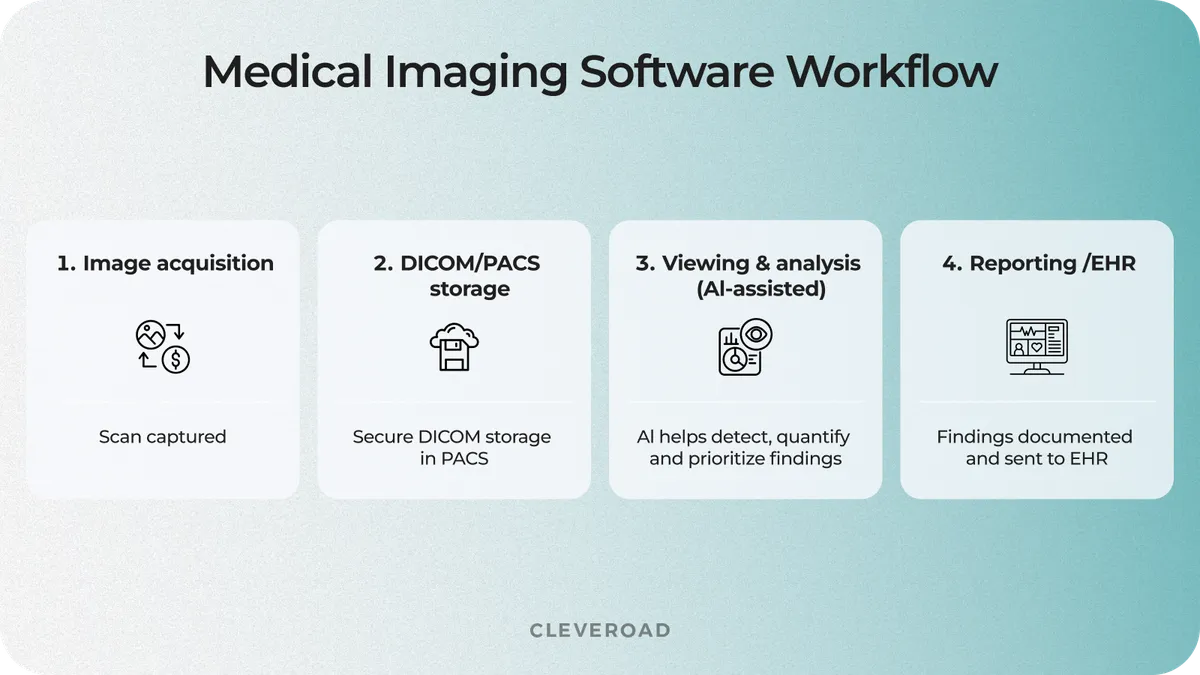
How medical imaging software moves an image from scan to report
Healthcare organizations increasingly adopt AI-powered medical imaging solutions to handle growing volumes of diagnostic data and support clinicians with faster image interpretation. According to the 2025 MarketsandMarkets report, the global medical image analysis software market is expected to grow from around $2.8 billion in 2026 to $4.35 billion by 2032. The AI segment is growing faster: the AI in medical imaging market is projected to rise from roughly $2.16 billion in 2026 to $8.23 billion by 2031.
Applications of Medical Imaging Software in Clinical Practice
Medical image analysis software supports different clinical specialties. The most common applications include radiology, cardiology, oncology, and surgical planning. Each specialty applies medical image analysis software differently depending on the type of imaging data and treatment goals.
Radiology and diagnostic imaging
Radiology is one of the most mature application areas for medical imaging AI. According to research published in Radiology, 76.5% of FDA-cleared AI medical devices were related to radiology use cases as of December 2024, reflecting the large volume of image-based diagnostics and the potential for AI-assisted interpretation.
Medical image analysis software supports radiologists by analyzing X-rays, CT scans, and MRI images to identify suspicious findings and accelerate image review. These capabilities help specialists prioritize critical cases and focus attention where it is most needed.
Modern solutions combine image processing algorithms, computer vision, and AI models to identify patterns such as lung nodules or signs of stroke. These systems give radiologists a second read, speeding up interpretation and keeping it consistent, while the final call remains with the specialist.
Cardiology imaging
Cardiology imaging software helps physicians analyze heart-related images and monitor cardiovascular conditions. A medical imaging software development company can build solutions that process data from echocardiography, cardiac CT, MRI, and other imaging techniques to identify structural changes and support treatment planning. If your cardiology team monitors patients with complex heart conditions, imaging software can help compare cardiac scans over time and highlight structural changes that may require additional investigation.
AI-powered analysis can help clinicians evaluate cardiac structures, assess functional changes, and identify findings that require further investigation. This allows cardiologists to review complex cases with additional data support.
Oncology and pathology
Medical image analysis software plays an important role in cancer diagnosis, staging, and treatment planning. In oncology workflows, AI medical device software development services help create AI algorithms that help specialists evaluate tumors, measure changes in lesions, and compare imaging results across different stages of treatment. If your oncology department tracks tumor progression across multiple scans, image analysis software can help measure changes in lesion size and compare results throughout treatment.
Pathology image analysis can also support digital slide review by identifying cellular patterns associated with specific conditions. These capabilities help specialists detect changes earlier and develop more personalized treatment strategies.
Explore how telemedicine software development services will help you build medical software for better care delivery
3D reconstruction and surgical planning
3D imaging software converts medical scans into detailed anatomical models that help surgeons prepare for complex procedures. These solutions combine CT, MRI, and other imaging data to create interactive 3D visualizations of organs, bones, or affected areas.
Surgeons use these models to study patient-specific anatomy before procedures, identify potential challenges, and plan interventions more accurately. 3D reconstruction is especially valuable in areas such as orthopedics, neurosurgery, and reconstructive surgery.
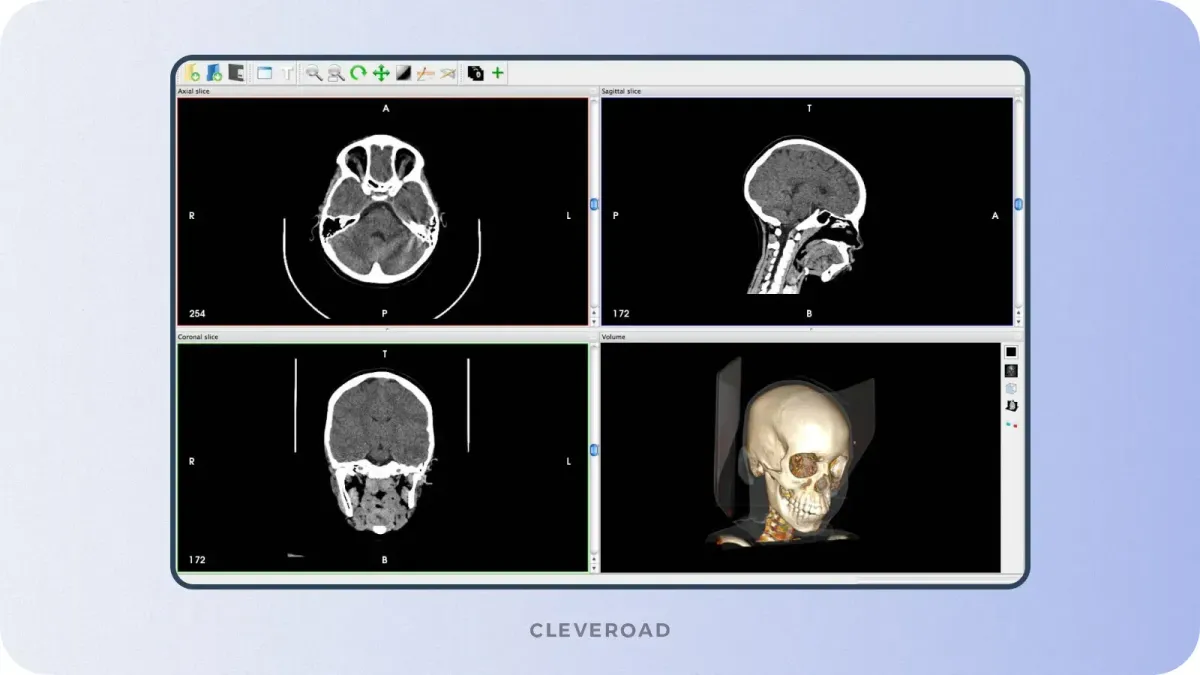
3D reconstruction feature example
Core Features of Custom Medical Imaging Software
Custom medical imaging software helps healthcare organizations create connected diagnostic workflows where clinicians can securely access, analyze, and share medical images.
The right feature set depends on your clinical workflow. For example, if your radiologists compare current scans with previous examinations every day, the imaging viewer should support synchronized multi-study layouts, fast image navigation, and comparison tools.
DICOM support and image viewer
If your radiologists work with images from different devices and vendors, DICOM support ensures that CT, MRI, and ultrasound data can be accessed through a unified viewer. The software should support the DICOM standard to ensure compatibility with imaging modalities such as MRI, CT, ultrasound, and X-ray systems.
Medical image viewers typically include tools for adjusting image views, reviewing different planes, and comparing current scans with previous examinations. These capabilities help radiologists analyze findings more efficiently.
PACS and RIS integration
If your hospital already uses PACS and RIS systems, integration allows your team to avoid manual data transfers and keep imaging workflows connected with scheduling and reporting processes. PACS integration enables secure image storage and retrieval, while RIS integration connects imaging workflows to scheduling, reporting, and patient management.
These integrations reduce fragmented workflows and allow healthcare providers to access imaging data together with relevant clinical information.
Annotation and measurement tools
If your specialists need to track changes in tumors or anatomical structures over time, annotation and measurement tools allow them to mark findings and compare measurements across examinations. Specialists can mark abnormalities and compare changes across examinations.
These annotations create a shared reference point for radiologists, surgeons, and other specialists, making it easier to discuss findings and coordinate treatment decisions.
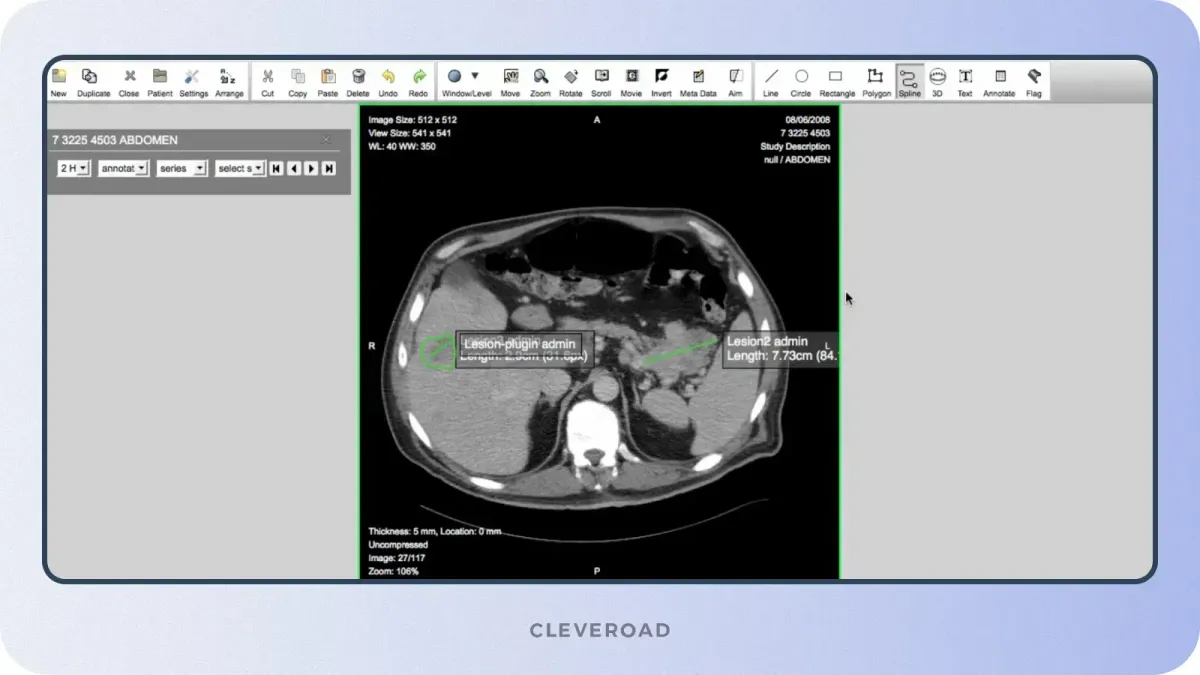
Quantification feature example
AI-assisted analysis and CAD
AI-assisted analysis helps healthcare professionals identify patterns in medical images and prioritize cases that may require closer review. Computer-aided detection (CAD) systems can identify potential abnormalities and provide additional insights based on trained AI models.
For example, AI algorithms can help detect lung nodules in CT scans or highlight areas that require further review. These tools support clinicians by reducing manual workload and improving consistency in image interpretation.
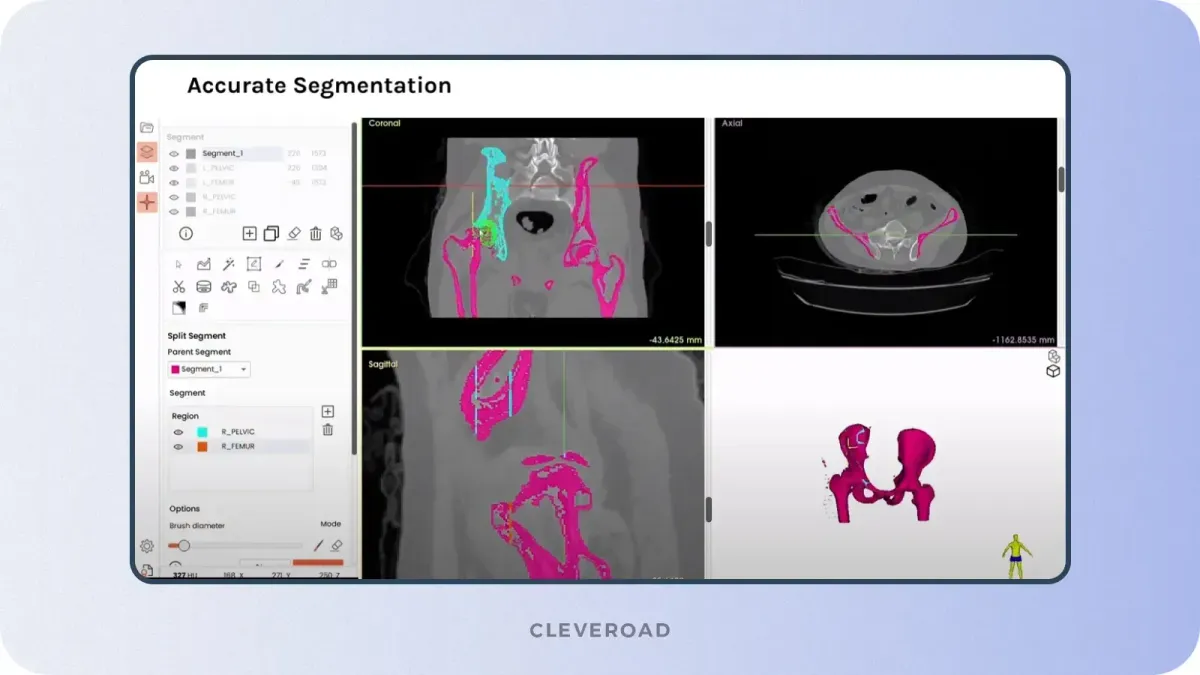
Image segmentation feature example
Reporting and EHR integration
Reporting and EHR integration connect imaging workflows with broader healthcare systems. Medical imaging software should allow clinicians to create structured reports, attach findings to patient records, and share results with authorized providers.
Integration with Electronic Health Records (EHRs) ensures imaging results become part of the patient’s complete medical history, helping physicians make decisions based on a broader clinical context.
Security and access control
Security and access control protect sensitive medical images and patient data throughout the imaging workflow. Healthcare imaging solutions should include role-based access control, encryption, audit logging, and support for regulatory requirements such as HIPAA.
These measures help organizations protect sensitive medical data while allowing authorized healthcare professionals to collaborate securely across diagnostic workflows.
Cleveroad’s computer vision development services help businesses build image-analysis solutions with AI-powered recognition
How Does AI Power Medical Imaging?
AI-powered medical imaging software helps healthcare providers detect abnormalities, prioritize urgent cases, automate image analysis, and extract more insights from complex medical data. Instead of reviewing every scan manually, clinicians can use AI algorithms. Imagine your radiology team receives dozens of urgent scans during a busy shift. AI-powered imaging software can help prioritize critical cases, highlight suspicious areas, and provide additional information before the physician makes a final assessment.
AI is applied across medical imaging workflows through several key capabilities:
- Detection and classification. AI models analyze medical images to identify potential abnormalities, such as lung nodules, tumors, fractures, or signs of neurological disorders.
- Image segmentation. AI automatically separates organs, tissues, or lesions from surrounding structures, helping physicians evaluate specific areas with greater precision.
- Clinical triage and prioritization. AI systems can rank cases based on detected risks, helping radiology teams review urgent findings faster.
- Quantitative analysis. AI algorithms measure features such as lesion size, volume changes, or disease progression to provide objective data for clinical decisions.
The adoption of AI in medical imaging continues to accelerate as healthcare organizations integrate computer vision into diagnostic workflows. According to the 2025 research in Nature Digital Medicine, radiology is the largest category among FDA-authorized AI-enabled medical devices, demonstrating strong adoption of AI technologies in image-based diagnostics.
For healthcare organizations developing medical imaging platforms, AI implementation requires more than adding an algorithm. Successful solutions combine high-quality imaging data, secure infrastructure, clinical workflow integration, and explainable AI capabilities that help physicians understand and validate system recommendations.
Our AI Strategy Advisor helps align AI-powered imaging capabilities with specific clinical use cases, technical requirements, and business goals
Medical Imaging Software Development Process
Let’s look at the basic steps in medical image analysis software development you must follow to achieve a successful solution.
1. Assess your healthcare organization’s needs
To ensure the success of your medical imaging software development product, you should start with a thorough assessment of your medical organization’s needs. Engage in meaningful discussions with your medical and administrative staff to understand their pain points and challenges they face while providing healthcare services.
Listening to your staff’s feedback and understanding their day-to-day workflow will help you determine the core objectives of the medical imaging system. Whether improving diagnostic accuracy, speeding up image acquisition, enhancing collaboration, or optimizing patient data management, having a clear set of goals will ensure that the final solution aligns with your strategic vision.
2. Find an experienced tech partner
The next critical step is to find an experienced healthcare software provider. When choosing a medical imaging software development company, pay attention to relevant expertise, proficiency in medical software development, experience delivering legislation-based solutions, a portfolio of healthcare and telehealth solutions, etc. You can find reliable software providers on the professional platform, such as Clutch. You can visit the company’s profile to get relevant info about services, project budget, and real clients’ feedback.
3. Define product requirements
Once you find a software provider, the development team conducts a detailed definition of your product’s requirements. Together with your vendor, you also decide whether you need a standalone medical imaging system or an integrated solution into your healthcare system. The team also defines functional and technical requirements, including the types of medical images, supported image formats, supported processing algorithms, and data security and privacy requirements. The entire planning process and requirements gathering are based on your organization’s workflow and primary business needs.
4. Develop a system based on the requirements
Based on defined requirements, developers start creating medical software. But the development approach will differ depending on whether you want to build an autonomous medical imaging software or integrate the solution into your existing healthcare management systems.
If you decide to develop a standalone solution, it’s recommended to start with an MVP to validate your product idea. An MVP (Minimum Viable Product) is the version of custom medical image analysis software that contains only the essential features required to ensure the app’s functionality and meet basic user needs. Such an approach allows you to quickly deliver software with minimal investment, ensure its viability, and gather feedback from your medical staff. Further, you can allocate funds to develop a fully fledged solution based on the results and user feedback.
If you need to integrate a medical imaging software module into your existing healthcare systems, the team can create a proof of concept (POC). This method allows for ensuring the new module is compatible and effectively integrates with key business management systems:
- Electronic Health Records/Electronic Medical Records (EHR/EMR)
- Hospital Information System (HIS)
- Radiology Information System (RIS)
- Picture Archiving and Communication System (PACS), etc.
For AI-powered medical imaging solutions, the development process also includes preparing and validating medical datasets before model training and deployment. Teams need to verify data quality, remove inconsistencies, and ensure that datasets represent relevant clinical scenarios to improve AI model reliability. AI-assisted development approaches can help engineers accelerate implementation, optimize workflows, and support the creation of AI-enabled image analysis features.
Regardless of the chosen approach, the main task of a medical imaging software development company will be to create a functional and user-friendly solution. Therefore, developers may use such tools as the medical imaging interaction toolkit and several healthcare APIs to ensure successful development and integration. Moreover, QA engineers perform several tests during and after development to ensure all features work correctly, including AI model performance validation, data accuracy checks, and verification of image analysis results against clinical requirements.
5. Implementation, support, and training
Once the medical imaging software is developed, the next step is to implement the solution into your clinic’s infrastructure. Your technical partner drives this step, ensuring the integration runs with minimal disruption to your workflow. They will work closely with your team to deploy the software efficiently and configure it to meet your specific requirements.
Even after implementation, you may need tech support due to the solution’s complexity. Your vendor will remain a reliable point of contact, providing ongoing technical assistance and support. You can contact your tech provider whenever you encounter issues or have questions about the software’s functionality. This ongoing support ensures that your custom medical image analysis software operates reliably, allowing you to focus on delivering high-quality patient care without disruptions.
6. Monitoring, performance evaluation
Once medical software is implemented, monitoring its performance and impact on the clinical processes is vital. Perform regular evaluations of the system’s results and effectiveness. If necessary, you can ask your IT partner to make improvements and adjustments based on feedback from your staff. So you can maximize the benefits of your medical imaging software.
If you need professional medical image analysis software development services, turn to us. We have been developing healthcare and telemedicine solutions since 2011 and can assist you in creating a medical imaging system for better diagnosis. Let us tell you more about our experience in the healthcare industry and what medical IT services we offer.
Challenges of Medical Imaging Software
Medical imaging software is demanding to build. Here are the challenges and how to handle them:
Security and compliance
Medical imaging software must protect sensitive healthcare data, as diagnostic images and patient information are considered Protected Health Information (PHI). Security requirements should shape the system architecture from the start, with measures such as encryption for data at rest and in transit, MFA, RBAC, and audit logs. Depending on the product scope and target market, healthcare organizations may also need to address requirements such as HIPAA, GDPR, FHIR interoperability standards, ISO 27001 security practices, and FDA requirements for clinical-grade solutions.
At Cleveroad, we have experience developing healthcare software with secure data handling and regulatory requirements in mind. One example is the DECODE.ME teledermatology platform we developed for Codex Labs.
Cleveroad stabilized the inherited platform, fixed backend issues, improved performance, and built infrastructure designed to support HIPAA-aligned data protection requirements. The team also configured PHI storage on Google Cloud Platform (GCP) FHIR to enable secure healthcare workflows.
As a result, Codex Labs received a stable, HIPAA-ready version of DECODE.ME within 5 months, making the platform ready for demonstration at the 2025 AAD Innovation Meeting and further evaluation by dermatology professionals.
Watch Barbara Paldus, Founder & CEO of Codex Labs, share her experience working with Cleveroad and how the team helped prepare DECODE.ME for further adoption.
Dr. Barbara Paldus, CEO at Codex Labs: Feedback on Cleveroad’s Telemedicine Development Services
Technical complexity
Medical imaging software processes large volumes of data with complex image-processing algorithms, which demand both performance and accuracy. This is hard to get right without domain expertise. That is why it pays to partner with a vendor experienced in medical imaging engineering, so the final solution stays reliable under real clinical load.
Lack of expertise
Medical software development requires high skills and specialized knowledge in the Healthcare domain. So choosing the right provider matters more here than on a typical build. You can create your own in-house team, expand the current one with the right expertise, or outsource product development to 3rd-party firms. But you may have difficulties finding software engineers in your area capable of developing such a complex medical solution.
This way, you can turn to an external medical imaging software development company to access tech talents from other regions. Moreover, you can choose the cooperation model that suits your needs.
- Outstaffing. This model allows you to optimize team costs by augmenting your internal team with the necessary specialists from other regions. For example, you may need a backend developer, a frontend developer, and 1 QA to work on medical imaging software. This cooperation model allows you to reduce the time and resources required to hire specialists and obtain the necessary expertise within a week.
- Outsourcing. By outsourcing medical image analysis software development services, you can get managed IT services from a 3rd-party company. Applying this model will give you a team of specialists fully responsible for the development process and product quality. There are daily and weekly check-up meetings where you review how the process is going. This model lowers costs in two ways: faster delivery and competitive regional rates. It also opens access to tech talent and technology worldwide.
Clinical staff resistance to new technology
Implementing a new digital solution can cause resistance among your clinic staff due to a lack of experience and fear of the unknown. Failure to use a new imaging app may result in missing out on benefits such as more accurate diagnoses and improved treatment planning. To overcome this issue, you should train your staff by explaining how the new software works and by providing guides and tutorials. Support and assistance from your software vendor during implementation will help ensure the successful integration of the medical imaging system into your business environment.
Explore how to build HIPAA-compliant software so you can use it without legal risks
How Much Does Medical Imaging Software Cost?
Medical imaging software development usually costs between $30,000 and $2,000,000+. The final budget depends mainly on the product scope, AI functionality, and compliance requirements.
A basic DICOM viewer focuses on image access and visualization, while clinical-grade platforms require advanced AI capabilities, hospital integrations, and regulatory preparation.
The biggest cost drivers are software complexity, healthcare integrations, AI functionality, security requirements, and compliance scope. Machine learning features require additional work on data preparation, model training, and validation. Learn more about these workflows in our machine learning in healthcare guide.
| Solution type | Typical scope | Estimated cost |
|---|---|---|
Basic DICOM viewer | Image viewing, DICOM compatibility, basic annotations | $30,000-$120,000 |
Custom imaging platform | PACS/RIS integration, AI-assisted analysis, reporting workflows | $120,000-$500,000 |
Clinical-grade solution | Regulatory preparation, hospital integrations, validated AI pipelines | $500,000-$2,000,000+ |
These ranges are approximate because medical imaging products differ in technical and regulatory requirements. Platform complexity, integrations, AI maturity, and compliance needs determine the final budget.
Cleveroad - Your Medical Imaging Software Development Company
Cleveroad is a healthcare software development company with 15+ years of experience building secure digital solutions for private practices, individual clinics, and multi-hospital systems. We develop healthcare platforms that support clinical workflows and integration with existing healthcare systems.
Our expertise includes medical imaging software, AI-powered image analysis solutions, healthcare integrations, and other digital health technologies. We help organizations create scalable solutions that support modern diagnostics and patient care.
By partnering with Cleveroad, you get:
- Healthcare software expertise aligned with standards such as HIPAA, GDPR, HL7, and FHIR
- Experience building secure systems for medical data processing and healthcare integrations
- AI implementation capabilities for image analysis and clinical workflows
- Full-cycle development, from discovery and architecture design to testing and support
- Development processes supported by ISO 9001 quality management and ISO 27001 information security certifications
To demonstrate our expertise in Healthcare software development, we would like to demonstrate one of our recent cases: Quality Management System.
Our client was a US-based medical device company that needed a centralized Quality Management System to manage quality processes, organize regulatory documentation, streamline workflows, and support compliance with FDA and ISO requirements.
Cleveroad developed a custom Quality Management System that unified quality-related workflows, documentation management, and compliance processes within a single platform. Our team designed and implemented a secure architecture, built functionality to manage quality procedures, and ensured the solution met industry-specific requirements for medical device software.
As a result, the client received a scalable Quality Management System that improved visibility into quality processes, streamlined documentation workflows, and supported compliance management for medical device operations.
If you are planning to build medical imaging software, Cleveroad can help you take it from architecture to a validated, compliant platform your clinical teams can rely on.
Build your medical imaging solution with healthcare experts
Partner with Cleveroad to develop secure medical imaging software with AI-assisted analysis, healthcare system integrations, and compliance-focused architecture tailored to your clinical workflows
Short answer: Medical imaging software is a platform that helps healthcare providers capture, store, visualize, and analyze medical images.
These solutions work with imaging technologies such as MRI, CT, ultrasound, and X-ray. Modern platforms usually include DICOM support, PACS integration, image viewers, and AI-assisted analysis capabilities to support clinical workflows.
A basic DICOM viewer with image viewing and annotation features may cost between $30,000 and $120,000. A custom imaging platform with PACS/RIS integration, AI-assisted analysis, and reporting features may require $120,000-$500,000. Clinical-grade products that meet FDA requirements, validated pipelines, and hospital-wide integrations can exceed $500,000.
The final budget depends on integrations, AI functionality, security requirements, compliance needs, and the complexity of clinical workflows.
Common AI applications in medical imaging include:
- Detection: identifying abnormalities such as tumors, fractures, or lung nodules.
- Segmentation: highlighting organs, tissues, or lesions for more precise analysis.
- Prioritization: ranking urgent cases so that specialists can review critical findings more quickly.
- Quantification: measuring changes such as lesion size, volume, or disease progression.
AI-powered tools support physicians by providing additional insights while keeping clinical decisions under specialist control.
Short answer: DICOM is a standard that allows medical imaging systems to store and exchange images and related patient information.
Medical imaging software needs DICOM support to connect with devices such as MRI, CT, and ultrasound scanners. It also enables integration with PACS platforms, consistent image formatting, and reliable data exchange between healthcare systems.
Medical imaging software requires secure architecture, documented quality processes, and compliance-focused development practices.
Key measures include:
- Encrypting medical data using AES-256 for storage and TLS for data transfer.
- Implementing access controls, MFA, and audit logs.
- Securing integrations with EHR, PACS, and RIS systems.
- Validating software performance and documenting development processes.
For AI-powered medical imaging solutions, FDA requirements depend on the intended clinical use, level of automation, and whether the system provides diagnostic recommendations or decision support.

Evgeniy Altynpara is a CTO and member of the Forbes Councils’ community of tech professionals. He is an expert in software development and technological entrepreneurship and has 10+years of experience in digital transformation consulting in Healthcare, FinTech, Supply Chain and Logistics
Give us your impressions about this article
Give us your impressions about this article