How to Migrate From .NET Framework to .NET Core: A Step-by-Step 2026 Guide
07 Jul 2026
15 Min
146 Views
Legacy .NET Framework applications rarely fail at once. They usually become harder to maintain over time: releases take longer, infrastructure choices stay limited, integrations require extra work, and developers spend more time maintaining outdated dependencies than building new features.
Since 2011, Cleveroad has delivered full-cycle web development and application modernization services, helping companies migrate legacy .NET systems to modern .NET architectures while keeping core business workflows stable throughout the transition. We've turned that experience into a practical guide: how to assess your legacy .NET app, pick a migration path, and decide when a phased migration beats a full rewrite.
Key takeaways:
- The migration from the .NET Framework to .NET Core starts with a code audit, a dependency review, an architecture assessment, and a compatibility check.
- Automated tools help detect blockers, while engineers handle architecture and integration risks.
- Migration runs in stages, from assessment to modernization, testing, and deployment.
- Cost depends mostly on system complexity, integrations, and testing scope.
- A phased migration helps reduce downtime and keep legacy modules stable while the app development team moves the system to modern .NET.
Why Migrate From .NET Framework to .NET Core?
The .NET Framework is now in maintenance mode, while the newer platform continues to receive new features and cloud-focused capabilities. As legacy systems age, each release becomes harder to support without extra refactoring. By migrating from .NET Framework to .NET Core, your company can reduce long-term support risk and optimize infrastructure costs while releasing application updates faster. You also get access to a modern runtime and better development tools that make future modernization easier.
End of feature development for .NET Framework
.NET Framework 4.8 is the last major version of the .NET Framework line. Microsoft still provides security and reliability updates, but new platform capabilities now appear only in modern .NET. To use the newer runtime, web, and deployment features, you have to upgrade or port the application.
Features unavailable on .NET Framework include:
- Improved runtime performance in modern .NET compared to .NET Framework
- Native Ahead-Of-Time (AOT) compilation
- Minimal APIs
- Ongoing ASP.NET Core enhancements
This shift is not only a vendor push. Recent academic work points the same way: a 2026 arXiv experience report describes a model-driven approach for migrating legacy .NET Framework and ASP.NET MVC UI components to a modern web stack while preserving functional behavior — a sign that porting off .NET Framework is becoming a mainstream engineering practice.
Think about how to migrate framework to core when legacy code slows releases, or shifts developer effort toward maintaining outdated components instead of building new features. Start with a dependency review of every NuGet package to identify unsupported or obsolete libraries before development begins.
Performance and hosting cost
Before migration, your application runs on a runtime with limited optimizations and higher server demand. This setup typically requires more infrastructure to handle the same workload, increasing hosting costs and reducing scalability.
After migration to .NET Core or modern .NET, you benefit from optimized runtime execution, faster request handling, and more efficient memory usage. You can process more traffic with fewer servers, lowering infrastructure costs and improving overall system performance and scalability.
The diagram below illustrates how moving to modern .NET improves application performance:
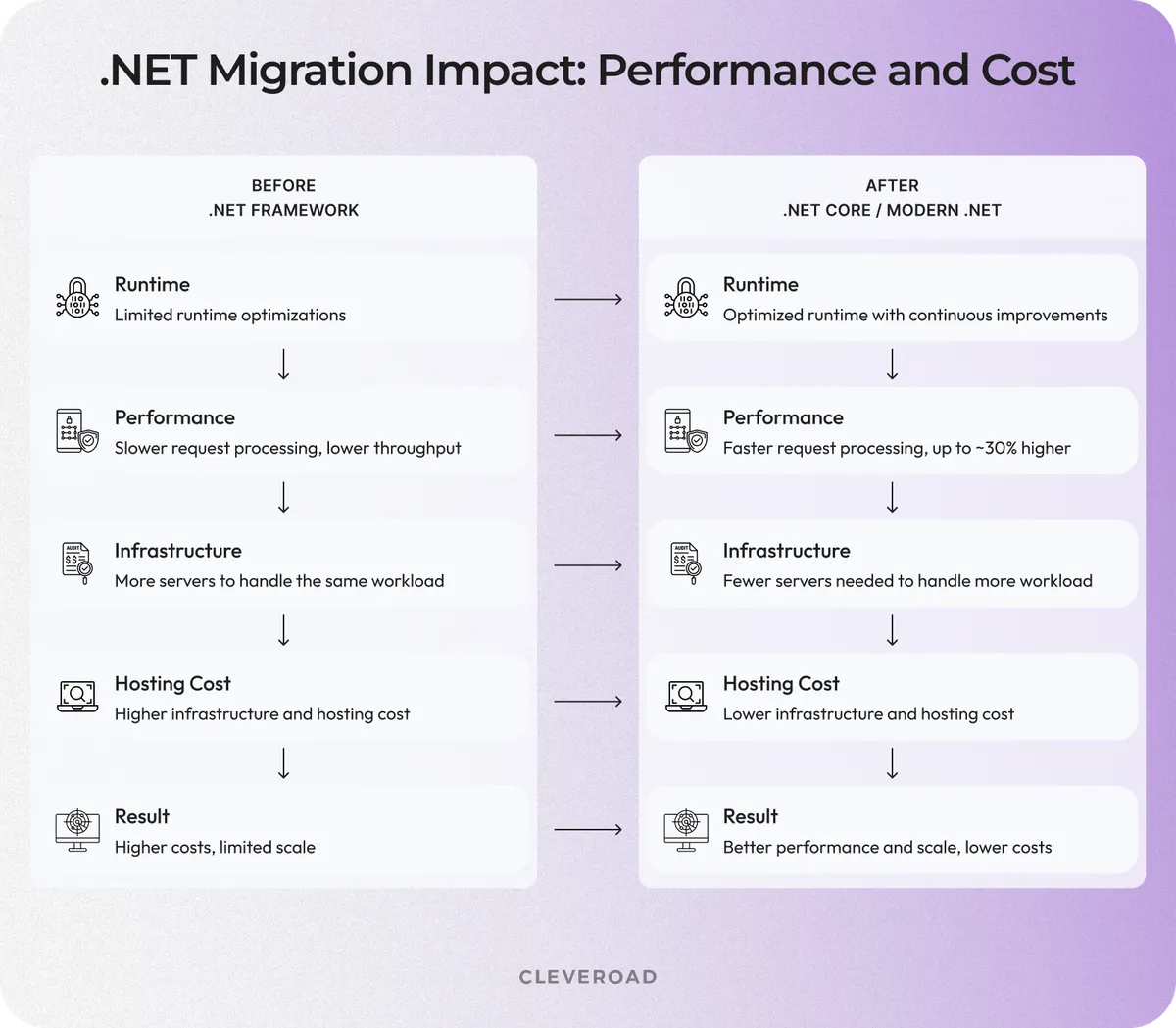
Before vs after migration: performance and hosting cost
Cross-platform, containers, and cloud-native deployment
Modern .NET lets you run the same application on Windows, Linux, and macOS, enabling container and cloud-native hosting. You can deploy the same build to Docker or Kubernetes, which also simplifies your CI/CD pipelines.
In most cases, you can use Visual Studio together with the .NET Upgrade Assistant to automate part of the migration before completing the remaining refactoring manually.
From our experience at Cleveroad, moving enterprise applications to Linux-based container environments often yields lower hosting costs and more predictable deployments, along with easier horizontal scaling across cloud platforms. This is a key part of a successful .NET Framework to .NET Core migration strategy when modernizing legacy enterprise systems.
Explore our legacy software modernization services to assess your application and modernize your .NET solution with minimal business disruption
.NET Framework vs .NET (Core): Key Differences That Affect Migration
The .NET Framework is primarily a Windows-focused and largely monolithic platform, while modern .NET is open-source, cross-platform, modular, and better suited for cloud-native and container-based architectures.
Before you migrate a .NET Framework app to Core, a migration tool can assess compatibility across framework versions and flag APIs that may block the move. Most of the real effort, though, lands on a few technical layers, especially in systems that mix several legacy patterns. A structured legacy system modernization approach helps identify these issues early and reduce the risk of refactoring. You'll often need to update API usage and define the correct target framework before the new project can compile successfully.
Platform differences also matter when applications depend on Windows-specific components such as Internet Information Services (IIS) behavior, Component Object Model (COM), or Windows Services. These dependencies require analysis before moving to modern environments.
Use the table below to see which technical differences usually create the most migration effort:
| Aspect | .NET Framework | .NET (Core / modern .NET) | Migration impact |
|---|---|---|---|
Platform | Windows-only | Windows, Linux, macOS | Enables Linux and container-based hosting |
Source model | Proprietary | Open-source | Indirect impact on tooling and ecosystem |
Architecture | Monolithic | Modular, lightweight | Better fit for microservices and cloud deployments |
Config | web.config / app.config | appsettings.json | Code and configuration refactoring required |
Startup | Global.asax | Program.cs middleware pipeline | Request pipeline redesign required |
DI | Third-party containers or manual patterns | Built-in dependency injection | Refactoring required |
Support | 4.8 is the last major line, security updates only | Active Long-Term Support (LTS) releases | Primary driver for migration |
Which Technologies Won’t Migrate to .NET Core?
Some technologies in .NET Framework do not have direct equivalents in modern .NET, which affects the overall migration process. The most common blockers include ASP.NET WebForms, WCF server-side components, Windows Workflow Foundation, and COM+ / Enterprise Services. In many cases, these components cannot be moved directly and require redesign or replacement as part of a broader modernization effort. Microsoft documents these limitations in its official .NET porting guidance, which is commonly used during early migration planning to assess application compatibility.
This table shows the key technologies that typically increase migration effort and explains how they are replaced in modern .NET.
| Not supported | Modern alternative |
|---|---|
ASP.NET WebForms | ASP.NET Core MVC / Blazor |
WCF server | gRPC or REST APIs |
Windows Workflow Foundation | Elsa Workflows / custom services |
COM+ / Enterprise Services | Messaging systems / cloud-native services |
After reviewing this comparison, it becomes easier to evaluate whether migration from .NET Framework to .NET Core is feasible or whether a partial redesign is required. In many real-world systems, dependencies must be validated against the existing codebase and framework versions before migration decisions are made.
Most challenges appear when legacy systems rely on tightly coupled architecture or outdated patterns deeply embedded in core business logic. In such cases, engineering teams typically map dependencies, review existing modules, and plan incremental modernization. Selecting the correct target framework early helps reduce migration risk and ensures predictable deployment across environments.
At this point, you should involve an experienced vendor to validate architectural decisions and define a safe execution plan before starting the step-by-step migration process.
How to Migrate From .NET Framework to .NET Core Step by Step
Migrating from .NET Framework to modern .NET usually requires a structured approach and an experienced migration partner. The tech partner helps you assess your system and define the upgrade path, guiding the process from planning to deployment.
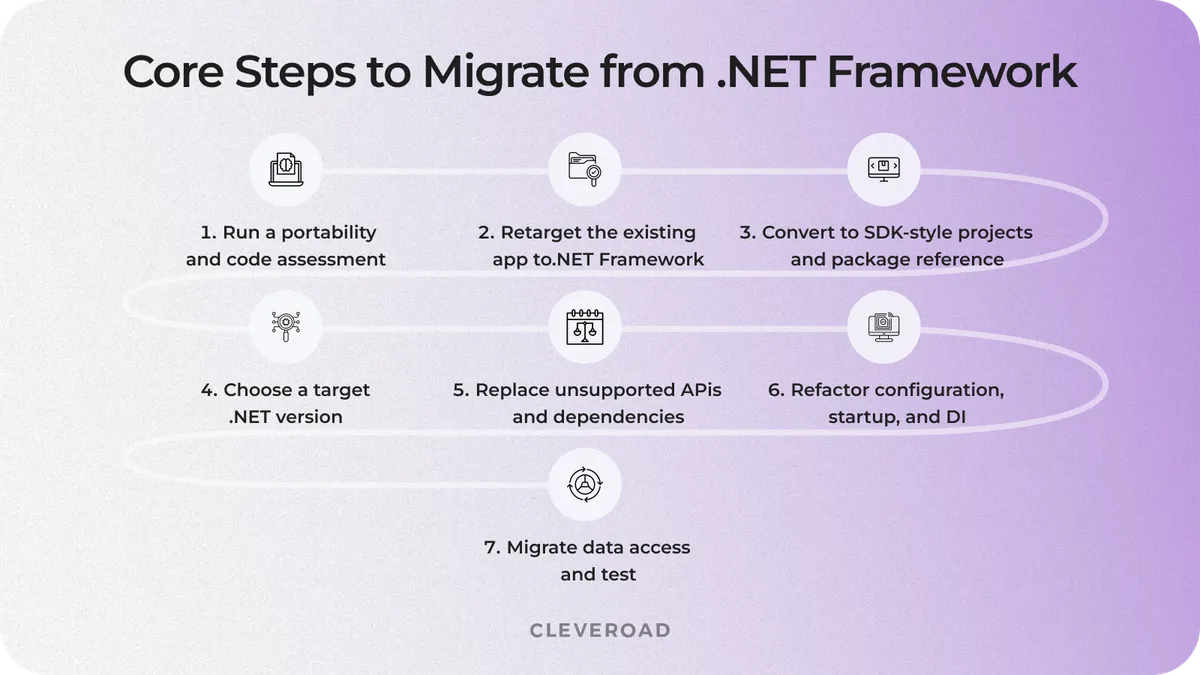
7 migration steps from assessment to testing and deployment
Step 1. Run a portability and code assessment
Run the .NET Portability Analyzer and a full code audit before you touch the code. This step identifies which APIs, libraries, and Windows-only dependencies can block migration, defining the project's real scope.
At this stage, you and your vendor also evaluate how the existing code aligns with the latest SDK version and identify gaps in the API surface that may affect the migration. Together, you review the full codebase in GitHub repositories and map it against a reference core application structure to determine what must be refactored. Your vendor also helps you validate compatibility rules using Microsoft Learn documentation before you start to migrate .NET Framework to .NET Core.
Need to assess migration risks? Explore Cleveroad’s code audit services to review your .NET application and plan a safe migration path
Step 2. Retarget the existing app to .NET Framework 4.7.2+
Move the source project to .NET Framework 4.7.2 or later before starting the main migration. This step improves .NET Standard compatibility and expands supported NuGet options, helping expose framework-level compatibility issues before you port the application to modern .NET.
Use this stage to validate the upgrade approach, then align on the target framework strategy, and confirm the migration path before deeper refactoring begins.
Step 3. Convert to SDK-style projects and package reference
Convert packages.config to PackageReference and move the .csproj file to the SDK-style format. This structure makes dependencies easier to manage, simplifying build configuration and preparing the application for modern .NET tooling.
Visual Studio can automate part of the conversion. Still, review build settings, custom targets, and legacy references before the project structure changes, since these are where conversion tends to break the build.
Step 4. Choose a target version
Choose .NET 8 LTS as the target version to create a stable long-term migration baseline up to the end of 2026. This version gives enterprise systems a predictable support window and a modern runtime foundation for future upgrades.
Before development starts, check whether .NET 8 fits your architecture, dependencies, infrastructure, security policies, and deployment plans. This stage is also the right time to work with your migration vendor to validate the target framework and confirm long-term compatibility across the solution.
Step 5. Replace unsupported APIs and dependencies
Replace unsupported dependencies and framework-specific code with modern alternatives. This includes incompatible NuGet packages, Windows-only APIs, and System.Web-based code. The .NET Upgrade Assistant can detect and update some issues, but engineers still need to review unsupported dependencies manually and refactor the parts that affect business logic.
When you migrate .NET Framework to .NET Core, this step becomes critical because dependency conflicts often determine the real scope of the migration before any code changes begin.
At Cleveroad, we often isolate external integrations behind small HttpClient-based services to keep the app business logic cleaner and make integrations easier to test.
Hire Cleveroad’s .NET developers to keep your migration moving safely without disrupting business-critical logic
Step 6. Refactor configuration, startup, and DI
Move web.config settings to appsettings.json and replace Global.asax startup logic with the Program.cs middleware pipeline. It gives the application a clearer startup flow and aligns configuration with modern .NET tooling.
Next, adopt the built-in dependency injection container for application services, external clients, and configuration. Built-in DI makes dependencies more predictable and simplifies maintenance.
Step 7. Migrate data access and test
The data layer and automated tests typically expose the most migration issues. Migrate the data access layer to EF Core for a modern approach, or keep EF 6.x as an interim solution when rewriting the database logic is too risky to do at once.
Once the data layer is stable, run unit and integration tests using xUnit or NUnit. At this stage, add regression coverage for the workflows you can't afford to break, like payments, authentication, and third-party integrations, before moving to production.
Incremental vs Big-Bang: Choosing a .NET Migration Strategy
Small applications can often move to modern .NET in one pass. For large web systems, you usually get a safer path when your engineering team migrates endpoint by endpoint behind a reverse proxy. This approach follows the Strangler Fig pattern: the legacy .NET Framework app continues to run while selected routes, modules, or services migrate to a new .NET app.
YARP, Microsoft’s reverse proxy toolkit, can route traffic between the old and new applications. Stable legacy modules stay in the .NET Framework app, while migrated endpoints go to the new ASP.NET Core app. This setup helps you migrate framework to core without waiting for a full rewrite before the business sees value.
Look through the table below to choose a migration strategy based on your system risk and rollback needs:
| Criteria | Incremental migration | Big-bang migration |
|---|---|---|
Best fit | Large systems with active users and many integrations | Smaller apps with clean architecture |
Migration flow | Move endpoints, modules, or services step by step | Move the full codebase at once |
Downtime risk | Lower, because legacy modules keep running | Higher, because release happens in one cutover |
Rollback | Easier to roll back selected routes | Harder to roll back without full release reversal |
Time to value | Faster, because migrated parts can go live earlier | Later, because value appears after full migration |
Main tool | YARP or another reverse proxy | Standard release pipeline |
Cleveroad recommendation | Best for business-critical systems | Best for low-risk apps |
A big-bang migration works better when your system has:
- Smaller code base
- Limited integrations
- Clean architecture
- Low production risk
In this case, your development team updates the entire code base and adjusts the project format, validating the system, and releasing the migrated version all at once. This path can be faster, but it leaves less room for a gradual rollback if production issues arise.
An incremental migration suits enterprise systems with many moving parts, such as user roles, payment flows, and third-party integrations. Your vendor team can start with low-risk endpoints, prove the migration approach, and then move to higher-risk logic once the architecture and test strategy are stable.
At Cleveroad, we usually recommend incremental migration when your system supports daily operations or has many external dependencies. It helps you move an old project to the core step by step, use the latest .NET runtime where it delivers value first, and keep the application available during modernization. You can also read our guide on modernizing legacy systems with automation.
Common .NET Migration Challenges and How to Solve Them
Most .NET migration delays come from legacy dependencies. You can migrate code faster when you know which libraries, APIs, database logic, and pipelines need refactoring before development starts.
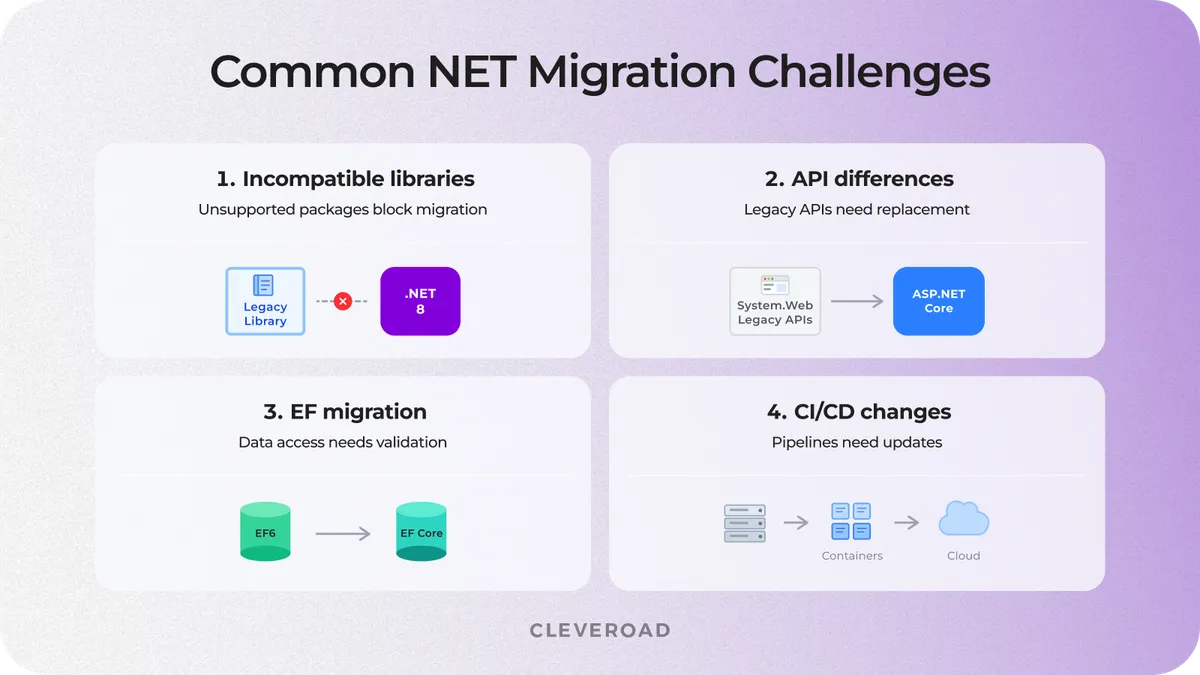
Common .NET migration challenges
Incompatible third-party libraries
Start with a “what cannot move?” audit. Review third-party packages, internal libraries, and vendor SDKs to identify which components support modern .NET and which ones block migration. The fix usually follows one of three paths:
- Update the dependency
- Replace it with a supported alternative
- Wrap the legacy component behind an adapter until the team can remove it safely.
At Cleveroad, we handled a similar architecture challenge while modernizing a legacy Quality Management System for Prime Path Medtech. Instead of extending an outdated platform, our engineering team redesigned the solution with a modular architecture, automated core workflows, and reduced the customer’s operating costs by 20% while improving system flexibility and maintainability.
This is what Breanne Butler, the Client Liaison Officer at Prime Path Medtech, tells about our cooperation on the project:
Breanne Butler, Client Liaison Officer at Prime Path Medtech™
API and base class library differences
The most frequent API issues appear around System.Web, reflection, configuration, serialization, and type handling. These parts often sit deep inside business logic, so a direct replacement can break workflows that look stable on the surface.
A safer approach is to introduce abstraction layers before large-scale refactoring. These layers help isolate legacy APIs and replace System.Web-dependent logic with ASP.NET Core-compatible patterns, testing each change without rewriting the full application at once.
Entity Framework migration
EF6 can run on modern .NET, so Entity Framework does not always block go-live. You can keep EF 6.x as an interim solution when database logic is complex, and the release timeline does not allow a full data layer rewrite.
At this stage, AI-assisted legacy code modernization can also help review repetitive data access patterns and highlight areas that need manual refactoring before the move to EF Core.
A full EF Core migration makes sense when you need better performance, cross-platform support, and long-term maintainability. A rewrite becomes necessary when the current data layer depends on outdated providers or tightly coupled database access patterns.
Deployment and CI/CD changes
Migration also changes how the team builds, packages, and deploys the application. The DevOps team may need to containerize the app, update pipelines for the dotnet CLI and SDK, and adapt deployment scripts for modern hosting environments.
On-prem build servers often slow this step down because they rely on older agents or legacy release scripts. At Cleveroad, our DevOps engineers help set up CI/CD pipelines, containerized deployments, environment variables, and rollback flows so the migrated .NET application can move to production with lower release risk.
What Does It Cost to Migrate From .NET Framework to .NET Core?
Migration from .NET Framework to modern .NET can start at the lower end of the $100,000 range for small projects and exceed $1,000,000 for enterprise systems with large codebases. The final budget depends most on codebase size, unsupported dependencies, and how much data-layer and CI/CD work the move requires.
| Scope | What’s involved | Indicative range | Timeline |
|---|---|---|---|
Small / lift-and-shift | Minor fixes, few dependencies | $100,000-$200,000+ | ~3 months |
Mid-scope | Partial modernization, DB/data layer work | $200,000-$500,000+ | 4-6 months |
Large enterprise, 200K+ Lines of Code (LOC) | Microservices, heavy refactor, full QA | $500,000-$1,000,000+ | 6-9 months |
These figures should be treated as order-of-magnitude estimates, not fixed pricing. Based on Cleveroad’s project estimation approach, .NET Framework migration usually starts from $100,000 for smaller applications and can exceed $500,000 for complex enterprise systems with legacy dependencies, data layer refactoring, and deployment changes. Final numbers should be confirmed by a Chief Technology Officer (CTO) or Solution Architect after codebase assessment.
The budget climbs when the codebase carries hard blockers, like WebForms, WCF server components, or complex EF logic, on top of weak test coverage. These elements require manual review because automated tools cannot fully predict how legacy logic will behave after modernization.
The largest cost drivers usually include:
- Dependency and API replacement: $15,000 to $70,000+
- Data layer and EF migration: $25,000 to $150,000+
- CI/CD and deployment setup: $10,000 to $60,000+
- Regression testing and QA: $20,000 to $200,000+
If you need to convert the project to the SDK-style structure, engineers also review build configuration, package references, and target framework settings. This step helps the migrated application compile safely before deeper refactoring starts.
Upgrading directly from older .NET Framework versions to the latest modern .NET version usually requires more refactoring than upgrading from .NET 5 or later. The advantage of the latest .NET release is long-term maintainability, better runtime performance, improved security support, and a more cloud-ready deployment model.
Migration payback becomes clearer when current licensing, Windows hosting, support, or infrastructure overhead exceeds about $50,000 per year. In that case, modernization can reduce recurring costs while making releases faster and easier to support. You can also compare vendor pricing by region in our guide on IT consulting rates.
Why Choose Cleveroad for Your .NET Migration
Cleveroad is a custom software development and legacy modernization company based in Central and Northern Europe. Since 2011, our team has been helping businesses update outdated systems, reduce technical debt, and move applications to modern architectures. For .NET migration projects, we combine code audit, backend engineering, QA, and DevOps support on one team.
Working with Cleveroad, you get:
- Legacy modernization expertise: Our team helps assess outdated systems, replace unsupported components, refactor business logic, and reduce long-term maintenance risks.
- Dedicated .NET teams: We provide .NET migration experts to support migration flows.
- Code audit before migration: We review dependencies, data access logic, and security gaps before development starts.
- DevOps for cross-platform deployment: Our DevOps engineers help set up CI/CD pipelines and containerized deployment for smoother releases.
- ISO-certified delivery processes: Cleveroad follows ISO 9001 and ISO 27001 standards to ensure quality management and information security during software modernization.
You can choose the engagement model that best fits your migration goals. We offer:
- IT staff augmentation to strengthen your in-house team,
- A dedicated team to take ownership of the migration,
- A project-based cooperation for end-to-end modernization with defined scope and deliverables,
- An AI-assisted team that combines experienced engineers with AI-powered workflows to accelerate delivery and improve development efficiency.
Modernize your .NET app with us
Upgrade your legacy .NET application with a team experienced in architecture refactoring and production deployment. We help you migrate to modern .NET with minimal disruption to your business
.NET Framework is a Windows-only platform, while .NET Core, now unified into modern .NET, supports Windows, Linux, and macOS. A typical .NET Framework project uses legacy project structure and Windows-specific APIs, whereas modern .NET uses the SDK-style format and cross-platform tooling.
Modern .NET also supports .NET Standard for sharing libraries across different implementations, although new projects usually target the latest .NET releases directly. If your solution still uses a .NET Standard library, you should review whether it remains necessary before migration.
The current .NET ecosystem also provides better performance, long-term support, container compatibility, and cloud-native development features.
A successful .NET Core migration starts with a portability assessment and dependency review before any code changes begin. The first step is usually running the .NET Portability Analyzer to identify unsupported APIs and Windows-specific components.
After the assessment, you update the project structure, replace unsupported dependencies, and convert the application into a .NET Core project. During this stage, engineers typically install the required .NET SDK and choose the appropriate target runtime, such as .NET 8 or a newer Long-Term Support release.
If your application still targets .NET 5, upgrading directly to the latest supported version is usually recommended to maximize long-term support and security.
Moving .NET Framework to Core helps reduce maintenance costs and improve performance, simplifying cloud deployment. Modern .NET also provides a more consistent .NET API surface, making future upgrades easier.
Many organizations migrate .NET Framework applications to improve scalability and remove Windows-only limitations. After migration, .NET applications typically require fewer infrastructure resources while remaining easier to maintain over time.
If you are unsure which migration path fits your system, Microsoft Q&A and official documentation can help clarify framework compatibility, although a technical assessment is still recommended for complex enterprise applications.
Most migration challenges come from legacy architecture rather than the framework replacement itself. You also need to check whether moving from .NET 5 or an older runtime to the latest version affects support, dependencies, and deployment.
The most common issues include:
- Unsupported third-party libraries and Windows-specific APIs in the .NET API
- Legacy authentication, WebForms, WCF, or outdated deployment pipelines
- Compatibility gaps when moving shared libraries from .NET Standard 2.0
- Data access changes that require additional testing instead of immediate refactor
- Existing build configuration that must work with the .NET SDK and SDK-style project structure
A structured assessment also helps you review the project file and understand what needs to change before moving a project into the core project structure.

Evgeniy Altynpara is a CTO and member of the Forbes Councils’ community of tech professionals. He is an expert in software development and technological entrepreneurship and has 10+years of experience in digital transformation consulting in Healthcare, FinTech, Supply Chain and Logistics
Give us your impressions about this article
Give us your impressions about this article