Stripe vs PayPal vs Braintree: Which Payment Gateway Fits Your App
Updated 13 Nov 2026
13 Min
6413 Views
Stripe, PayPal, and Braintree accept the same cards, so they may look interchangeable at first glance. The real differences lie in fees and in how smooth checkout feels in a mobile app. Your choice also decides what you can build on top: subscriptions, seller payouts, cross-border sales, or local payment methods. A wrong pick is expensive to fix, because switching providers after launch means migrating saved cards and rewriting your payment flow.
For 15+ years, we at Cleveroad have been building web and mobile products, and our team has integrated all three providers into marketplaces, FinTech products, subscription apps, and on-demand services. In this guide, we compare their rates and capabilities and show which one fits your business model. We also walk you through how the integration works.
Key takeaways:
- Stripe is the most versatile choice for apps that need subscriptions and seller payouts, plus a single SDK that handles both cards and digital wallets.
- PayPal is worth adding when your buyers expect a PayPal or Venmo button at checkout, but as your only payment provider, it costs the most of the three.
- Braintree, now PayPal Enterprise Payments, unifies card, PayPal, and Venmo payments, making it ideal for larger businesses.
- Many apps use Stripe to accept cards and wallets and add PayPal as a second checkout button.
- Integrating one payment provider into an app through its SDK takes about 40 hours of development and 20+ hours of testing.
Stripe vs PayPal vs Braintree at a Glance
Stripe is a payments platform with APIs for cards, digital wallets, subscriptions, and payouts. PayPal is a digital wallet with its own checkout button that many buyers already know and use. Braintree is PayPal’s payment gateway for businesses, accepting cards, PayPal, and Venmo through one integration.
In 2025–2026, PayPal renamed Braintree to PayPal Enterprise Payments. The APIs and Software Development Kits (SDKs) stayed the same, and the developer documentation did too, so this guide uses the familiar Braintree name.
The table below gives a quick summary of each provider by best use case: in-app checkout, subscriptions, and marketplace payouts.
| Provider | Best for | In-app checkout | Subscriptions | Marketplace payouts |
|---|---|---|---|---|
Stripe | Apps that need cards, wallets, subscriptions, and seller payouts in one stack | Native iOS and Android SDKs with a prebuilt payment sheet | Stripe Billing, any billing interval | Stripe Connect |
PayPal | Apps whose buyers expect a PayPal, Venmo, or Pay Later button | PayPal Mobile SDK for PayPal, Pay Later, and cards | PayPal Subscriptions API | PayPal Complete Payments Platform |
Braintree | Businesses that want cards, PayPal, and Venmo in one integration | iOS and Android SDKs with custom card fields | Built-in recurring billing, cycles set in months | Braintree Marketplace, US merchants only, through sales |
Stripe vs PayPal vs Braintree: Detailed Comparison
A payment gateway takes the buyer’s card or wallet details and sends them to the bank for approval, then settles the money to your account. Below, we compare the three gateways across six criteria that shape your app’s costs and architecture. All rates apply to US accounts as of October 2026.
Fees
On domestic card payments in the US, the three providers charge similar rates. The gap widens for international cards and disputes. It’s widest on payments made through the PayPal button: at 3.49% + $0.49 each, they carry the highest rate in this comparison.
The fixed part of the fee matters most on small orders. On a $10 purchase, the difference between PayPal’s $0.49 and Stripe’s $0.30 adds almost 2 percentage points to your processing cost, which adds up fast in apps with frequent low-value payments.
Once your volume reaches several hundred thousand dollars a month, all three providers are open to negotiating custom pricing. That’s why public rates matter most at launch, while you’re still paying standard pricing. The table below compares standard US rates for domestic cards, international cards, chargebacks, and Automated Clearing House (ACH) Direct Debit, the US bank-to-bank debit network.
| Provider | Domestic card rate | International cards surcharge (%) | Chargeback fee ($) | ACH Direct Debit |
|---|---|---|---|---|
Stripe | 2.9% + $0.30 | +1.5, plus 1 if currency conversion is needed | $15, plus $15 if you counter the dispute (refunded if you win) | 0.8%, capped at $5 |
PayPal | 2.99% + $0.49 for standard card payments; 2.89% + $0.29 for advanced card processing; 3.49% + $0.49 for PayPal Checkout | +1.5 | $20 for card chargebacks; $15 for disputes on PayPal Checkout | 0.8%, capped at $5 |
Braintree | 2.89% + $0.29 | +1 for cards issued outside the US, plus 1 for non-USD presentment | $15 | 0.75%, capped at $5 |
US rates as of October 2026 from the official pricing pages of Stripe, PayPal, and Braintree. Rates differ by country and change over time.
Payment methods and checkout
All three providers accept major cards, Apple Pay, and Google Pay, while PayPal and Venmo buttons are available only through PayPal and Braintree. Stripe covers more local payment methods: its pricing page lists 100+ payment methods and 135+ currencies, which helps if you sell in regions where cards aren’t the default way to pay.
If you sell to buyers in Europe, make sure the provider runs 3-D Secure, the bank verification step for online card payments. Strong Customer Authentication rules under PSD2, the EU’s payment services directive, require it for most of these payments. All three providers handle 3-D Secure on their side, so your app only needs to show the bank’s confirmation screen.
Mobile SDKs
Stripe offers native iOS and Android SDKs with a prebuilt payment sheet that already includes digital wallets and 3-D Secure. Your developers configure the sheet instead of designing the card form from scratch, which shortens both development and testing.
The PayPal Mobile SDK accepts card payments and PayPal wallet payments, including Pay Later, natively inside the app. Braintree is moving mobile integrations to custom card fields built with its SDK, because it deprecated the prebuilt Drop-in UI in October 2026.
Subscriptions
Stripe Billing costs 0.7% of subscription volume and supports any billing interval, free trials, usage-based pricing, and prorated plan changes. PayPal offers its own Subscriptions API for recurring payments made from a PayPal account.
Braintree recurring billing, by contrast, sets billing cycles in whole months. Monthly and yearly plans, along with any other cycle counted in months, work out of the box, while weekly or usage-based pricing needs custom logic on your server.
Marketplace and platform payments
If your app moves money to sellers or contractors, you need a module that onboards them and splits each payment. Stripe Connect covers seller onboarding with Know Your Customer (KYC) checks and splits every payment into your fee and the seller’s payout. If your platform sets its own pricing for sellers, Connect starts at 0.25%. PayPal’s equivalent is PayPal Complete Payments Platform, while Braintree Marketplace is available only to US companies through the sales team.
In the MoveUp peer-to-peer (P2P) ride-sharing app, Cleveroad built the payment logic on Stripe. Riders pay drivers directly in the app, and the platform charges a fee when a ride is canceled. That’s why, for an app that transfers money between users, the payout module matters more than the card rate. Payouts define your onboarding flow and your compliance workload, while a 0.1% difference in card fees rarely changes the economics.
Moving money between users is a product of its own. Here’s how to build a P2P payment app
Fraud protection and disputes
Stripe includes Radar Lite in its standard pricing, while full Radar costs $0.05 per transaction. Braintree charges $0.05 per Fraud Protection Lite inquiry.
Disputes cost more on PayPal: $20 per card chargeback and $15 per dispute on a PayPal Checkout payment. If you sell goods with a high return or dispute rate, build these fees into your unit economics from the start.
Data security works the same way across the three providers: each stores card data on its side, which shrinks the part of PCI DSS your team has to cover. Our guide explains how to become PCI compliant with that smaller scope.
How to Choose Between Stripe, PayPal, and Braintree
Your choice of payment gateway depends on your buyers: where they live, how they prefer to pay, how often they buy, and how much they spend per order. It also depends on whether your app pays other users. Below are the scenarios where each provider fits best.
The decision tree below sums up the choice in three questions.
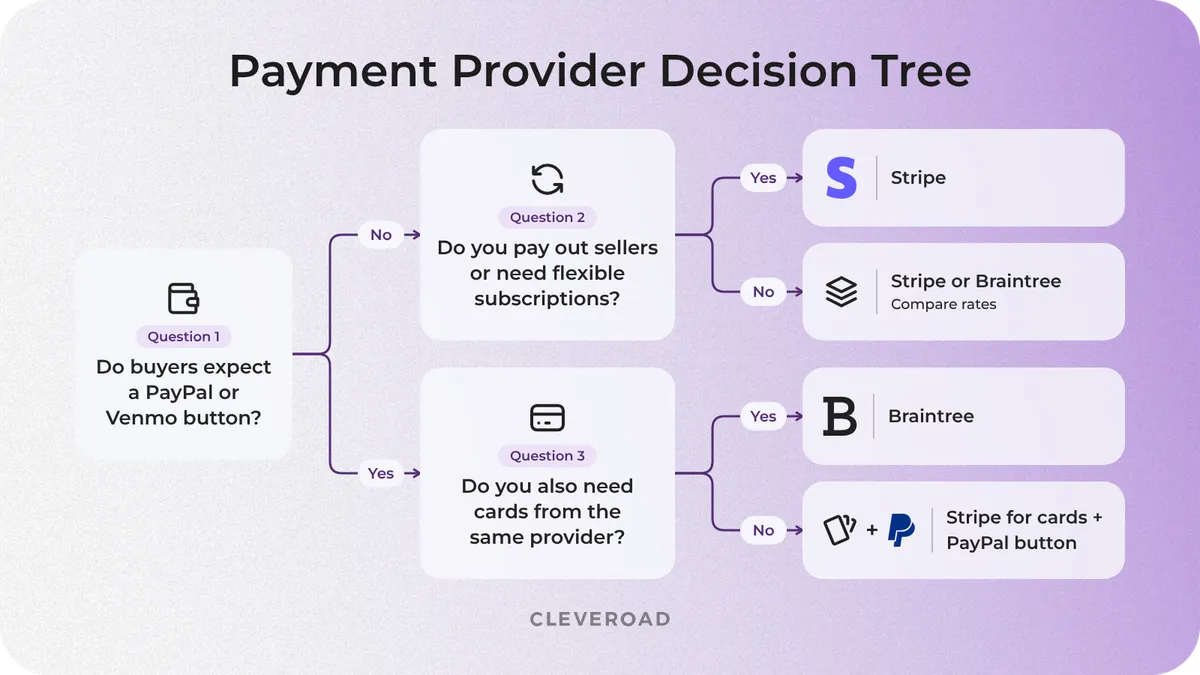
How to choose between Stripe, PayPal, and Braintree
Choose Stripe if…
Stripe suits apps with subscriptions, international payments, seller payouts, or local payment methods. Its SDK also supports cards and major mobile wallets through one integration.
In our experience, Stripe’s documentation and test tools let developers get started quickly, so integrations usually need fewer clarification rounds with the provider’s support.
Choose PayPal if…
PayPal makes sense when your audience is used to paying through PayPal or Venmo, for example on second-hand marketplaces and in sales between private individuals. Many of these buyers would rather pay from an account they already trust than type card details into a new app, and a familiar wallet button gives them that option.
As your only provider, PayPal costs the most of the three, so most products add it as an extra checkout button next to card payments.
Choose Braintree if…
Braintree suits high-volume businesses that need cards, PayPal, and Venmo in one integration with custom rates. Smaller businesses can use Stripe and PayPal instead. New Braintree integrations should include custom card fields from the start.
Use Stripe and PayPal together
That extra button is the most common setup in practice: Stripe handles cards, Apple Pay, and Google Pay, while the PayPal button serves buyers who prefer to pay from their PayPal or Venmo balance. The downside is two dashboards and two streams of webhooks (the server-to-server notifications a provider sends about each payment event), which your backend has to merge into one order history.
Cleveroad integrated both PayPal and Stripe, for OpenStudios, a Spanish B2B marketplace that connects designers with manufacturers.
How Cleveroad Can Help You Integrate Stripe, PayPal, or Braintree
No matter which provider you choose, the payment flow follows the same pattern. Your server creates a payment, and the app shows the payment form. After the buyer pays, the server confirms the result through a webhook.
Cleveroad handles the integration from provider selection to post-launch support, and you get a concrete result at each stage.
Provider choice on discovery
During discovery, our business analyst and solution architect choose a provider based on your target markets, sales model, and whether your app pays out to users. Sometimes the answer is a combination of Stripe and PayPal. As a result, you get a payment flow diagram for the chosen provider and an estimate of the work.
Payment architecture
We design the flow so card data stays with the provider and never touches your servers. This way, PCI DSS validation usually comes down to SAQ A, the shortest Self-Assessment Questionnaire. We also make webhooks the single source of truth for payment status. We plan refund logic in the same step, so a refund updates the order through the same webhook flow as a payment.
Denis Chunikhin
Solution Architect at Cleveroad
"We treat the provider’s webhook as the only proof that a payment went through. A phone can lose connection right after the bank confirms the charge, so an order that relies on the app’s callback can end up paid but shown as unpaid. Updating order status from webhooks closes that gap."

Integration on iOS, Android, and web
Our team builds the payment screen and adds Apple Pay and Google Pay along with 3-D Secure support. The way the app connects to the provider depends on the gateway:
- Stripe: the server creates a PaymentIntent, and the app shows the SDK’s prebuilt payment sheet; for a marketplace, we add seller onboarding through Connect.
- PayPal: the server creates an order through the Orders API, the app launches checkout with the PayPal Mobile SDK, and after the buyer approves, the server captures the payment.
- Braintree: the server issues a client token, and the app collects card details using the SDK’s custom fields, replacing the deprecated Drop-in UI.
One team builds both the server and the apps, so order statuses match across all platforms.
Need the full step-by-step process for iOS and Android? Read How to integrate payment gateway into an app
Payment testing
We test every scenario in the provider’s sandbox: successful and declined payments, 3-D Secure checks, refunds, disputes, and repeated webhook deliveries.
A payment bug costs more than an ordinary one, since it means lost revenue or double charges, so we cover these scenarios with automated tests. Our guide on testing Stripe-based payment logic shows how this works in practice.
Support after launch
After release, we monitor payments and update SDKs when a provider retires older versions, as happened with Braintree Drop-in. If you already run your own payment infrastructure, Cleveroad can strengthen your in-house team through IT staff augmentation.
Mangopay, a European FinTech company that provides payment infrastructure for marketplaces and platforms, is one of the teams we support this way. When Mangopay needed more engineering capacity for its payment products, Cleveroad quickly provided qualified software engineers who joined the company’s in-house team.
Here’s what Kirk Donohoe, CPO at Mangopay, says about our cooperation:
Kirk Donohoe, CPO at Mangopay: Feedback on Cleveroad’s FinTech Staff Augmentation
Integration time and cost
Integrating one provider through its SDK into an iOS and Android app takes about 40 hours of development and 20+ hours of testing. At a $50 hourly rate, those 60 hours come to about $3,000. Keeping the integration healthy takes 5–10 hours a month for SDK updates, provider API changes, webhook monitoring, and reviews of disputed payments.
Adding a second provider, seller payouts, a web checkout, or custom subscription logic increases the scope, and the discovery phase gives you an exact estimate. To fit a larger scope into the same budget, you can also work with an AI-assisted development team.
Cleveroad’s payment gateway software development services cover architecture, integration, testing, and support
Cleveroad’s Experience With Stripe, PayPal, and Braintree
With 15+ years of web and mobile development experience, we treat payment integration as a standard part of our mobile application development service, whether the product is a marketplace or a subscription app.
We work under ISO 9001 and ISO/IEC 27001:2022 certified processes, which matters whenever your app handles payment data. Here’s what our payment experience covers:
- Stripe, PayPal, and Braintree integrations for mobile and web apps
- Marketplaces and P2P payment flows, from in-app payments between riders and drivers to cancellation fees and order refunds
- Subscriptions and 3-D Secure checkout for buyers in Europe
- Apple Pay and Google Pay in native and cross-platform Flutter apps
- Payment architecture that keeps card data with the provider and your PCI DSS scope minimal
- Automated testing of payment logic, from declined cards to repeated webhook deliveries
- Post-launch support: payment monitoring and SDK updates when providers retire old versions
For El Tab, a drinks subscription service for bars and pubs in London, Cleveroad built a cross-platform Flutter app with Stripe integration and added payment options.
Another example of our Stripe work is a marketplace platform for B2C customers with a payment engine built for buyers on both sides of the Atlantic.
Our client is a US retail company that planned to bring buyers and merchants together on its own B2C online marketplace for the US and Europe. They needed a technical partner to:
- Define a lean Minimum Viable Product (MVP) scope, so every feature would justify its return on investment
- Build an extended MVP that stands out from competing B2C platforms and is optimized for organic search traffic
- Support and develop the marketplace after launch to keep it competitive
Our team built a B2C online marketplace with a responsive web platform for shoppers and merchants, plus a Flutter mobile app for iOS and Android, all managed through a web back office. Shoppers find products through Elasticsearch-based search with suggestions and autocomplete, while merchants manage inventory, bulk pricing, and time-limited discounts from their shop panels. A custom CMS handles SEO metadata and unique product URLs, and AI-based moderation flags 18+ text and images before users open them.
The core of the marketplace is a payment engine on Stripe with 3-D Secure support. Buyers can cancel unfulfilled orders and request returns and refunds according to the shop’s policy, and the marketplace owner can configure subscription plans for merchants with different prices and listing limits.
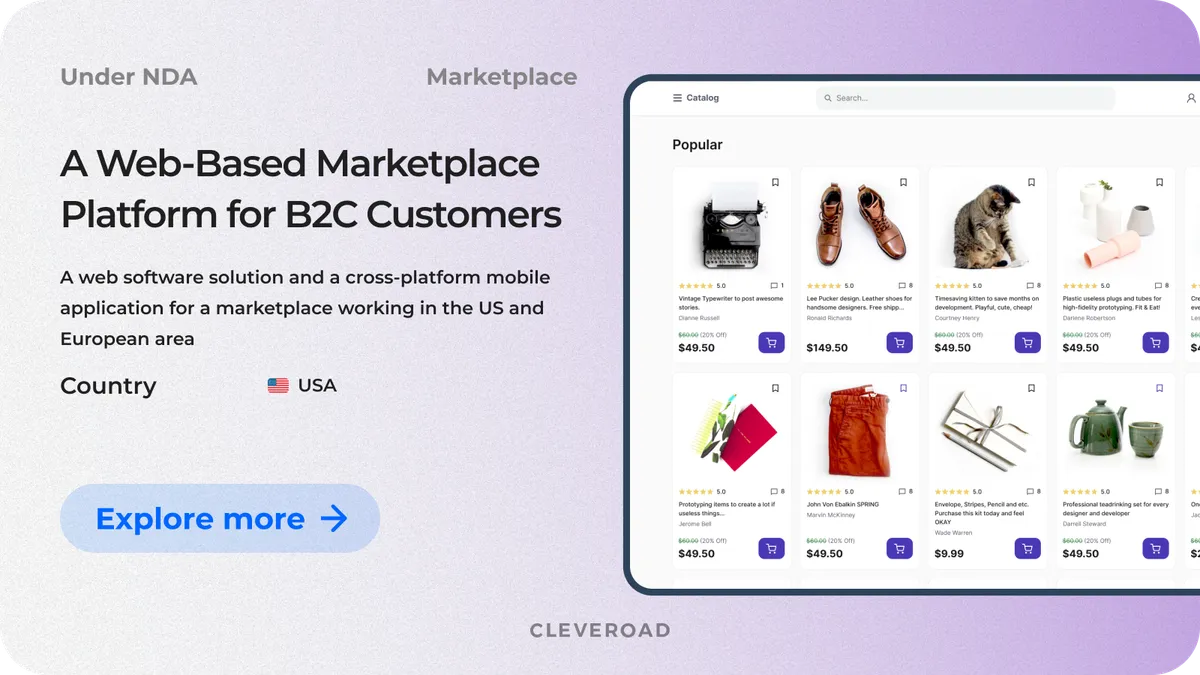
B2C marketplace with a Stripe payment engine and 3D Secure
As a result, the client launched a marketplace MVP with a lean feature set that keeps development spending tied to return on investment. With 3-D Secure support, the payment engine meets transaction requirements for both EU and US buyers. The website started gaining organic search traffic just three months after release, and Cleveroad continues to develop the platform in the second stage, adding support chat, UPS shipping, an advertising module, and AI-based product recommendations.
Ready to add Stripe, PayPal, or Braintree to your app?
Tell us about your payment flow, and our team will pick the right provider and integrate it into your app end-to-end, from payment architecture to post-launch support
It depends on your business model:
- Stripe, if your app sells subscriptions or pays out to sellers
- PayPal as an extra checkout button, if your buyers expect to pay with PayPal or Venmo
- Braintree, if you need cards plus PayPal and Venmo in one integration and process enough volume to negotiate a custom rate
Braintree is PayPal’s separate payment gateway for businesses, now called PayPal Enterprise Payments. It accepts cards, PayPal, and Venmo through one integration, while standard PayPal Checkout is mainly a wallet button where buyers pay from their PayPal account.
For US card payments, usually yes:
- Stripe: 2.9% + $0.30
- PayPal standard card processing: 2.99% + $0.49
- PayPal Checkout button: 3.49% + $0.49
The gap is widest on small orders, where the fixed fee takes a bigger share of the total.
A typical setup looks like this: Stripe handles cards, Apple Pay, and Google Pay, and a PayPal button sits next to them at checkout. It’s one of the most common combinations in e-commerce and marketplace apps. Your backend has to merge orders and webhooks from both systems into one order history. Budget roughly 60 hours of development and testing for each provider.
In most cases, Stripe. Stripe Billing costs 0.7% of subscription volume and supports any billing interval, free trials, usage-based pricing, and prorated plan changes, while Braintree sets billing cycles only in whole months. That still covers you if every plan you sell renews monthly or yearly.

Evgeniy Altynpara is a CTO and member of the Forbes Councils’ community of tech professionals. He is an expert in software development and technological entrepreneurship and has 10+years of experience in digital transformation consulting in Healthcare, FinTech, Supply Chain and Logistics
Give us your impressions about this article
Give us your impressions about this article