How to Create a School Management System: Step-by-Step Guide
09 Jun 2026
21 Min
115 Views
Creating a school management system involves careful planning, a clear definition of modules, and the choice of the right technology stack. You need management system software that unifies student records, attendance, scheduling, parent communication, and finance while maintaining secure role-based access.
With 15+ years of EdTech software development experience, Cleveroad has delivered scalable education platforms that handle complex workflows and compliance requirements. This article explains how to create school management system, including features, tech stack, development steps, costs, and real project insights. Before diving into the details, here's a snapshot of what you can expect in terms of cost, timeline, and development roadmap.
Key Takeaways:
- Custom school management software typically costs $20,000-$50,000 for an MVP, $50,000-$120,000 for a mid-scope system with mobile and integrations, and $120,000-$250,000+ for an enterprise-grade platform with AI and multi-campus support.
- Development takes 3-5 months (MVP) to 9-14 months (enterprise), depending on module count, integrations, and team setup.
- Creating a custom school management system follows seven steps: discovery and scoping → database architecture → UI/UX design → module development → RBAC and integrations → QA and testing → deployment and training.
What is School Management Software Actually
Custom school management software replaces fragmented tools with a single system for daily school operations. Instead of managing student records across spreadsheets, messaging apps, accounting tools, and separate attendance systems, your team works within one platform that centralizes attendance, scheduling, communication, finance, and reporting.
With a custom school management system, you reduce manual work by replacing disconnected tools and automating routine processes. For example, when attendance is updated, the system automatically notifies parents, updates reports, and syncs data across teacher dashboards, eliminating duplicate data entry.
Off-the-shelf systems such as PowerSchool, Zoho, Classter, and Gradelink support standard school workflows. They handle core tasks like gradebooks, enrollment, attendance tracking, and parent portals. For smaller schools with typical processes, these solutions often meet basic needs.
You should consider a custom school management solution when your processes do not fit standard software. Instead of adapting workflows to a ready-made product, you build a system around how your school actually operates - this is the core principle behind how to create a school management system that fits real-world needs. This need typically appears in three cases: unique grading logic, multi-campus structures, or region-specific compliance requirements. It also applies to schools with complex tuition models or internal approval workflows.
The market trend supports this shift. The global school management software market reached $25 billion in 2024, and the Market Research Future School Management Software report projects 17.2% CAGR through 2032. Schools invest in such systems because digital administration has moved from a "nice-to-have" toolset to a core operating layer for education providers.
In practice, a complete school management platform can cover every aspect of school operations:
- Student management system: profiles, student enrollment data, academic history, documents, and health records
- Attendance and scheduling: keeping track of attendance, class timetables, teacher workload, room allocation, absence tracking, and automated alerts
- Parent-school communication: announcements, direct messages, performance updates, and emergency notifications
- Academic workflows: grade management, assignments, exams, progress reports, and custom evaluation models
- Finance and billing: tuition payments, invoices, scholarships, discounts, refunds, and payment reminders
- Role-based access: separate permissions for administrators, teachers, parents, students, accountants, campus managers, and each faculty member
- Analytics and reporting: attendance trends, academic progress, financial reports, staff workload, compliance records, and data insights that help administrators make informed decisions
What Features Should School Management Software Include?
The features of school management software depend on the user roles the system must serve and define how to create a school management system that fits real user needs. Students and teachers, parents, and administrators each require a distinct experience, but all modules share the same database to ensure consistency, accuracy, and real-time updates. Below is a role-based module structure that helps organize functionality before diving into AI-powered enhancements.
| Module | Core Features | Who Uses It |
|---|---|---|
Student information system | Profiles, enrollment status, attendance records, academic history, and guardian contacts | Admins, teachers |
Academic management | Class scheduling, grade entry, exam management, homework assignments, timetable generation | Teachers, students |
Communication & parent portal | In-app messaging, push notifications, absence alerts, fee reminders, school announcements, and communication tools for teachers and parents | Parents, teachers, admins |
Finance management | Fee collection, invoicing, payment tracking, receipt generation, and financial reporting | Admins, finance staff |
Staff & HR | Staff profiles, timetable management, leave tracking, payroll data, performance records, inventory management, and internal requests. | Admins, HR staff |
AI-powered modules | Automated timetable optimization, attendance anomaly detection, and grade trend alerts | Admins, teachers |
Student information system
A student information system is the foundation of school management software and a core component of how to create school management software that works as a single source of truth for all modules. It stores enrollment details, guardian contacts, attendance records, medical notes, academic history, documents, and other important information in one centralized database.
The main value of this module is data reliability. For example, when an administrator updates a student's enrollment status, that change should be reflected across class lists, teacher dashboards, financial records, parent notifications, and reports. This prevents duplicate records and helps school staff work with the same accurate data. Once the student database is clean, structured, and access-controlled, the school can safely build scheduling, grading, communication, finance, and analytics workflows on top of it.
A well-designed student information system should include:
- Student profiles: name, date of birth, photo, ID number, grade level, enrollment status, and assigned campus
- Guardian records: parent contacts, emergency contacts, custody notes, and notification preferences
- Academic history: previous grades, completed courses, assessment results, certificates, and teacher comments
- Attendance records: absences, late arrivals, leave reasons, approvals, and trend history
- Medical and support notes: allergies, special education needs, health alerts, and access-restricted comments
- Document storage: enrollment forms, consent forms, transfer papers, and compliance-related records
Academic management
The academic management module handles teaching-related workflows and supports broader educational management, including timetable generation, grade entry, exam scheduling, and homework assignments. A well-built system streamlines scheduling and eliminates double bookings, room conflicts, and overlapping class schedules.
Advanced systems offer auto-generated timetables that account for teacher availability, room capacity, subject constraints, and curriculum priorities. This feature is critical for schools with non-standard scheduling models - something most off-the-shelf tools struggle with, requiring manual adjustments or workarounds.
Key features include:
- Timetable management: automatic and manual schedule creation, conflict detection, and resource allocation
- Grade entry and tracking: student assessments, assignment scores, cumulative grades, and GPA calculation
- Exam scheduling: session planning, room assignment, exam notifications, and grading workflow
- Homework and assignments: distribution, submission tracking, teacher feedback, and automated reminders
- Reporting and analytics: progress reports, grade trends, attendance correlations, and performance dashboards
Communication & Parent Portal
This module enables real-time communication between schools and parents, supports student engagement, and reduces administrative back-and-forth. Push notifications for absences, grade updates, fee reminders, and announcements are sent automatically, eliminating the need for staff to manually contact each parent.
The system uses a dual-channel approach:
- In-app messaging: structured conversations between teachers, parents, and administrators for non-urgent updates, assignment feedback, or questions
- Push notifications: immediate alerts for time-sensitive events such as absences, upcoming deadlines, or payment reminders
By combining these channels, parents stay engaged with their child's school life without being overwhelmed by notifications. Administrators and teachers can ensure timely communication while maintaining clear records of interactions.
Finance management
The finance management module helps schools collect fees online, manage invoices, track payments, and generate reports. It reduces manual work and removes the need for spreadsheets, bank reconciliation, and constant parent follow-ups.
The module integrates with payment gateways like Stripe and supports flexible fee structures. It also logs every transaction for audit and compliance needs.
Core finance management features usually include:
- Fee setup: tuition plans, one-time fees, recurring payments, discounts, and scholarships
- Online payments: payment gateway integration, parent portal payments, and payment status updates
- Invoice generation: automatic invoices, due dates, tax details, and downloadable PDFs
- Receipt management: payment confirmations, receipt history, and parent-facing records
- Payment reminders: automated alerts for upcoming, overdue, or failed payments
- Financial reporting: revenue reports, outstanding balances, refund history, and exportable audit logs
AI-powered modules
AI modules add value when a school already has structured data across attendance, grades, and schedules. They help reduce admin workload and allow staff to detect risks early.
The system can automate scheduling, detect attendance anomalies, and track grade trends. This helps schools prevent conflicts, identify disengagement, and support students before issues escalate.
AI-powered software for school management features may include:
- Automated timetable optimization: schedule generation based on teacher, room, subject, and campus constraints
- Attendance anomaly detection: alerts for repeated absences, late arrivals, and behavior patterns linked to dropout risk
- Grade trend alerts: early warnings when student performance declines across one or several subjects
- Administrative recommendations: suggestions for schedule changes, workload balancing, or resource allocation
- Parent communication triggers: automated alerts when attendance or performance patterns require parent attention
Cleveroad can support such functionality as part of custom school management software development. The company's school management software services include AI capabilities for decision support and improving student and staff experiences, while its broader AI development services cover predictive analytics, ML-based decision support systems, and AI integration into custom applications. Cleveroad also explores the features and cost of educational applications in detail in the article E-learning application development, which can be helpful when planning school software modules and integrating with LMS platforms.
The key limitation is data readiness. AI modules only work well when the school has clean student records, consistent attendance logs, structured grades, and clear access permissions. For that reason, AI features usually fit better after the core school management platform modules are stable or as part of a phased enterprise build.
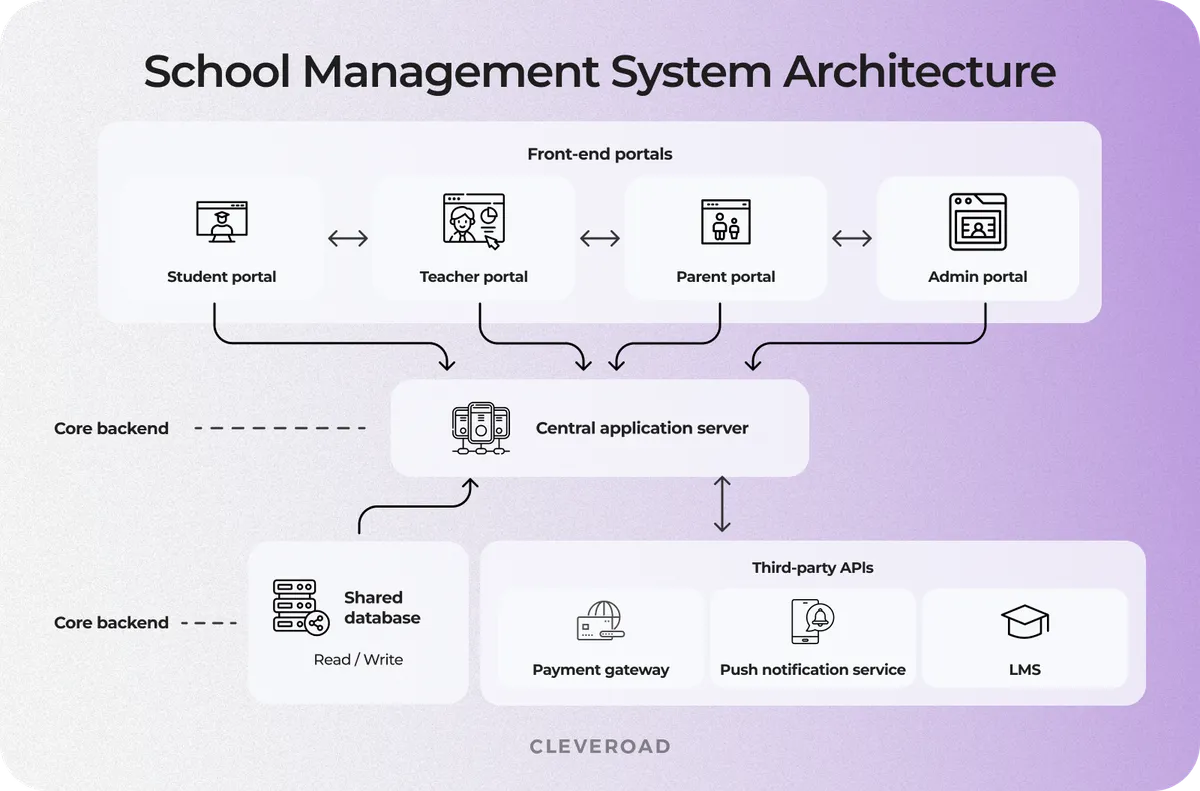
School management system architecture overview
How Do You Choose the Right Tech Stack for School Management Software?
The right tech stack for developing a school management platform depends on two factors: the platform's scope and the system's scale, which directly impacts how to make school management software that performs reliably in real-world conditions. First, define whether you need a web-only product or a web platform plus mobile apps. Then, determine whether the system will support a single school or a multi-campus environment with thousands of concurrent users. A wrong stack is one of the most expensive problems to fix after launch because it affects performance, release speed, infrastructure cost, and future feature delivery.
| Scope | Frontend | Backend | Database | Mobile | Infrastructure |
|---|---|---|---|---|---|
MVP / basic | React.js | Node.js | PostgreSQL | React Native | AWS (EC2, S3) |
Mid-scope | React.js or Vue.js | Python (Django) or Node.js | PostgreSQL + Redis | Flutter | AWS with auto-scaling groups |
Enterprise | React.js | Java (Spring) or Node.js | PostgreSQL + Redis + Elasticsearch | Native iOS/Android or Flutter | AWS or Azure, microservices |
For The School App, a US cross-platform school community app built by Cleveroad, our team used Swift for iOS, Java for Android, Angular for the web admin panel, and a Node.js (Express) backend with MySQL and AWS infrastructure. The web admin panel used Angular on the same backend, which gave the project a consistent architecture across mobile and web.
The logic behind the stack is simple. Frontend choices define how fast you can build role-based portals. Backend choices define how well the system handles workflows, integrations, and scale. Database choices define data consistency and reporting speed. Mobile choices define budget and time to market. Infrastructure choices define whether the system can grow without expensive rework.
If you're choosing a stack and module structure, Cleveroad's school management software development service explains how we plan these projects from the discovery phase to release
How to Create School Management Software: 7 Core Steps
To build reliable school management software, start with discovery, design, and early testing running in parallel, as skipping discovery often leads to budget overruns, delays, and compliance risks.
In this section, we explain how to create school management software based on our experience delivering similar education projects. We break down the key steps, decisions, and pitfalls that impact development outcomes.
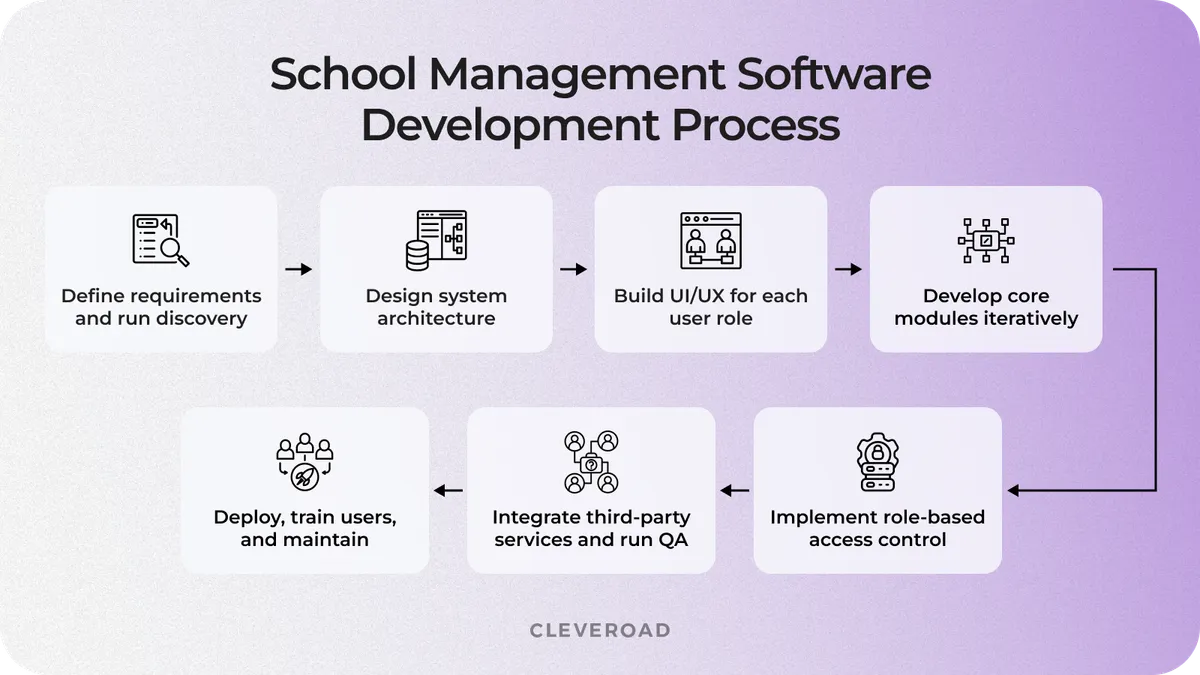
School management software development process
Step 1. Define requirements and run discovery
Before working with a vendor, define your requirements internally. Identify who will use the system and what problems the platform should solve. Once you understand your goals, you can start collaborating with a vendor through the discovery phase. This phase defines how to make school management software that fits your workflows and avoids rework later.
Discovery controls scope creep and sets the foundation for development before a single line of code is written. At this stage, the team documents user roles, workflows, compliance requirements, integrations, business needs, and data migration scope. The discovery phase should also clarify regional compliance requirements. US schools must consider FERPA when handling student records, while European institutions must comply with GDPR when processing personal and health-related data.
Cleveroad's discovery phase service helps define the feature list, architecture, user flows, risks, and project estimate before development starts. For The School App, Cleveroad's discovery phase ran over two weeks and included 20+ stakeholder meetings. Our team produced a specification document, wireframes, and a clickable prototype that locked the scope before development began. The client had previously worked with two vendors who skipped this step and ran over budget on both attempts.
If you want to understand how to structure, validate, and develop a learning-focused digital platform, see Cleveroad's step-by-step guide on how to create an educational website
Step 2. Design database architecture and system modules
The database schema must be defined before UI design begins, because all modules rely on consistent, structured data. Key tables include:
- Student records - personal info, enrollment status, grade history
- Attendance events - class sessions, absences, tardiness logs
- Fee transactions - invoices, payments, discounts, refunds
- Communication logs - messages, notifications, announcements
Proper relational integrity and indexing ensure fast query performance as the database grows. Cleveroad recommends deciding early whether to use a monolithic or modular architecture and which modules like finance, communication, attendance, HR, or analytics, should ship first:
- Monolithic: simpler initial implementation, but harder to scale or add features like AI analytics or LMS integration later
- Modular: separates core modules (student info, academic, finance, communications) so new modules or integrations can be added without re-engineering the core system
By designing the database and module architecture upfront, teams prevent future data conflicts, simplify role-based access implementation, and lay the groundwork for analytics and AI features.
Step 3. Build UI/UX for each user role
Each user type needs a user-friendly interface that helps them use the system without extra training:
- Admin dashboard: analytics-heavy, reporting-focused, configurable views for educational administration and school-wide oversight
- Teacher view: task-oriented, showing schedules, class lists, assignments, and grading workflow
- Parent portal: notification-driven, emphasizing alerts, attendance updates, communication with teachers, and student engagement
- Student portal: task and progress-focused, showing assignments, deadlines, and grades
Collapsing all roles into a single interface creates cognitive overload, reduces engagement, and drives poor adoption in early usage.
Cleveroad emphasizes testing wireframes with real users before front-end development begins. Engaging teachers and administrators during this stage uncovers workflow assumptions and usability issues the dev team cannot identify on their own, ensuring the UI supports actual daily operations rather than theoretical use cases.
Step 4. Develop core modules iteratively
To make school management software stable, start by building the student information system and the attendance module. Once these core modules are stable, release finance, scheduling, and AI analytics modules in subsequent sprints.
Cleveroad follows an Agile SDLC with two-week sprint approach with client demo checkpoints at the end of each iteration. This process uncovers requirement mismatches issues early, when corrections are inexpensive, rather than after full module development, which would require costly rework.
Iterative development ensures that each module integrates cleanly with the existing database, respects RBAC rules, and supports seamless role-based workflows across the platform.
Step 5. Implement role-based access control
Role-based access control (RBAC) is not a post-launch configuration - it must be wired into module architecture, starting from database and module design. Each user role should have clearly defined permissions for which data fields they can read or delete, ensuring compliance and secure data handling.
Standard permission levels in school management software include:
- Super-admin: full system access, including configuration and all data
- School admin: access to all school-wide data and administrative functions
- Teacher: access only to assigned classes, students, and relevant academic data
- Parent / Student: access restricted to personal records, attendance, grades, and notifications
Implementing RBAC early ensures that all modules respect these permissions, avoiding post-launch security gaps and reducing the risk of compliance issues with regional regulations.
Step 6. Integrate third-party services and run QA
Integrating 3-rd-party services in LMS platforms introduces potential synchronization issues. For example, a school-wide push notification firing simultaneously to all parents can reveal performance bottlenecks or race conditions that are invisible in smaller test scenarios.
Cleveroad mitigates these risks with automated workflows, automated regression tests after every sprint, and manual exploratory testing before each release. Automated suites catch routine integration errors quickly, while manual testing uncovers edge cases that require human judgment, such as unusual scheduling conflicts, multi-campus data propagation, or rare payment failure scenarios.
This dual approach ensures that all third-party services work seamlessly under peak conditions and that each module interacts correctly with the shared database, RBAC, and role-specific workflows.
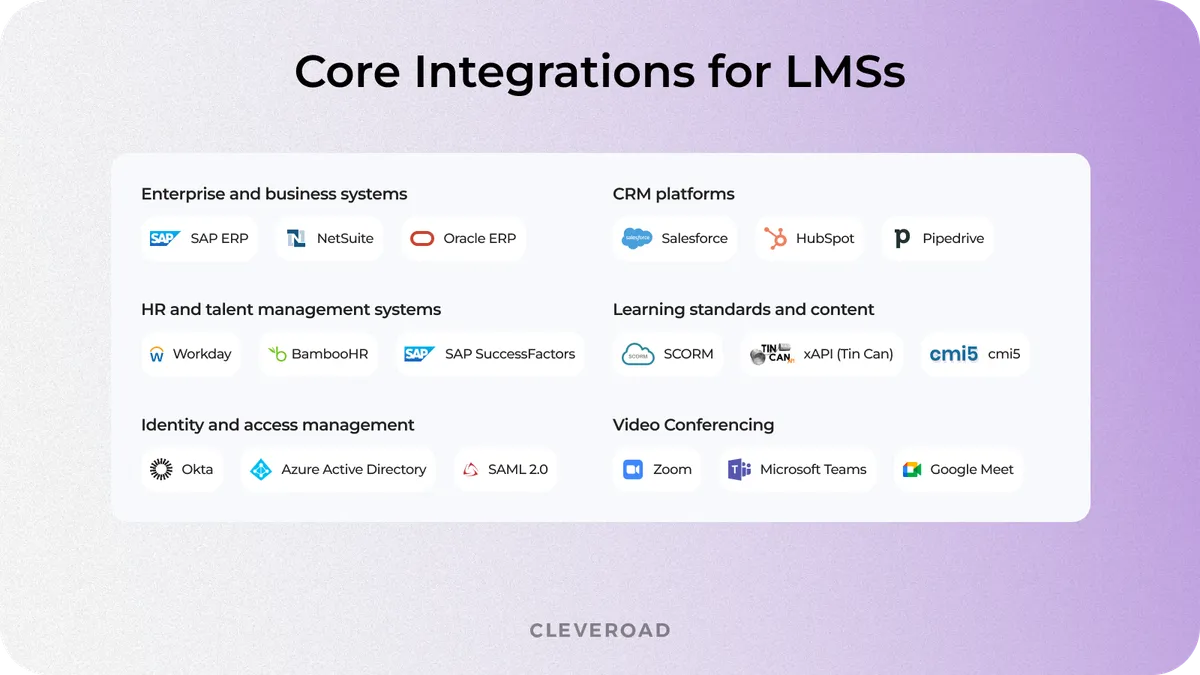
Core integrations for LMS platforms
Step 7. Deploy, train users, and maintain
Deployment completes the process of how to create a school management system that works under real usage conditions. You can deploy the system in cloud environments like AWS or Azure, or use on-premise infrastructure based on security and operational needs. Regardless of the setup, ensure monitoring, backups, access control, and stable performance under peak usage.
A standard handover package should include:
- Role-specific training sessions: separate onboarding for admins, teachers, finance staff, and IT teams
- Written documentation: user guides, admin instructions, release notes, and technical handover files
- Access and credential transfer: source code, repositories, cloud accounts, admin panel access, and third-party service credentials
- Configure and set up user roles and permissions for admin, teacher, parent, student, finance staff, and IT team
- Post-launch support: a 3-6 month support window with SLA-backed response times
- Maintenance plan: bug fixing, performance monitoring, security updates, and feature improvements based on user feedback
Training is critical for adoption. Without role-based onboarding, even well-built software may see low usage in the first school year. Each user group needs clear guidance on workflows, system use, and support processes. The goal is to ensure smooth daily operations, clear communication with parents, and stable system use from day one.
With over 15 years of experience in custom software development, Cleveroad has successfully delivered many EdTech platforms streamlining school operations and educational workflows. For Crossfader, a music education platform, our team developed a custom learning management system from scratch, including web and mobile solutions, that supports course management, student enrollment, and performance tracking.
See how Jamie Hartley, CEO of Crossfader, describes our approach and end-to-end development in this video testimonial, highlighting how Cleveroad transforms complex client requirements into functional, user-friendly software that scales with the organization.
Jamie Hartley, CEO & Founder at Crossfader. Feedback about cooperation with Cleveroad
What Are the Biggest Challenges in School Management Software Development
The four most costly errors in school management software development are underestimating the complexity of RBAC, ignoring integration standards at the architecture stage, scalability for peak usage periods, and underplanning the migration from existing school administration systems. All are recoverable during discovery and architecture design, but expensive to fix after launch.
Data security and RBAC complexity
Failure mode if ignored: exposing sensitive student data, legal liability, and reputational damage.
Access control defines who can view and modify sensitive data. Without clear permissions, schools risk data leaks, compliance violations, and loss of trust from students and parents. Schools in the US handle FERPA-protected student data, and some projects may also need to comply with the CCPA depending on user location and data processing scope. In the EU, GDPR applies.
Resolution: Implement a permission matrix during discovery. Every data field in the database should be explicitly mapped to the roles allowed to read, edit, or delete it. This matrix must be reviewed by a compliance lead before module development begins to ensure that RBAC is enforced from the start. For detailed guidance, see the study on FERPA compliance requirements in school software.
Integration with existing school systems
Failure mode if ignored: disconnected workflows, duplicate records, inconsistent data, and expensive one-off integrations.
Most schools already use tools for finance, attendance, learning, library operations, or administrative tasks. Integrating a new school software with existing ERP software, gradebook tools, or library systems requires an API-first architecture and often significant data cleaning before migration.
Resolution: Adopt educational interoperability 1EdTech's OneRoster or the Ed-Fi data standard. These standards reduce the time and cost needed to connect disparate systems, avoiding custom one-off adapters for each legacy tool, and ensure smooth data exchange across modules.
Proper planning during architecture design ensures the school platform works seamlessly with existing school systems from day one and supports everything from admissions to payment processing and academic workflows.
Our education portal development services help organizations launch tailored digital learning environments around their specific needs
Scalability for peak usage periods
Failure mode if ignored: system crashes during predictable load spikes, slow response times, and poor user experience.
School management systems experience predictable surges in usage - for example, during report card release, enrollment periods, or school-wide push notifications. Without proper infrastructure, these spikes can crash the system in minutes.
Resolution: Use cloud auto-scaling on AWS or Azure elastic compute instances, combined with Redis caching for frequently accessed data such as timetables and student profiles. This approach handles peak loads efficiently without the need to over-provision infrastructure year-round, saving costs while ensuring reliable performance.
Planning for scalability upfront ensures that both daily operations and peak events run smoothly, maintaining user trust and uninterrupted access across students, teachers, parents, and administrators.
Migrating data from legacy systems
Failure mode if ignored: missing records, duplicated data, inaccurate reports, and delayed go-live.
Most schools switching to a custom school management solution have years of student records, student enrollment data, attendance files, and payment history in spreadsheets, outdated on-prem databases, or legacy vendor exports. Migrating this data accurately without duplication or loss requires a dedicated ETL (Extract, Transform, Load) process and a dry-run migration before any go-live date.
A rollback plan is non-negotiable: production launch should only proceed after a full data audit confirms zero records dropped or corrupted.
Resolution:
- Perform a complete data audit of all source systems before migration
- Define field mappings from legacy systems to the new school solution
- Clean data to remove duplicates, correct formats, and validate required fields
- Execute a test migration on a sample dataset to catch errors early
- Document a rollback plan and verification procedure
- Conduct post-migration validation comparing counts, reports, and access rights
This approach ensures that historical records are preserved, the new system starts with clean and consistent data, and the school avoids costly manual corrections after launch.
If you're comparing development partners, Cleveroad's EdTech software development service covers key school software challenges, from data migration to RBAC architecture
How Much Does It Cost to Create School Management Software?
The cost of school management software depends on whether you want to make it a basic web portal, a full management app, or an enterprise-grade platform. The table below segments costs by project scope so you can locate your project before diving into the individual cost drivers.
| Scope | Budget range | Timeline | What's included |
|---|---|---|---|
MVP / basic | $20,000-$50,000 | 3-5 months | 2-3 core modules (Student Information System, Attendance, Communication), web portal, basic RBAC, no third-party integrations |
Mid-scope | $50,000-$120,000 | 5-9 months | 4-6 modules, web + mobile app, payment gateway integration, custom reporting, cloud deployment |
Enterprise | $120,000-$250,000+ | 9-14 months | Full module suite, multi-campus support, AI-powered analytics, LMS integration, enterprise-grade security and QA |
The scope of features is not the only factor that defines development cost. Software estimation depends on multiple variables, including team setup and long-term support requirements.
Key cost drivers beyond module count:
- Team location: Eastern European teams run $50-$80/hr vs. $100-$180/hr in the US or Western Europe
- UI/UX complexity: A mobile parent-facing portal adds significantly more design time than a back-office admin panel
- Post-launch maintenance: Typically 15-20% of initial development cost per year
Cleveroad's Experience With School Management Software
When it comes to building a reliable school management platform, real-world experience matters. Cleveroad has delivered solutions that connect students, parents, and staff, streamline administrative workflows, and support secure data handling. Below is how our portfolio experience translates into school management software development in practice.
Our customer is a US-based school that needed a single digital platform to connect students, parents, and staff around events, schedules, staff contacts, school updates, and fee payments. Its existing communication and administrative workflows relied on fragmented tools, making daily coordination slower and harder to manage.
The school needed a technical partner to:
- Replace disconnected communication tools with a unified mobile and web platform
- Create iOS and Android apps for students, parents, and staff
- Build a web-based admin panel for managing school updates, events, schedules, contacts, and payments
- Ensure scalable cloud infrastructure and secure handling of student data
- Define the project scope before development to avoid the rework caused by the two previous vendor engagements
The Cleveroad team started The School App project with a two-week discovery phase. Our specialists held 20+ stakeholder meetings and prepared a specification document, wireframes, and a clickable prototype before development began. After the scope was approved, a 7-person team designed and built the solution using Swift for iOS, Java for Android, Angular for the web admin panel, MySQL and Express for the backend, and AWS for cloud deployment.
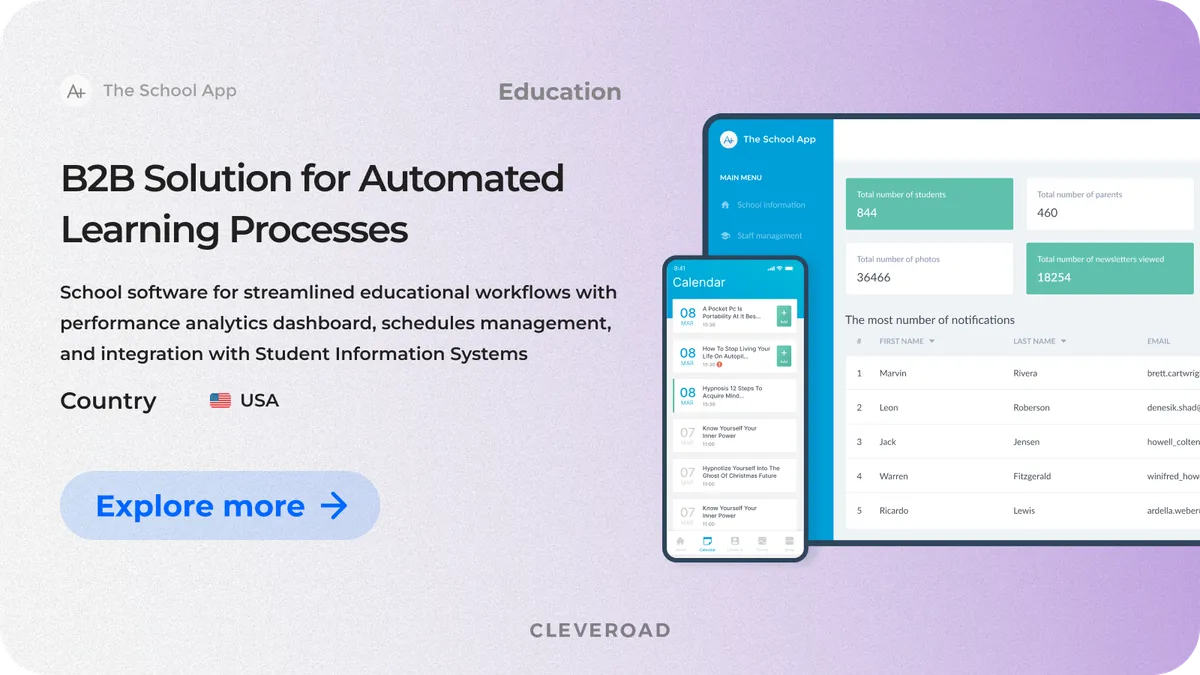
The School App interface
The school management system we've delivered includes mobile apps and a web-based admin panel that enable the school to manage communication, events, schedules, staff contacts, school updates, and payment workflows in a single connected environment. AWS infrastructure supports the school's growing community and provides a scalable cloud foundation for further product development.
As a result, the client received mobile solutions and a web admin panel that centralizes school communication and supports daily interaction among students, parents, and staff.
After launch, the platform reached:
- 80% account activation rate across parents, students, and staff within the first 3 months
- 70% reduction in time required for school-wide communication by administrators

 USA
USA


Why Choose Cleveroad for School Management Software Development
Cleveroad is an education software development company with experience delivering custom digital solutions for schools and EdTech providers. We are ready to support your project from scope validation to full-scale implementation, including discovery, architecture design, RBAC planning, UI/UX design, web and mobile development, integrations, QA, deployment, and post-launch maintenance.
By partnering with Cleveroad, you gain:
- 15+ years of experience in custom software development and practical delivery across education, healthcare, finance, logistics, retail, and other industries
- Structured discovery process that defines module scope, user roles, RBAC architecture, integration needs, and data migration requirements before development starts
- Cross-platform mobile capability covering iOS, Android, React Native, and Flutter to support parent, student, and staff access without separate product logic for each platform
- Secure cloud deployment expertise from an AWS Select Tier partner, covering AWS-based infrastructure, scalable architecture, automated backups, monitoring, and performance optimization
- Integration experience with payment gateways, LMS platforms, notification services, calendar APIs, and existing school systems
- ISO 9001:2015-certified quality management and ISO/IEC 27001-certified security processes for projects that require reliable delivery and protected data handling
- Flexible cooperation models, including fixed-price delivery for clearly scoped builds and dedicated teams for products that require long-term feature growth
Cleveroad has already delivered a range of school management solutions, so we know how to turn a school software idea into a working digital system. Whether you need an MVP for one school or a scalable platform for a multi-campus network, Cleveroad can help define the right set of modules, estimate the timeline, and build school management software ready for real-world daily use.
Ready to start your school management software project?
Get in touch with Cleveroad. We'll scope your software modules depending on your school needs and help you all the way to successful product launch.
School management software usually takes 3-5 months to build an MVP and 9-14 months to build an enterprise-grade system. The timeline depends on the module count, integrations, platform scope, data migration, and the speed of approvals during discovery.
A simple timeline may look like this:
- Discovery and scoping: 2-4 weeks
- UI/UX design and architecture: 3-6 weeks
- Core module development: 8-16 weeks
- QA, deployment, and training: 3-6 weeks
School management software manages school operations, while a learning management system manages the learning process. Software for school management covers student records, attendance, finance, schedules, parent communication, staff workflows, and reports.
An LMS focuses on courses, lessons, assignments, tests, learning materials, and student progress inside the educational process. Many schools use both systems together, which is why LMS integration often becomes part of school management software development.
Yes. School management software can be built as native iOS and Android apps or as a cross-platform mobile app with Flutter or React Native.
The most practical setup is often:
- Web admin panel for school administrators and finance staff
- Mobile parent app for alerts, payments, attendance updates, and messages
- Mobile teacher app for attendance, schedules, grades, and quick communication
- Student portal or app for assignments, grades, deadlines, and announcements
This setup keeps complex administrative work on the desktop and gives daily users fast access from mobile devices.
Data security starts with role-based access control, encrypted data storage, secure authentication, audit logs, and permission rules defined during discovery. For US schools, the system must comply with FERPA requirements regarding student education records. GDPR requirements also apply to European institutions.
A secure school platform should define which fields each role can view, edit, delete, or export. For example, parents should access only their child's records, while teachers should access only their assigned classes and students. The development team should also test permissions, integrations, and data exports before launch.
Off-the-shelf school management software works well for schools with standard workflows, limited customization needs, and a smaller budget. It can cover common tasks like attendance, gradebooks, billing, and parent communication faster than a custom build.
A custom solution makes more sense when the school has non-standard grading rules, multi-campus operations, unique compliance requirements, complex tuition models, legacy data migration needs, or integration-heavy workflows. In this case, custom school management software can align with the school's real processes rather than forcing staff to rely on manual workarounds.

Evgeniy Altynpara is a CTO and member of the Forbes Councils’ community of tech professionals. He is an expert in software development and technological entrepreneurship and has 10+years of experience in digital transformation consulting in Healthcare, FinTech, Supply Chain and Logistics
Give us your impressions about this article
Give us your impressions about this article