Hospital App Development: Features, Integrations, and Cost
Updated 14 Sep 2026
18 Min
884 Views
Hospitals rarely start app development from scratch. Most already rely on an Electronic Health Record (EHR) or Electronic Medical Record (EMR) system, laboratory software, billing tools, and other clinical systems. A hospital app has to connect these systems into one convenient access point. Without that integration layer, it risks becoming another isolated interface that staff and patients have to manage.
At Cleveroad, we have 15+ years of software development experience and hands-on expertise in healthcare products, including clinic management systems, telemedicine platforms, remote patient monitoring solutions, and EHR/EMR software. In this guide, we explain what functionality a hospital app needs, which integrations shape its architecture, how the development process works, and what budget and timeline to expect.
Key takeaways
- A hospital app works as a front end for the systems the hospital already uses. Its practical value depends on EHR, laboratory, billing, identity, and other integrations rather than the number of screens.
- Patient and staff apps solve different tasks. Patient-facing features cover appointments, health records, messaging, test results, and notifications. Staff-facing features include schedules, communication, and patient charts.
- Integration depth has the largest impact on budget. A patient app using existing services may cost $60,000–$110,000. EHR integration raises the range to $120,000–$220,000, while video visits and device data can push it to $220,000–$400,000
Why Hospitals Build Their Own Apps
Patients already use digital access as a routine part of healthcare. According to the Assistant Secretary for Technology Policy, 77% of US individuals were offered online access to their medical records in 2024, and 65% accessed them. Among people who accessed their records, 57% used an app, up from 38% in 2020.
Hospitals build their own apps to put this access into a mobile experience connected to the systems patients and clinical teams already depend on. Four hospital app use cases provide the clearest value:
- Give patients direct access to care and medical information. Patients can book, cancel, or reschedule appointments and access records, test results, prescriptions, and treatment information from one interface. This reduces reliance on phone calls and gives patients a direct route to their health data.
- Connect patients with their care teams. Secure messaging, notifications, test-result updates, and virtual consultations extend communication beyond an in-person visit. A hospital app can support services such as a virtual hospital waiting room when hospitals need to coordinate remote and on-site care.
- Support remote patient monitoring. An app can receive data from connected medical devices and wearables, such as blood pressure monitors and glucose meters. Clinical teams can review these readings between visits and use them as part of remote care workflows. Health mobile app development can help hospitals integrate such capabilities into a broader digital care platform.
- Bring existing hospital systems into one interface. EHR/EMR, laboratory, scheduling, billing, and other systems can exchange data with the app through APIs and healthcare interoperability standards. This integration gives patients and staff one access point instead of adding another disconnected system.
Patient behavior supports this integration-first approach. The global mobile health (mHealth) market was projected to reach $332.7 billion in 2025, according to Statista. For hospitals, custom mHealth app development therefore serves a patient population already accustomed to mobile access to health services.
Disease-specific needs can shape the scope as well. Diabetes is a common starting point, where the practical scope may include connected glucose monitoring, medication support, patient education, and clinician access to patient-generated data.
Cleveroad provides healthcare software solutions development for medical organizations that need to connect patient-facing applications
Key Types of Mobile Applications for Hospitals
Before you start hospital mobile app development, define the workflow the product must support, who owns its budget, and which hospital system provides the data. These factors help determine the right app type and integration scope.
Patient data and record-management apps
Patient data and record-management apps give patients access to medical records, test results, visit summaries, and appointment information. The hospital CIO, digital health department, or patient experience team typically owns the budget, while the app must connect to the EHR/EMR to display current clinical data.
Patient satisfaction and feedback apps
Hospitals use patient satisfaction and feedback apps to collect patient feedback after visits and identify issues across departments or care journeys. Patient experience or quality departments usually fund the product, and it should connect to the patient administration system, CRM, or EHR so feedback can link to a specific encounter.
Patient communication and remote health monitoring systems
Remote patient monitoring (RPM) apps collect patient-generated health data and give clinicians a way to follow patients outside the hospital. Digital health, clinical operations, or a department responsible for a specific care program may own the budget. The platform typically connects to the EHR plus medical devices or their cloud APIs.
Cleveroad has hands-on experience in building remote patient monitoring solutions. For example, our team developed a remote patient monitoring SaaS platform for a German medical service provider. A 13-person Cleveroad team delivered the solution that allows caregivers to review patient readings from connected bracelets and watches and receive alerts about care events. The platform helped the client expand its healthcare offering with a subscription-based product for B2B customers, resulting in a 20% increase in the client's profit.
Virtual nursing applications
Virtual nursing apps support medication routines, care plans, patient education, and follow-up outside an in-person visit. Nursing leadership, clinical operations, or digital care departments usually sponsor these products. Integration with the EHR and medication administration or pharmacy systems keeps care instructions and medication data aligned with the clinical record. Patient medication management software can form part of this workflow.
Medical second-opinion telemedicine platforms
Medical second-opinion telemedicine platforms connect patients with physicians for remote consultations, specialist reviews, and second opinions. Telehealth programs, clinical departments, or hospital leadership may fund them. The core integrations usually include the EHR, scheduling system, identity management, and video communication infrastructure.
Patient health management platforms
Hospitals can provide patient health management apps to support care plans between visits, track patient-reported data, and give people access to educational resources. Population health, digital health, or care management departments commonly own the budget. These platforms need an EHR connection so patient-entered information and clinical data can support the same care workflow. Unlike standalone consumer wellness trackers, a hospital health management app works within the provider's care model and connects patient activity with clinical services.
Chronic illness management apps
Chronic illness management apps help patients manage conditions such as diabetes or cardiovascular disease through symptom tracking, medication records, measurements, and condition-specific guidance. Specialty departments, population health programs, or care management teams typically fund them. Depending on the condition, the app may need connections to the EHR, pharmacy systems, connected devices, or laboratory systems.
Prescription information and order-management applications
Prescription apps let patients review medication information, manage refills, receive reminders, and track prescription status. Pharmacy services or digital health departments usually sponsor this type of product. Integration with the hospital EHR and pharmacy or e-prescribing system is essential because medication orders and prescription status must stay synchronized.
For hospital leaders, the app category is only the starting point. The buyer, clinical workflow, and required system integrations determine the actual development scope, since a patient portal connected only to scheduling has very different architecture and cost requirements from an RPM platform that exchanges EHR and medical-device data.
Use our hospital management software development services to connect clinical and administrative workflows and give hospital staff secure access to the data they need
Features to Include in a Hospital App
Hospital app features should reflect both patient tasks and the workflows of the staff who serve them. The patient interface should also support a broad age range: use readable font sizes, strong contrast, clear labels, and as few steps as possible between the home screen and frequent actions such as booking an appointment or checking a test result.
The exact scope of the hospital app development project depends on the hospital systems already in place. Scheduling, EHR, billing, identity, and communication systems determine which functions the app can support and how much integration work each one requires.
Secure registration and profile management
Secure registration verifies each user's identity so only authorized individuals can create accounts. Once registered, users manage their profiles, update personal information, and securely store their medical history, allergies, and preferences.
Appointment booking and management
Developing a user-friendly interface is a key priority, as the hospital app should be usable and intuitive for patients of all ages. It should let patients browse available appointment slots, select preferred healthcare providers, and book appointments easily. With hospital app development, your medical institution can provide real-time availability updates, enable appointment rescheduling or cancellation, and send reminders to patients.
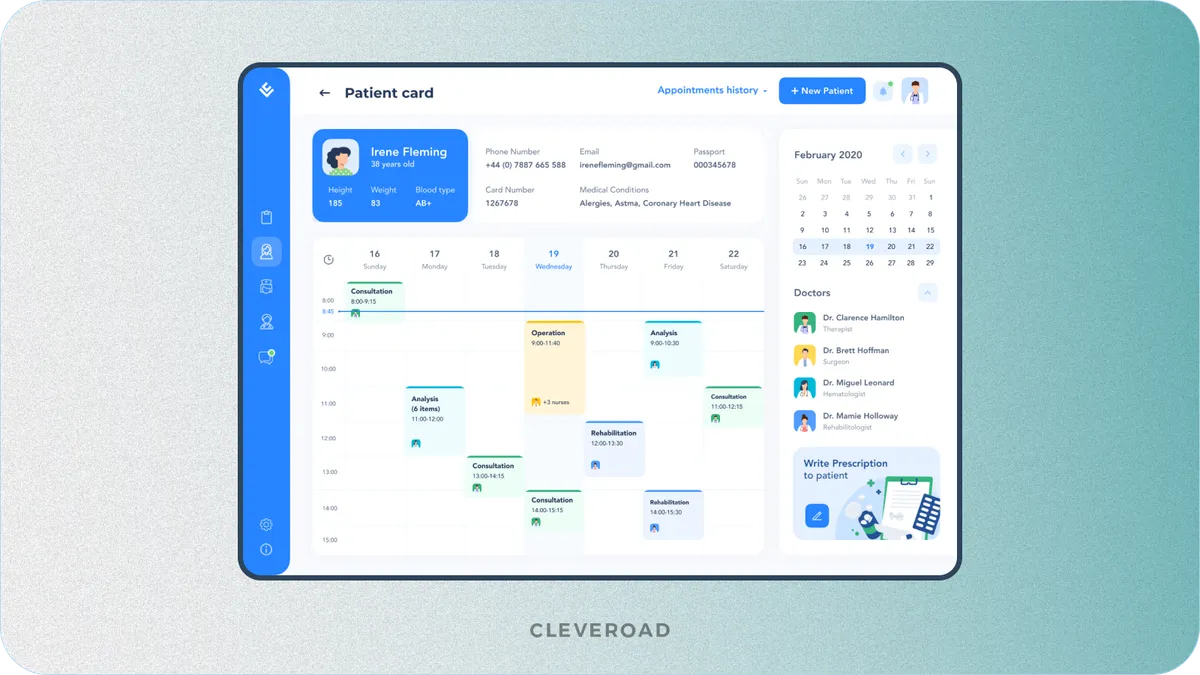
Example of appointment management interface built by Cleveroad (Source: Dribbble)
Access to health records
The app can give patients secure access to medical records, laboratory results, radiology reports, and treatment history. Encryption, authentication, and role-based access help protect sensitive health information.
The EHR determines what patients can actually see. The product team can design how records appear in the app, but the available data depends on the APIs, permissions, and data types supported by the hospital's EHR.
Messaging between patients and clinicians
Secure in-app messaging lets patients and clinicians communicate between visits. Patients can send messages, ask questions, and get timely responses from their care team. Notifications flag new replies, and patients can attach documents or images to a thread to keep the conversation in one place.
Prescription management
Patients can view current medications and dosage instructions, request refills, and receive medication reminders. Pharmacy integration can pass refill requests into existing prescription workflows instead of creating a separate manual process.
The app therefore needs access to medication data from the EHR, pharmacy system, or e-prescribing platform. Similar integrations are also central to pharmaceutical app development when software connects patients, clinicians, and medication workflows.
Virtual consultations
Video and audio consultations allow clinicians to provide remote care through the hospital app. The workflow usually combines appointment scheduling, secure calls, clinician access to patient information, and post-visit documentation.
The video layer represents a separate part of the development budget. Hospitals commonly integrate an established video provider instead of building the underlying real-time communication technology from scratch. The solution still needs connections to scheduling and EHR systems so clinicians can manage the consultation within the existing care workflow.
Cleveroad provides telemedicine software development for healthcare organizations that need video consultations
Emergency contacts and services
A dedicated emergency section keeps critical contacts in one place: local emergency numbers and the hospital's own emergency department line. One-tap dialing lets a patient call for help without searching, and location-based services can guide them to the emergency facility.
Billing and payment
A secure in-app payment gateway lets patients see itemized bills and pay them from the phone. Where the hospital works with insurers, the app can pass claim data into the existing billing flow instead of leaving patients to reconcile it themselves. Because card data is in scope, this feature carries PCI DSS requirements on top of HIPAA, which is why payment is often handled through a certified provider rather than built in-house.
Push notifications
Push notifications can alert patients about appointments, available test results, prescription updates, or other actions that require attention. Users should have controls that let them manage notification preferences.
The notification service needs event data from systems such as the EHR, scheduling platform, or pharmacy system. Medical details should not appear in the notification itself, including lock-screen messages and notification previews. The alert can tell the patient that an update is available and require authentication before the app displays the underlying health information.
Staff-side features
Staff-side features help doctors and nurses complete routine tasks without returning to a workstation. Core functionality can include:
- Shift and schedule management connected to the hospital scheduling system.
- Patient lists for rounds with room, task, and care information from the EHR.
- Mobile access to patient charts with diagnoses, results, medications, and care plans.
- Internal messaging for secure staff communication.
- Task completion tracking with write-back to the EHR or clinical task system.
Which Systems a Hospital App Must Integrate With
A hospital app gets most of its value from the systems it connects to. These integrations also take a large share of the project timeline because access permissions, vendor approval, data mapping, and write-back often take longer than the mobile interface itself. Most of these connections run on established healthcare interoperability standards, chiefly HL7 (Health Level Seven) and its modern successor FHIR (Fast Healthcare Interoperability Resources).
| System | What the app gets from it | Standard commonly used | What drives the effort |
|---|---|---|---|
EHR / EMR | Patient records, problem lists, allergies, visit history | FHIR R4, SMART on FHIR, HL7 v2 | Vendor marketplace review and certification, rather than the data format |
Scheduling module | Slot availability, provider calendars, booking writeback | Vendor API or FHIR Appointment | Writeback permissions are harder to obtain than read access |
Laboratory information system | Test orders and results | HL7 v2 ORU messages | Result formats differ between labs |
Radiology and imaging | Report availability and image links | DICOM, HL7 | Mobile image delivery requires a viewer strategy |
Billing and payments | Balances, statements, co-pay collection | Vendor API plus payment provider | Card data introduces additional compliance requirements |
Wearables and home devices | Vitals, glucose, activity data | Apple HealthKit, Health Connect, vendor SDKs | Background sync reliability on the patient's device |
The EHR usually has the largest impact on the integration plan. Its vendor determines available APIs, read and write permissions, and the data the hospital app can expose.
Why the EHR integration sets the timeline
The data exchange format is rarely the main bottleneck in EHR integration. More time goes into vendor marketplace approval and obtaining write access for actions such as appointment updates or record changes. These requirements should be confirmed before development starts. Early approval helps the team plan the integration scope and timeline around the EHR vendor's actual access rules.
Cleveroad provides EHR/EMR and patient portal development to give patients secure access to clinical data
What to do when the hospital runs a legacy system
If the hospital system has no modern API, there are two practical options. The first is an integration layer that exchanges data through HL7 v2. The second is polling, where the app checks the legacy system for changes at set intervals.
Polling is usually cheaper to launch because it requires less integration work. However, it creates more maintenance overhead and can increase infrastructure costs as data volume and synchronization rules grow.
Hospital App Development Process Step-by-Step
A hospital app moves through five stages, and for this kind of product, one of them, integration setup, starts earlier and runs longer than in most builds. Here is how the process runs:
Step 1. Idea validation
Idea validation decides one thing: whether the app is worth building at all. Start by defining which hospital workflow the app should improve. Identify what task currently takes staff too much time, which system or manual process the app should replace, and what result the hospital expects.
Step 2. Solution design stage
Once the idea is validated, the solution design stage fixes what the app must do and where its boundaries are, before any development contract. The team studies your requirements and defines the problems the app should solve and the functionality it must provide for the clinic and its patients. A Solution Design team (usually business analysts, a solution architect, and a designer if needed) then reviews your inputs in a dedicated session and clarifies open questions. Their job is to lock down business goals, main risks, and the basic quality attributes.
At Cleveroad, we offer a free Solution Design Workshop to help healthcare organizations turn their app ideas into a clear technical plan. During the session, our healthcare domain experts analyze your clinical workflows, existing systems, and business goals to define the required functionality, integrations, and development approach. Contact us today to book a Solution Design Workshop and discuss your hospital app with our healthcare experts.
Step 3. Discovery phase
Where solution design settles what to build, discovery settles how to build it. During product discovery, the Cleveroad team turns project requirements into a clear development plan. Our business analysts, solution architects, designers, and engineers analyze your goals, refine requirements, define target platforms, map user flows, select integrations, and prepare the technical foundation for development.
The discovery phase results in a detailed project vision that covers the required features, interface requirements, and development approach, helping you reduce risks before implementation begins. For a hospital app, discovery should also include an inventory of the systems already in use, such as the EHR, scheduling, laboratory, billing, and identity platforms. The team checks which APIs are available, what data each system exposes, and whether the hospital has read and write permissions before finalizing the architecture and estimate.
Step 4. Product development
At this stage, designers create prototypes and the UI/UX, while developers build the application, database, APIs, and required functionality. The scope also covers integrations with EHR/EMR, patient management, and laboratory systems, followed by functional, interface, and compatibility testing.
For hospital apps, integration work should start in the first sprint because vendor approvals and access permissions can take longer than the code itself. If another development team built the existing product, we start with a code and data audit to understand its architecture, security gaps, and integration constraints.
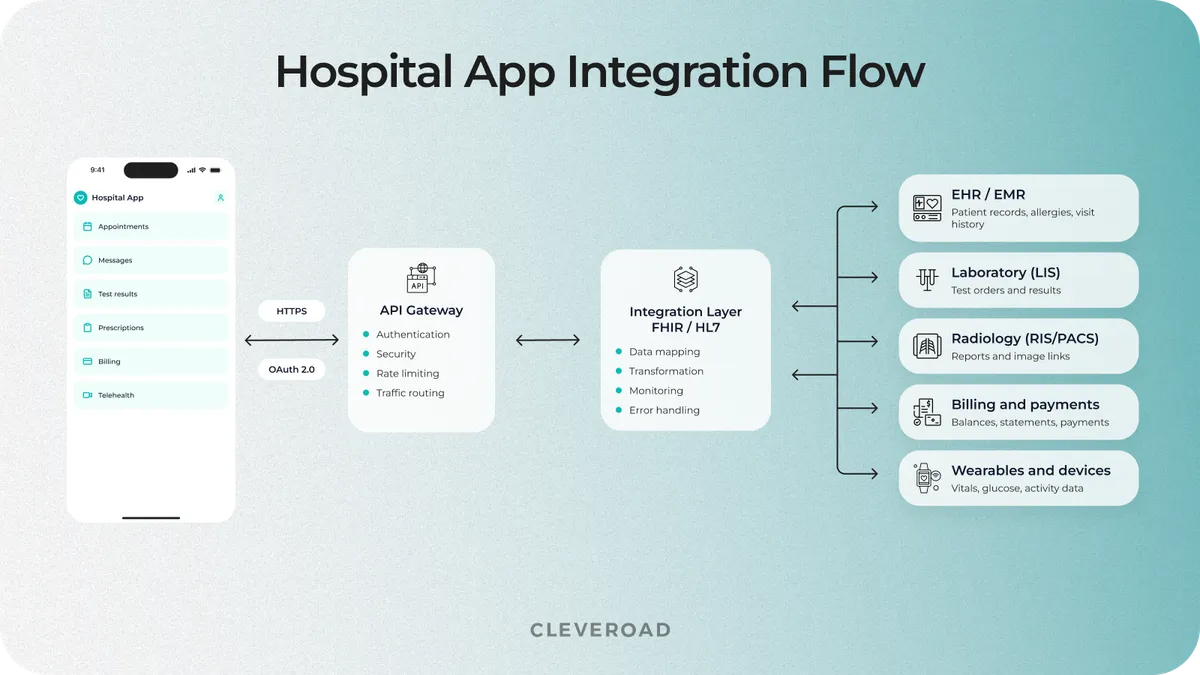
How a hospital app connects to the systems a hospital already runs
At Cleveroad, we build compliance into the development process from the start so hospital software is prepared for regulatory and security checks after release. We apply the same approach to healthcare products that handle sensitive patient data and require strict access, storage, and data protection controls.
We followed this approach for Codex Labs, a US healthcare company that develops digital products for medical use. For its DECODE.ME teledermatology product, the company needed to prepare an existing codebase for a fixed demonstration date while improving how the system handled patient medical data.
Cleveroad reviewed the inherited code, extended the product functionality, and improved data handling to support HIPAA requirements. The demo was ready for the AAD 2025 Innovation Meeting, where dozens of dermatologists connected with the product, and development continues as its functionality expands.
Watch what Barbara Paldus, Founder & CEO of Codex Labs, says about working with Cleveroad on the DECODE.ME product.
Dr. Barbara Paldus, CEO at Codex Labs: Feedback on Cleveroad's Telemedicine Development Services
Step 5. Delivery and maintenance
After testing, the team deploys the app to the required mobile or web platforms and verifies that APIs, integrations, and core workflows work correctly in production.
For hospital software, rollout should start with a pilot in one department and a measurable target, such as fewer scheduling calls or faster access to test results. The app can expand to other departments after the pilot confirms the expected result.
After release, Cleveroad can provide ongoing support and maintenance on request. The scope may include bug fixes, performance and stability improvements, dependency updates, regression testing, and adjustments based on user feedback or changes in hospital workflows.
Cleveroad’s Experience Building Hospital and Telehealth Apps
To demonstrate Cleveroad's experience in healthcare software development, we want to share several solutions we designed and built for healthcare providers:
Clinic management system with EMR integration
A US rehabilitation clinic that provides remote care and online consultations relied on a third-party SaaS EMR with around 40% of functionality it did not need. At the same time, staff had to switch between several disconnected systems for scheduling and other operational tasks, which increased costs and complicated daily work.
Cleveroad built a custom clinic management system with an EMR and a mobile application for medical professionals and patients of Telecare Rehub. The solution covered appointment booking, real-time scheduling, billing, prescriptions, user management, and related workflows in one platform. We deployed the solution on AWS, set up HIPAA-compliant data storage, and securely migrated the clinic's existing data.
As a result, the clinic replaced several disconnected tools with one platform and cut roughly 40% of unused SaaS functionality it had been paying for. Scheduling conflicts dropped, and the client gained secure, HIPAA-compliant control over its data instead of depending on a third-party EMR.
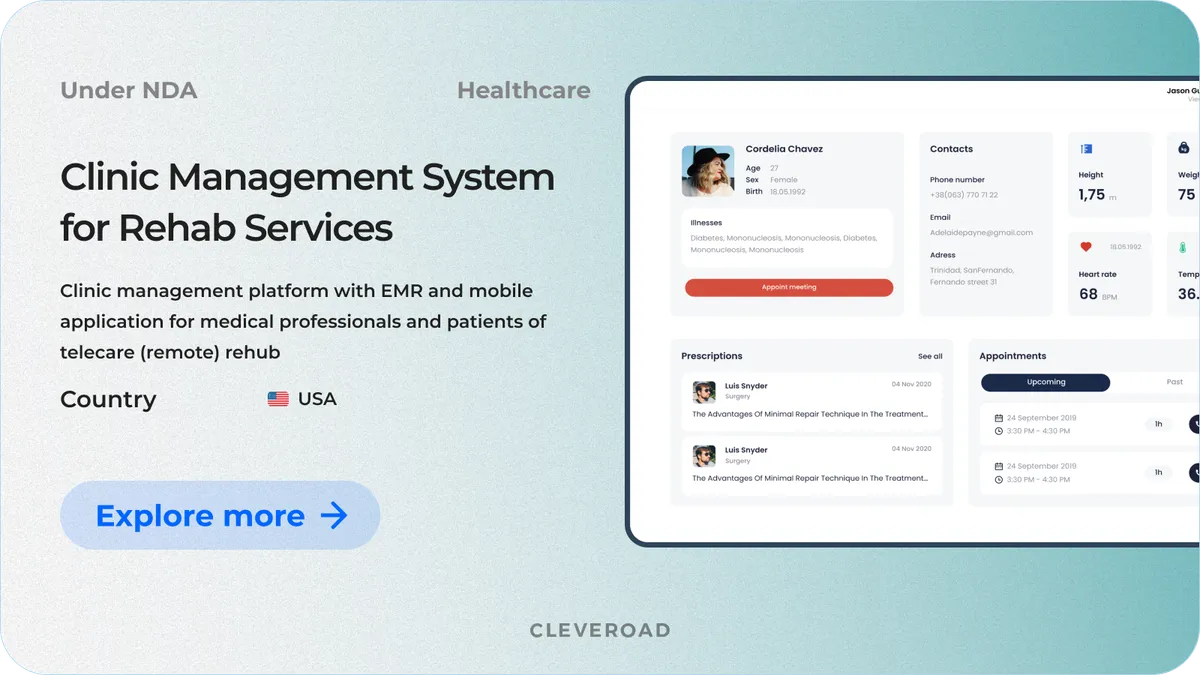
Clinic management system developed by Cleveroad
Telemedicine appointment system for a UK healthcare provider
A UK-based provider of healthcare consultations from National Health Service-trained general practitioners and clinicians needed a turnkey telemedicine platform for remote consultations. The system had to automate appointment workflows, support video and audio consultations, and meet UK healthcare and data protection requirements.
Cleveroad built a custom telemedicine platform with appointment management. The app covered appointment booking, remote consultations, patient and clinician interfaces, and administrative tools. We designed the architecture and data flows to support GDPR, CQC, MHRA, and KYC requirements.
As a result, the client received a legally reviewed telemedicine platform that met CQC, MHRA, GDPR, and KYC requirements. Automated workflows reduced manual operations and cut paperwork by 20%.
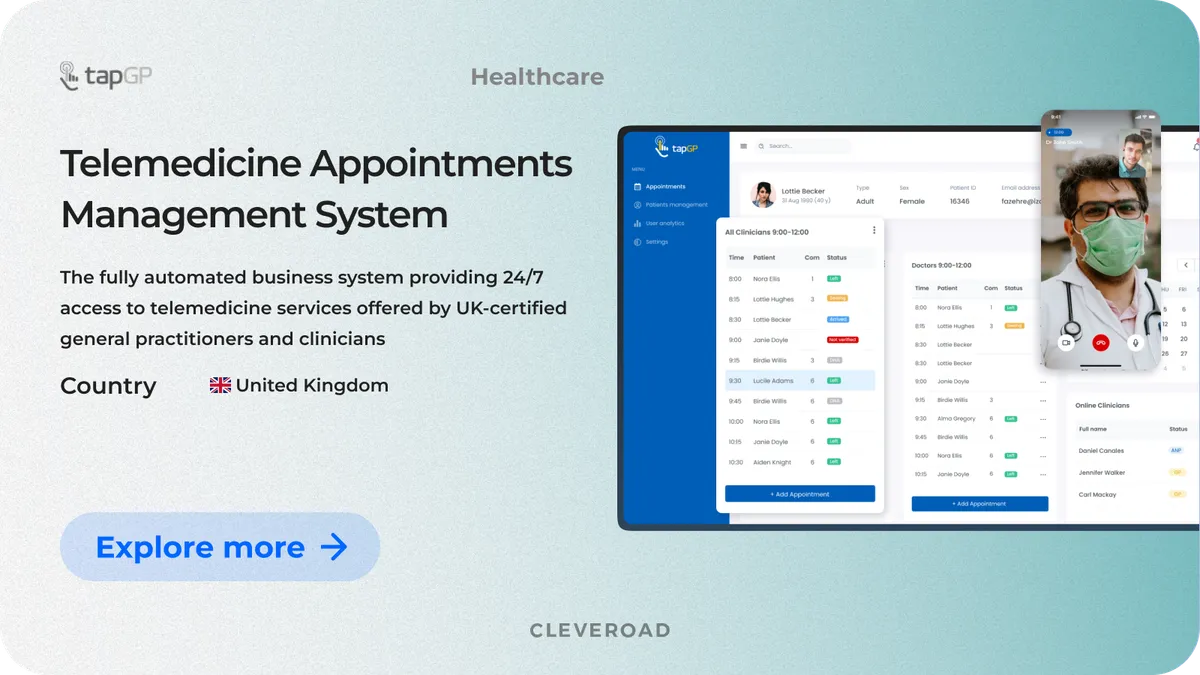
Telemedicine appointments management system built by Cleveroad
How Much Hospital App Development Costs
Hospital app development typically costs $60,000–$400,000+. The main factor behind this range is integration depth: an app that uses existing hospital services costs much less than a platform that exchanges data with EHR, laboratory, billing, video, and medical device systems.
| Scope | What it includes | Cost | Timeline |
|---|---|---|---|
Patient app on top of existing services | Registration, booking, notifications, static content, payments; no direct EHR connection | $60,000–$110,000 | 3–5 months |
Patient and staff app with EHR integration | Everything above plus records access over FHIR, secure messaging, prescriptions, staff schedules, and chart access | $120,000–$220,000 | 6–9 months |
Full hospital app | Everything above plus video consultations, device and wearable data, laboratory and billing integrations, and multi-facility rollout | $220,000–$400,000 | 9–14 months |
These estimates are based on Cleveroad’s project retrospective from the past three years and current healthcare software development benchmarks. The ranges assume an average development rate of $50–$80 per hour, which reflects the rate range Cleveroad typically operates within.
Video consultations add another integration layer, infrastructure requirements, and compliance scope. You can review the main cost components separately in our guide to the cost of implementing telehealth.
The final hospital app development cost depends on:
- Scope and complexity. More workflows, user roles, and custom functionality increase development effort.
- Design and user experience. Custom patient and staff interfaces require additional UX research, prototyping, and design work.
- Backend infrastructure and integrations. EHR, laboratory, scheduling, billing, and device integrations can account for a large part of the budget.
- Security and compliance. HIPAA, GDPR, access controls, encryption, audit logging, and other security requirements add engineering and testing effort.
- Platform coverage. Supporting iOS, Android, web, or separate staff and patient interfaces expands the scope.
- Testing and quality assurance. Hospital apps require functional, integration, compatibility, security, and performance testing before release.
At Cleveroad, we refine the estimate twice. The first rough estimate defines the expected budget based on the initial scope and integrations. After Discovery, we prepare a more detailed estimate based on confirmed workflows, architecture, and feature requirements.
How Cleveroad Approaches Hospital App Development
Cleveroad has 15+ years of software development experience and delivers healthcare and telemedicine solutions for clinics, hospitals, healthcare providers, and pharmaceutical companies. Our expertise covers hospital apps, appointment and prescription management software, healthcare CRM systems, telemedicine platforms, and remote care solutions.
For hospital app development, our team supports the full process from architecture planning and development to integration, testing, release, and maintenance.
What you get from working with Cleveroad:
- Custom healthcare software development. We build hospital applications around patient and staff workflows to improve access to care and support clinical operations.
- Experience with healthcare compliance. We develop software with HIPAA, HITECH, HL7, CDA, CCD, and other relevant healthcare requirements in mind.
- Healthcare system integration expertise. We connect apps with EHR/EMR, e-prescription, medical databases, diagnostic, billing, and other hospital systems.
- Architecture guidance from a Senior Solution Architect. We assess system dependencies, integration constraints, and infrastructure requirements before development starts.
- Structured development and project management. We apply defined processes for change management, stakeholder communication, risk control, and project monitoring.
Build your hospital app with Cleveroad
Work with our healthcare software team to design, develop, integrate, and launch a hospital app tailored to your clinical workflows, existing systems, and compliance requirements
Hospital app development typically costs $60,000–$400,000+. A patient app without direct EHR integration may cost $60,000–$110,000, while a full hospital platform with EHR, video consultations, device data, laboratory, and billing integrations can reach $220,000–$400,000.
A hospital app usually takes 3–14 months, depending on integration depth. A simple patient app may take 3–5 months, while a full hospital platform with several clinical integrations and multi-facility rollout may take 9–14 months.
The app usually connects through an API gateway and an integration layer that works with standards such as FHIR, SMART on FHIR, or HL7. The timeline depends less on the data format and more on EHR vendor approval, available APIs, and permissions to read or write data.
A hospital app that handles protected health information for a US healthcare organization must support HIPAA requirements that apply to its role and data flows. This usually affects access controls, encryption, audit logging, data storage, authentication, and agreements with third-party service providers.
A staff-facing hospital app should support daily clinical workflows with features such as:
- Shift and task management: staff can view schedules, receive assignments, and track completed tasks.
- Patient care tools: doctors and nurses can access patient lists, medical charts, and care updates during rounds.
- Internal communication: secure messaging helps teams coordinate care without relying on external channels.
- System integrations: connections with EHR, scheduling, and clinical systems keep staff working with up-to-date information from one interface.

Evgeniy Altynpara is a CTO and member of the Forbes Councils’ community of tech professionals. He is an expert in software development and technological entrepreneurship and has 10+years of experience in digital transformation consulting in Healthcare, FinTech, Supply Chain and Logistics
Give us your impressions about this article
Give us your impressions about this article