How to Convert an Android App to iOS or Vice Versa: Full Guide for 2026
Updated 18 Mar 2026
18 Min
11848 Views
How to convert an Android app to iOS and vice versa? Developing an app from scratch for a single platform first is a rational decision. It’s cheaper and faster, and it allows you to maximize your solution's chances of success without additional risks like budget constraints or unmet expectations.
Anyway, what if you’ve already achieved the expected goals from the initial solution and now need to expand it for a new platform? Below you’ll find a concise roadmap for Android app to iOS conversion or the other way around:
- Step 1. Choose the right IT vendor
- Step 2. Review app architecture
- Step 3. Plan UI/UX adaptation
- Step 4. Adapt platform-specific features
- Step 5. Evaluate cross-platform approach
- Step 6. Reuse code with J2ObjC
- Step 7. Test and ensure app store compliance
Main Reasons to Convert an Android App to iOS or Vice Versa
Different businesses have unique motivations for porting Android/iOS apps to another platform. Mind that in your exact case, the list of potential considerations may be narrowed or expanded.
Anyway, let’s review popular reasons for businesses to convert Android apps to iOS and vice versa:
New opportunities for user acquisition
For many businesses, one of the main reasons to convert from iOS to Android or in reverse might be the latter platform's popularity. Though Android doesn’t dominate all the markets, it’s still the world’s most popular mobile OS.
According to Backlinko, there are nearly 3 billion active Android devices worldwide, compared with 1 billion iOS-based devices. That makes the Android platform a true must-have for mobile presence if you’re planning to scale the product worldwide or across several countries.
Having an Android application might mean you want to know why you'd port it to iOS. Though iOS is less widespread compared to Android, it still dominates the most solvent markets:
- Oceania: 51,14%
- United States of America: 60,77%
- Canada: 58,72%
It’s impossible to ignore so many potential clients if the product is targeted at the regions mentioned above. We are not talking about regions where iOS has a 20%-40% market share, which is still a large number in a user equivalent.
In most cases, being present on both platforms allows a company to reach a larger target audience and makes the mobile strategy more profitable.
Generate more profit
Here, everything depends on the monetization model you’ve chosen. Anyway, two applications could potentially generate more profit than one. A platform's market share isn’t the only thing to pay attention to during expansion. Target audience, their preferences, and local laws also play a big role. If you plan to convert iOS app to Flutter, these factors become even more important, as cross-platform migration affects not only development costs but also scalability, user experience consistency, and long-term maintenance strategy.
For example, to launch the product in Europe, both applications have to be compliant with GDPR. For Arabic-speaking countries, UI/UX designers should adapt the interface to Arabic.
Access new markets
An expansion into multiple new markets always requires mobile applications for both platforms. iOS-to-Android conversion lets you acquire many app users in South America, Africa, Asia, and Central and Eastern Europe. Thus, to be well-prepared for expansion to North America, Oceania, and other local markets (e.g., Norway, Japan, Saudi Arabia), you need to convert Android to iOS applications to meet user needs.
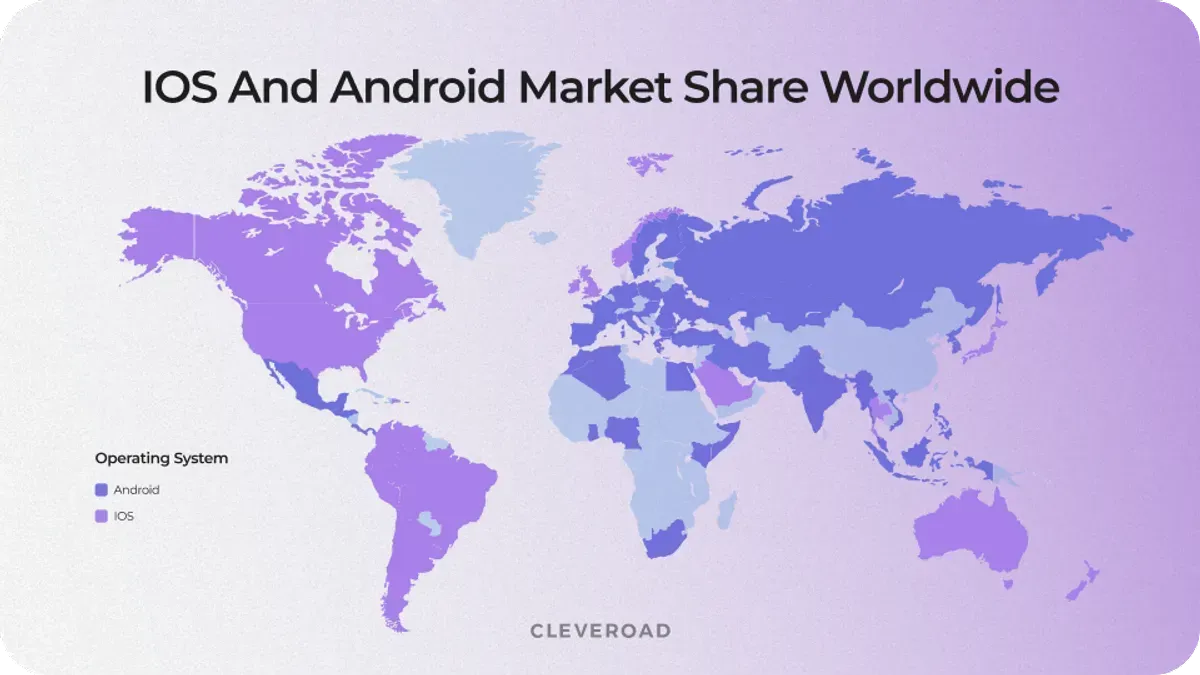
Android vs iOS market share on a world map
What to Know Before You Decide to Convert Android App to iOS?
Converting an Android app to iOS or vice versa takes more than copying functionality from one platform to another. The two ecosystems differ in development and performance expectations. Because of this, conversion often requires adapting the UI and optimizing backend interactions to work properly within the chosen environment.
Before starting the process, you should evaluate the potential business impact. Consider your growth goals and whether expanding to iOS or Android will support your product strategy. By taking a thoughtful approach, you will ensure the iOS/Android version delivers real value rather than becoming a costly duplicate of the app.
Let’s see the key points you must consider before dedicating resources to a conversion.
Platform design differences
Android and iOS follow distinct design philosophies, each with its own interface guidelines and user expectations. When converting apps in either direction, layouts, navigation patterns, and UI components often need to be thoughtfully redesigned rather than directly replicated. Aligning the app with platform-specific design standards ensures a natural user experience and better acceptance among target users.
Technology stack changes
Android and iOS rely on different programming languages and development environments. Android apps are typically built with Kotlin or Java, while iOS apps use Swift or Objective-C. As a result, converting an app between platforms requires significant code adaptation or complete rewriting to ensure compatibility, performance, and maintainability.
Backend and integration compatibility
Many apps depend on third-party services, APIs, and platform-specific integrations. During cross-platform conversion, it’s essential to verify whether these services are supported on the target platform. Features such as authentication, payment processing, push notifications, and external integrations may require additional configuration or alternative solutions to function correctly on both Android and iOS.
Learn about the mobile app development services we provide at Cleveroad and how we can help you with a proper iOS/Android conversion
Performance and device optimization
Android and iOS devices differ significantly in hardware configurations, operating systems, and performance expectations. Whether converting an Android app to iOS or vice versa, thorough testing and optimization are essential to ensure smooth functionality across a wide range of devices and screen sizes. Each platform has its own performance standards, UI behaviors, and system constraints, all of which must be carefully addressed to deliver a consistent user experience.
App store requirements
Publishing an application on either platform requires compliance with their respective store policies. Both the Apple App Store and Google Play have strict guidelines related to privacy, security, performance, and content. Adapting your application to meet these requirements may involve modifying features, updating permissions, or refining design elements to align with platform-specific standards before release.
In which case should you consider converting for your business?
Businesses typically decide to convert an Android app to iOS when it directly supports growth, partnerships, or product evolution. In many cases, the decision comes after the Android version proves viable and the company needs to expand its ecosystem.
Common business-driven app conversion scenarios include:
Support enterprise clients
Some corporate customers primarily rely on Android or iOS devices, depending on their internal ecosystems. Supporting both platforms ensures your product is accessible.
Increase product valuation
Startups available on multiple platforms often appear more scalable and mature to investors. Expanding across both Android and iOS strengthens your product portfolio.
Enable ecosystem partnerships
Certain integrations and services are optimized for either Android or iOS environments. Supporting both platforms allows businesses to collaborate with a wider range of partners.
Strengthen product presence
Being available on both major mobile platforms enhances competitive visibility. It ensures your app reaches a broader audience, regardless of users’ device preferences.
Reduce platform dependency
Relying on a single ecosystem can limit growth and increase risks. Expanding to both Android and iOS helps diversify your user base and creates a more resilient platform strategy.
How to Convert an Android App to iOS or Vice Versa Step-by-Step
Trying to figure out how to convert an Android app to an iPhone app and vice versa on your own may be confusing. So, we’ve prepared a 7-step list to help you make the transition successful.
Step 1. Select an experienced IT vendor
The conversion process requires proficiency in both Android and iOS development, great technical skills, and knowledge of the best tools for code reuse. Reaching out to an experienced mobile app development services provider ensures that your app’s design, performance, and functionality are preserved and that it functions properly.
At Cleveroad, we begin the Android-to-iOS conversion with a thorough assessment of the Android app’s architecture, identifying which components can be reused and which need to be rebuilt. Then, we manage the platform-specific UI/UX adjustments, ensuring adherence to iOS app design standards. We handle integration with native iOS features such as Apple Pay and Face ID, test the app across various iOS devices, and ensure compliance with App Store requirements.
Step 2. Analyze the app structure
At this stage, your vendor will evaluate your Android/iOS app’s architecture. This includes reviewing the framework, libraries, third-party tools, and backend integrations to understand how the system is built. This way, the IT partner can bridge the gap between Android and iOS while preserving performance, functionality, and a consistent user experience.
The key aspects the vendor will analyze include:
- Core architecture and code structure
- Used frameworks and dependencies
- Third-party services and APIs
- Backend compatibility and data flows
- Security mechanisms and data handling
- Performance bottlenecks and scalability limits
Step 3. Assess UI/UX redesign for iOS
Even though Android and iOS definitely share many design and user navigation principles, Apple empowers stricter UI/UX guidelines. The user interface may need significant form factor changes, including different icon placements, gestures, and design elements (fonts, navigation bars, etc.). Your vendor will work to align your existing app UI with iOS’s design philosophy to ensure smooth adoption among iOS users.
Step 4. Adjust platform-specific features
Some features on Android, such as back navigation, may be absent on iOS or function differently. Likewise, iOS will have its own core features, such as 3D Touch and Face ID. Converting existing Android apps to iOS must account for these discrepancies by adjusting or rewriting code. It is standard practice to implement platform-specific enhancements, and when handled by an experienced IT vendor, these enhancements ensure the app you are using has all the right features on both platforms without affecting performance.
Need experienced iOS development experts to achieve alignment with Apple’s guidelines? Read our guide on how to hire iOS developer to ensure seamless conversion
Step 5. Consider hybrid development frameworks
If you plan to support both platforms while reducing development time and costs, a hybrid development framework such as React Native or Flutter can be an excellent option. By incorporating a hybrid or usually referred to as cross-platform development services, your vendor will work on making an app with a single codebase for both platforms, making future maintenance easier.
For example, at Cleveroad, we helped multiple businesses create multifunctional cross-platform solutions. One of our vibrant cases is Blockbuster – a video-on-demand platform.
The client, a Danish media company, aimed to transform its traditional video rental business into a scalable digital streaming platform. To support rapid growth and reach users across multiple devices, we agreed on a cross-platform approach as a core strategy. This made the product accessible on mobile, web, and TV while maintaining a consistent experience and reducing the need for separate development efforts.
Here’s how the Cleveroad team contributed to the project:
- Implemented a cross-platform architecture to support mobile, web, and TV apps
- Rebuilt Android apps and developed iOS, tvOS, and web versions from scratch
- Ensured consistent UI/UX across all platforms while adapting to device specifics
- Integrated casting features (Chromecast, AirPlay) for seamless multi-device usage
- Migrated infrastructure to the cloud to support scalability and performance
As a result, the client received a high-performing streaming platform capable of serving a wide audience across the Nordic region. The cross-platform strategy accelerated time-to-market, reduced maintenance overhead, and enabled seamless user experiences on any device. This directly affected the rapid user growth, improved customer retention, and the successful digital transformation of the business model.
Here’s what Henrik Loop, CTO of Blockbuster, TDC, says about cooperation with Cleveroad:
Henrik Loop, CTO of Blockbuster, TDC, provides feedback about cooperation with Cleveroad
Step 6. Use J2ObjC for code reuse
You can also consider leveraging J2ObjC, a tool that translates Java code (one of Android's native programming languages) into Objective-C (one of iOS's native programming languages). By using J2ObjC, your development team can reuse significant portions of your business logic and non-UI code. This is especially useful for apps with complex backend services that would otherwise require complete rewrites. This approach enables faster conversion of Android apps to iOS and ensures the translated code runs smoothly on iOS without sacrificing functionality or reliability.
Step 7. Ensure compliance and test your app
Once the iOS app is developed or converted, extensive testing is essential to ensure it meets Apple’s performance and security standards. During this stage, your development team will conduct app testing and optimize the app for App Store approval, reducing the risk of rejection or release delays. Besides, your IT vendor will help you to ensure compliance with Apple’s strict App Store guidelines.
Tech Challenges of Porting Android to iOS and Vice Versa
Since we’ve already covered how to convert Android application to iOS (and vice versa), let’s focus on the key technical differences between these operating systems that make the process complex. In practice, the conversion is less about simple migration and more about thoughtful adaptation of architecture, design, and performance across platforms.
Different programming languages
As you may know, iOS and Android mobile operating systems use distinct programming languages:
- iOS: Objective-C / Swift
- Android: Java / Kotlin
While applications can support additional technologies, these are the primary languages used in mobile development. There is no direct way to translate code from one language to another without adjustments. This means developers often have to rewrite significant portions of the codebase, especially when dealing with platform-specific logic and UI components. Additionally, differences in syntax and paradigms can affect development speed and feature implementation timelines.
At Cleveroad, Android and iOS engineers collaborate closely to ensure smooth code transition and maintain feature parity when converting apps between platforms.
Here are the main challenges related to programming languages:
- No direct code translation between Java/Kotlin and Swift/Objective-C
- Need to partially or fully rewrite business logic
- Differences in language performance and memory handling
- Platform-specific SDKs and libraries compatibility
How to find app developers in 2026? Examine up-to-date rates, discover valuable hiring tips, and disclose app developers’ hiring options in this guide
Adaptation for various OS versions
Both iOS and Android release updates annually, which creates compatibility challenges. Not all users adopt the latest OS versions immediately, so your app must support a range of versions to remain accessible.
For iOS, fragmentation is relatively low, with around 75% of users adopting the latest versions quickly. In contrast, Android has higher fragmentation, with newer versions like Android 15 reaching a smaller portion of users. This makes testing and optimization more complex on Android than on iOS.
Still, this isn’t a blocker. An experienced development team will analyze usage statistics and define the optimal OS version coverage to balance performance, reach, and development effort.
What you should consider when handling OS fragmentation:
- Target OS versions based on real user adoption rates
- Backward compatibility for older devices
- Performance optimization across OS versions
- Ongoing updates and maintenance strategy
Screen sizes and resolutions
When converting an Android app to iOS or vice versa, developers must adapt the interface to different screen sizes and resolutions. iOS devices have a relatively limited range of screen variations, which simplifies UI adjustments.
Android, on the other hand, includes a vast ecosystem of devices with varying screen sizes, resolutions, and pixel densities. While Android provides tools to handle multiple densities efficiently, ensuring consistent UI behavior across all devices still requires additional effort and testing.
What are UI/UX Challenges While Converting an Android App to iOS
Changes to UI/UX design should be considered the same as the tech peculiarities of porting. After all, Android and iOS have different design languages – flat and material.
So to convert Android to iOS app and vice versa, the development team should mind the design guidelines provided by Apple and Google to ensure a great user experience. This means you may need a UI/UX designer on the team to handle this.
Let’s consider several differences between designing apps for Android and iOS.
Media assets
Adequate porting of media assets from one platform to another is important, as they differ in size between Android and iOS.
However, simply resizing isn't enough. Your developers need to carefully optimize each asset for the target platform. Utilizing adaptive design principles, scalable vector graphics, and platform-specific design guidelines ensures that visual elements appear consistent and high-quality across all devices. This process demands attention to detail to maintain a smooth and appealing user experience.
By prioritizing media asset optimization, developers can prevent common issues such as pixelation or misaligned visuals, ensuring the app performs well on both platforms.
Here is the size grid for iOS:
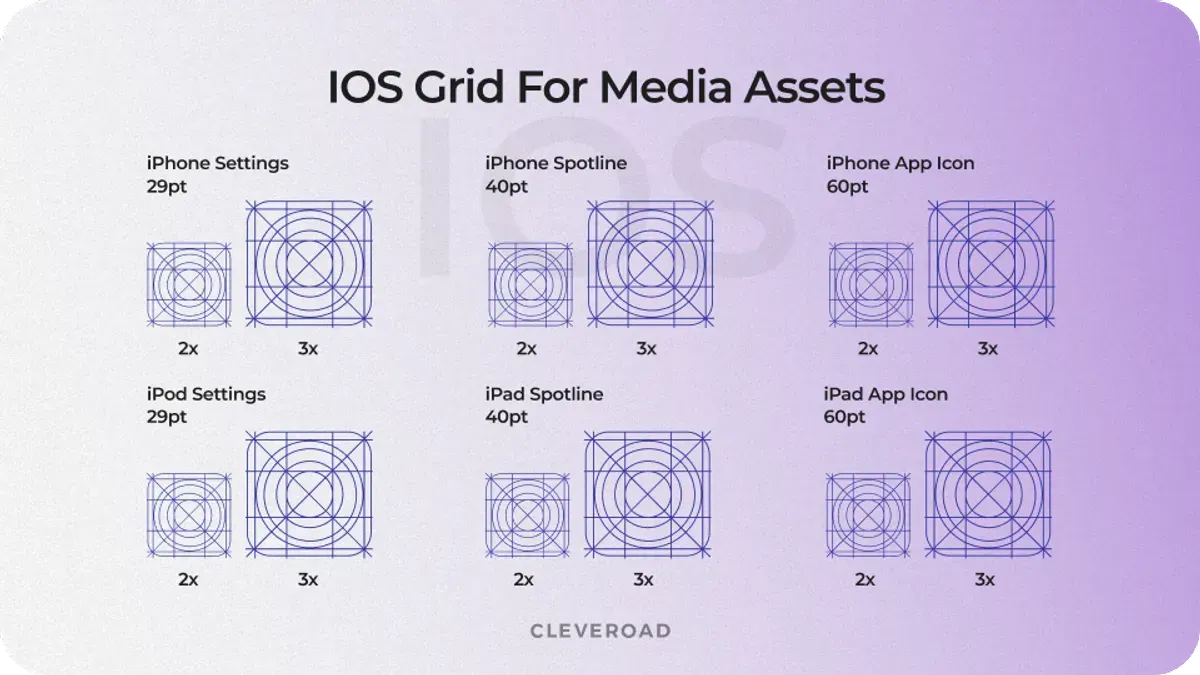
iOS grid for media assets
And for Android:
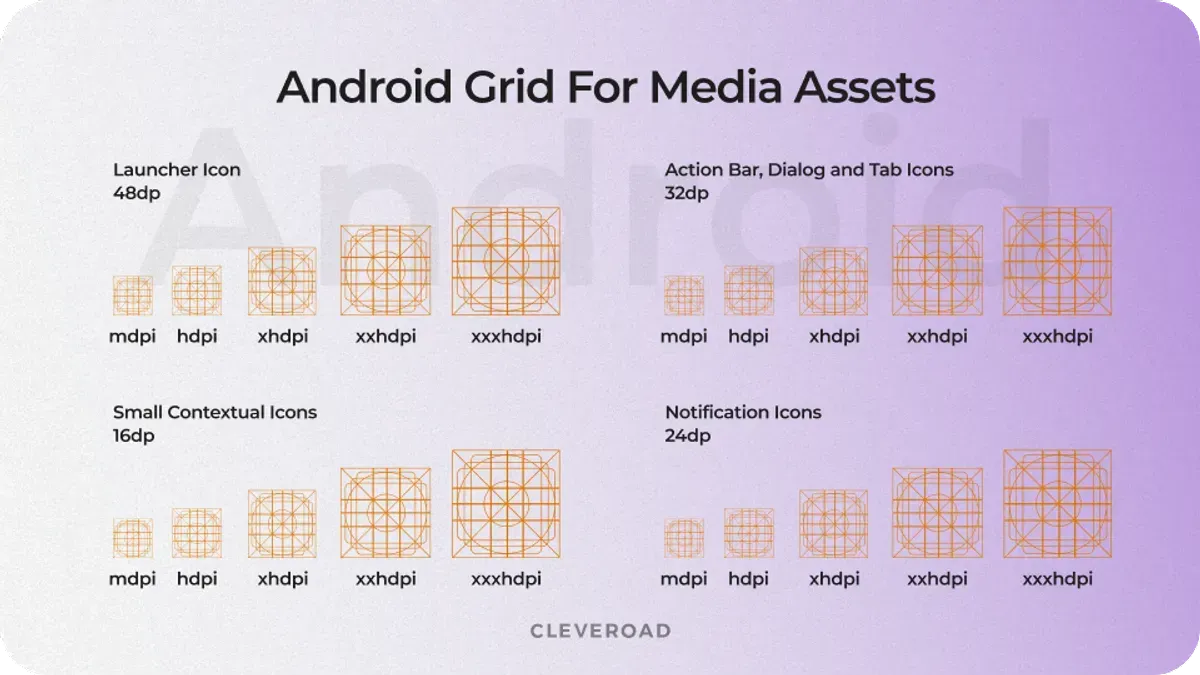
Android grid for media assets
Navigation patterns
When seeking to convert an Android version to iOS or vice versa, keep in mind that each platform requires users to interact with it differently. Android apps typically rely on a bottom navigation bar, floating action buttons, and a hardware or software back button. In contrast, iOS uses a top navigation bar with back buttons integrated into the UI, and gestures for navigation (e.g., swipe to go back, swipe up to access open tabs). This means developers need to rework navigation to fit iOS conventions while maintaining a smooth user experience.
Fonts
Each of these operating systems has a standard typeface: Roboto for Android and San Francisco for iOS. What’s more, both guidelines specify different use cases for their system fonts through various sizes, weights, and letter spacing. That makes them look more natural within a system.
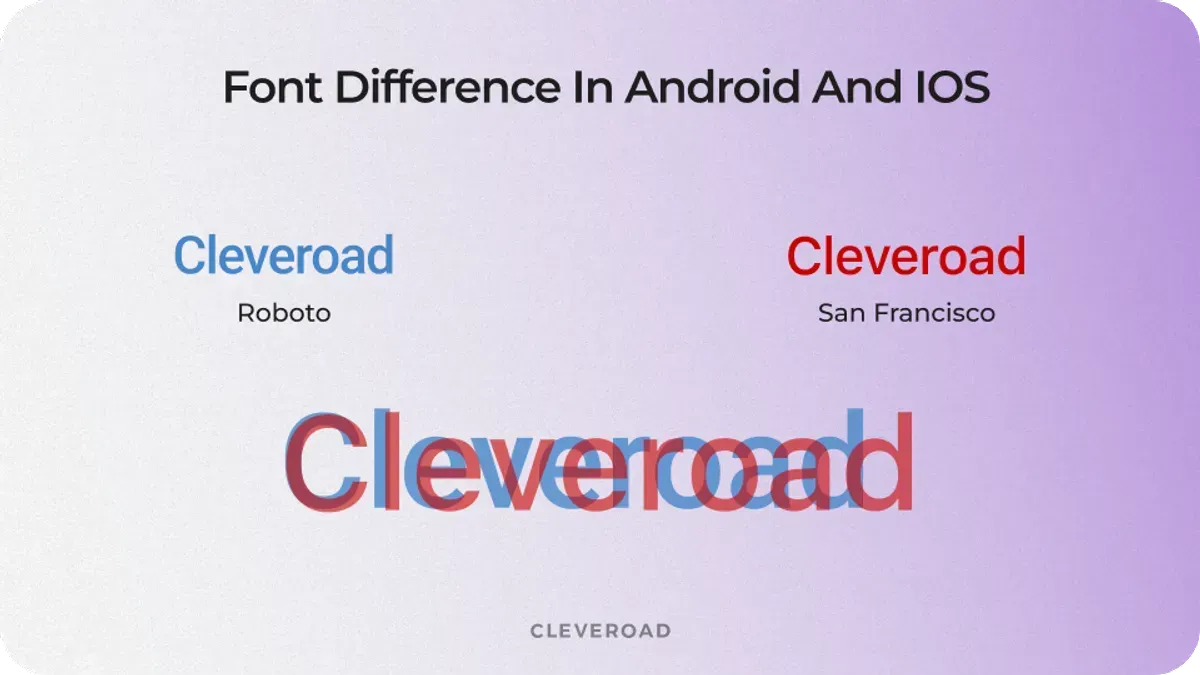
Typefaces on Android and iOS
Icons
As for system icons, they are slightly different as well. Probably the first thing that stands out is the thinner lines on iOS icons compared to the bold ones on Android.
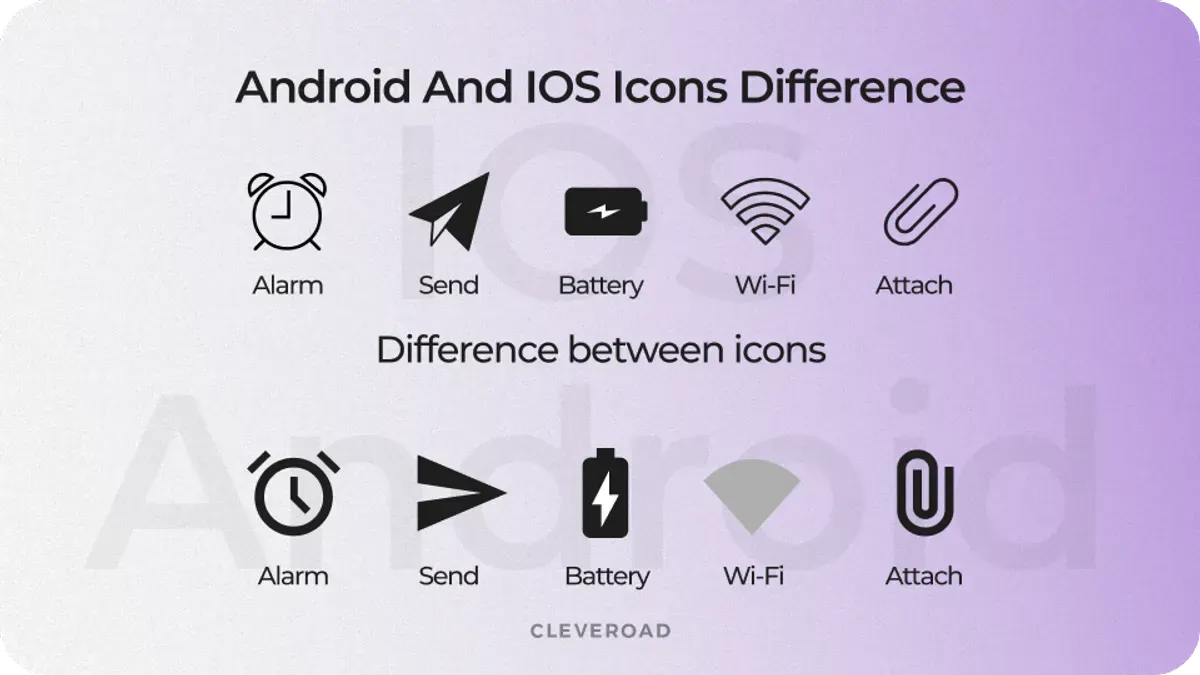
Comparison of icons on iOS and Android
Those are far from all the design differences that need to be addressed. Many more factors must be considered when porting an app to preserve a decent user experience (e.g., Navigation Drawer, Bottom Navigation/Tab Bars, App Bars/Navigation Bars).
What is the Cost to Convert Android app to iOS and Vice Versa?
The cost of converting Android apps to iOS or vice versa ranges from $6,000 to $50,000. But this estimate is approximate, since Android-to-iOS conversion pricing varies significantly depending on initial app complexity, the need for platform-specific functionality integrations, and the rates of your development team members.
Here’s a brief cost breakdown depending on the app’s complexity:
- Basic apps: Apps with basic functionality, minimal screens, and no heavy backend side could typically cost between $5,000 to $10,000.
- Moderately complex apps: Apps with more comprehensive screens, user authentication, in-app purchases, and complex navigation range from $10,000 to $25,000.
- Complex apps: If your app features include rich elements such as sophisticated animations, real-time data synchronization, or heavy backend services (e.g., e-commerce apps, apps with chat or social features), the cost can range from $30,000 to $50,000+.
Also, let's review the cost and timeline of Android/iOS app conversion based on stages:
| Conversion stage | Android to iOS cost | Android to iOS time | iOS to Android cost | iOS to Android time |
|---|---|---|---|---|
App assessment | $500-$2,000 | 40-60 hours | $500-$2,500 | 50-70 hours |
UI/UX redesign | $1,000-$6,000 | 60-100 hours | $1,000-$7,000 | 70-120 hours |
Features and code migration | $2,000-$15,000 | 100-180 hours | $2,000-$18,000 | 120-200 hours |
Feature integration | $1,500-$10,000 | 90-150 hours | $1,500-$12,000 | 100-170 hours |
Final optimization and compliance | $1,000-$5,000 | 50-80 hours | $1,000-$6,000 | 60-90 hours |
Total | $6,000-$50,000 | 340-570 hours | $6,000-$55,500 | 400-650 hours |
Besides, adapting Android UI/UX to iOS design requires significant effort from UI/UX specialists, who may need to redesign certain components, adding extra time and cost. This can add an additional 10-20% to the overall conversion price tag.
Feel free to contact us to receive more detailed information about the cost of your exact Android app to iOS conversion project
Another vital factor is the location and tech savviness of your development team.
For example, if you choose to hire programmers for app conversion in North America or Western Europe, the conversion cost will increase significantly due to higher developer rates ($50-$200/h).
On the other hand, let’s imagine you’ve decided to hire IT specialists from Asia or South America, as these regions offer the lowest software development costs ($20-$70/h). However, there’s a high chance you’ll encounter a significant time zone gap, a language barrier, and cultural differences in workflow and work ethic. As a result, this may affect the time required to conduct the conversion and its quality, and may increase costs due to organizational hurdles.
At the same time, regions like Central and Eastern Europe offer skilled experts with high English proficiency, competitive rates ($30-$80/h), and transparent collaboration. Central and Eastern Europe have a strong technical education system, producing highly qualified developers. Additionally, their favorable time zone overlap with Western Europe makes communication and conversion project management more seamless.
Note: These numbers are rough estimates of the Android-to-iOS conversion and may vary significantly depending on your specific case.
How Cleveroad Can Help You with Converting Android App to iOS or Vice Versa?
Cleveroad is a software development services provider with over 15 years of experience in the IT field. We offer a comprehensive suite of software services, including custom software development, legacy system modernization, UI/UX design, Discovery phase, IT consulting, and more. In addition, we provide flexible collaboration models such as IT staff augmentation and dedicated teams, allowing you to select the approach that best fits your budget, timeline, and need for specific specialists or a full team.
Cleveroad successfully cooperates with SMB’s, startups, and private clients. Our main domains are Logistics, Healthcare, and FinTech. We also have experience in creating software solutions for Retail, Real Estate, Travel, Education, Media, and other industries.
By partnering with us, you can enjoy the following advantages:
- Access to a team of 280+ in-house engineers, including 25% senior specialists, with 200+ successfully delivered projects.
- Collaboration with an ISO-certified partner (ISO/IEC 27001:2013 and ISO 9001:2015), ensuring top-tier quality and security standards.
- Free solution workshop to define project goals, explore tailored strategies, and assess feasibility, risk-free and without upfront costs.
- Expertise in integrating modern technologies and platforms, including CRMs (Salesforce, HubSpot), payment gateways (Stripe, PayPal), and other advanced APIs.
- Guaranteed compliance with relevant legal and regulatory standards, such as GDPR and accessibility requirements.
To evaluate our expertise in custom software development, take a look at our portfolio and check out the software projects we’ve already delivered to clients.
Turn your Android app into an iOS app or vice versa with our experts
Contact us and receive a settled team of skilled experts who’ll conduct a smooth transition from Android to iOS or vice versa to help you expand your market presence
Yes, it's possible. Converting your current Android app to iOS involves recreating it in Swift or Objective-C and adapting it to iOS guidelines.
To convert your Android app to iOS, keep up with the following steps:
- Step 1. Select an experienced IT vendor
- Step 2. Analyze the app structure
- Step 3. Assess UI/UX redesign for iOS
- Step 4. Adjust platform-specific features
- Step 5. Consider hybrid development frameworks
- Step 6. Use J2ObjC for code reuse
- Step 7. Ensure compliance and test your app
While direct transfer is not possible, you can use a tool that translates Java code (one of Android's native programming languages) into Objective-C (one of iOS's native programming languages), rather than building native apps in Xcode or Kotlin. By using J2ObjC, your development team can reuse significant portions of your business logic and non-UI code. This is especially useful if you want to migrate to an iOS app from apps with complex backend services that would otherwise require a complete rewrite.
Porting an Android app to run on iOS, or using a hybrid development framework like React Native or Flutter to create a new app, can be an excellent option. By incorporating a hybrid (often referred to as a cross-platform) approach, your vendor will build an app with a single codebase for both platforms, making future maintenance easier. In this way, transferring an Android app to an iOS app may be faster and cheaper.
Transferring an Android app to an Apple device, such as an iPhone or iPad, or vice versa, is common practice. However, it requires significant adjustments to functionality. Some features inherent to Android, like back navigation, may sometimes be absent on iOS or operate differently. Likewise, iOS will have its own core features, such as 3D Touch and Face ID. Converting the Android app to iOS must account for these discrepancies by adjusting or rewriting the code.

Evgeniy Altynpara is a CTO and member of the Forbes Councils’ community of tech professionals. He is an expert in software development and technological entrepreneurship and has 10+years of experience in digital transformation consulting in Healthcare, FinTech, Supply Chain and Logistics
Give us your impressions about this article
Give us your impressions about this article
Comments
1 commentsCool!