AI Code Refactoring: How It Works, What It Handles, and How to Do It Safely
21 Sep 2026
13 Min
133 Views
AI code refactoring uses AI models to restructure internal code while keeping the software's existing behavior unchanged. AI-powered code tools can split oversized functions, rename elements across multiple files, remove unused code, and update outdated syntax. Engineering leaders pay attention to this approach because technical debt grows faster than teams can remove it by hand, and repetitive cleanup at scale is exactly the kind of work AI does reliably.
At Cleveroad, we use AI-assisted code refactoring to support engineers throughout the modernization process. Based on this practical experience, we created this guide to explain how AI code refactoring works, where it delivers the most value, which tools and approaches to use, and how to introduce it into an existing optimization workflow.
Key takeaways:
- AI reliably handles low-level, repetitive cleanup. Software architecture and business logic decisions still need experienced engineers.
- Three randomized controlled trials involving 4,867 developers, published in Management Science, found a 26% increase in completed tasks among developers using an AI coding assistant.
- Safe AI adoption depends on one rule: a human engineer reviews and tests every AI-generated change before it merges into production.
What Is AI Code Refactoring and How Does It Work?
AI code refactoring uses artificial intelligence to restructure existing code while keeping its external behavior unchanged. The safety and scope of these changes depend on how much of the codebase the AI tool can understand before it edits.
AI refactoring tools work at three levels of depth: surface text patterns, structured code representations, and feedback from engineers who accept or reject their suggestions. Each level supports a different class of refactoring tasks and affects how safely the tool can modify the code. The path from suggestion to merged change has four checkpoints, and the review gate is where most teams cut corners.
Lexical pattern matching
At the most basic level, code is refactored by AI tools that scan source files as text tokens and flag visible code smells, such as long methods, duplicated blocks, inconsistent naming, and outdated syntax. Rule-based scanners like Semgrep work the same way, and AI tools let you describe the pattern in plain language instead of a rule file.
Lexical analysis runs fast because it only looks at the surface. It has no view of the architecture or the business rules underneath, so a flagged four-hundred-line function is a question rather than a verdict: sometimes it exists because a product requirement made it that way.
Abstract syntax tree and lossless semantic tree analysis
Abstract syntax trees (ASTs) and lossless semantic trees convert code into structured representations that show how functions, classes, variables, types, and dependencies relate. With that context, a tool can rename a variable across a large codebase, migrate a framework, or split a module without losing track of what references what, and it can tell two similarly named elements apart. OpenRewrite, jscodeshift, and ts-morph work this way.
Lossless semantic trees, a term from the OpenRewrite project, also preserve what a plain AST discards, including comments and exact formatting. A correct edit then does not reflow the whole file into a diff nobody wants to review. Structural correctness is still not behavioral correctness, which is why the workflow later in this article puts a test suite between the suggestion and the merge.
Reinforcement learning from developer feedback
Some tools adjust suggestions based on what engineers do with them. Copilot and Cursor use acceptance signals to rank what they surface, and a few refactoring platforms weight future suggestions toward the change types a team keeps. If you consistently accept extract-method suggestions and reject aggressive inlining, later suggestions drift accordingly.
Fine-tuning is the more direct route. IBM's December 2025 overview of AI code refactoring notes that code Large Language Models (LLMs) can be fine-tuned for software engineering tasks, and suggests teams fine-tune on their own codebase so recommendations follow local patterns.
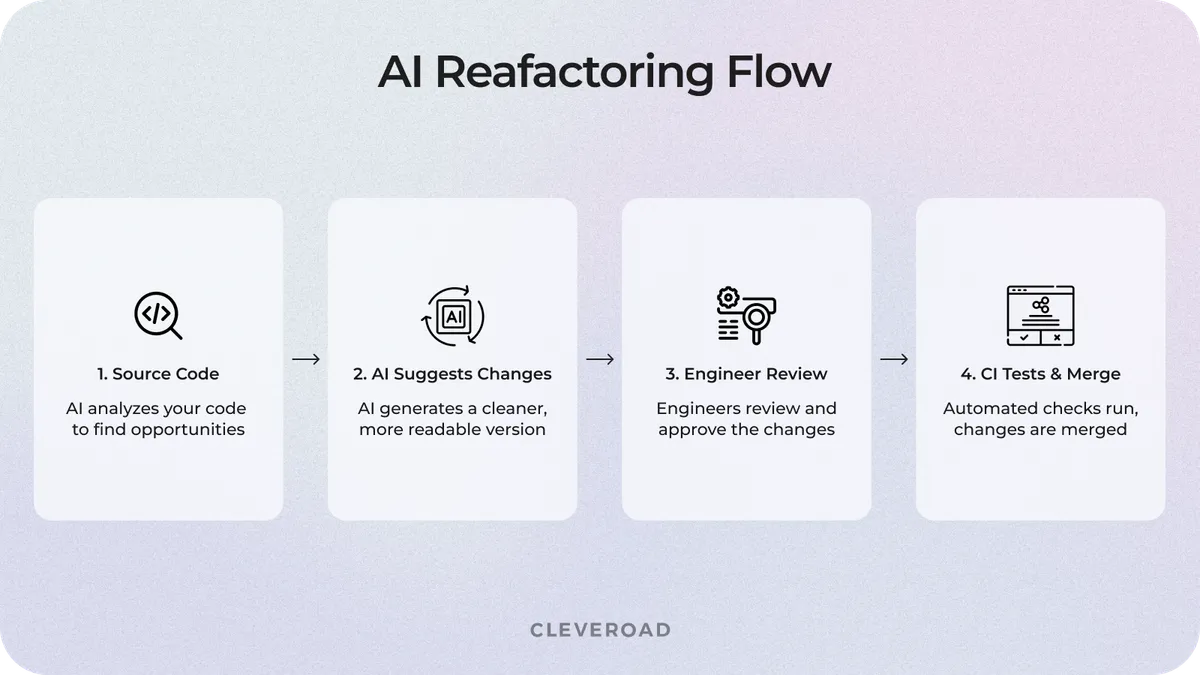
How an AI refactoring pass moves from source code to a merged change
What AI Refactoring Handles Well
AI refactoring works best on repetitive, mechanical changes that follow clear patterns across many files. The pattern to look for in your own codebase: a change you would otherwise repeat by hand in twenty files, where the twenty edits are near-identical, and none of them touches business logic. Every task below shares the same boundary: AI proposes the change, an engineer decides whether it fits the architecture and the product domain. Four task types account for most of the cleanup AI can safely take on, and each one still ends at a review gate.
An empirical study of 15,451 refactoring instances produced by AI coding agents in open-source Java projects found that the work was concentrated in low-level, consistency-oriented edits: changing a variable type, renaming a parameter, and renaming a variable. Maintainability and readability accounted for 80% of the stated motivation, and structural metrics improved measurably. That is the boundary this section describes, measured on real repositories rather than asserted.
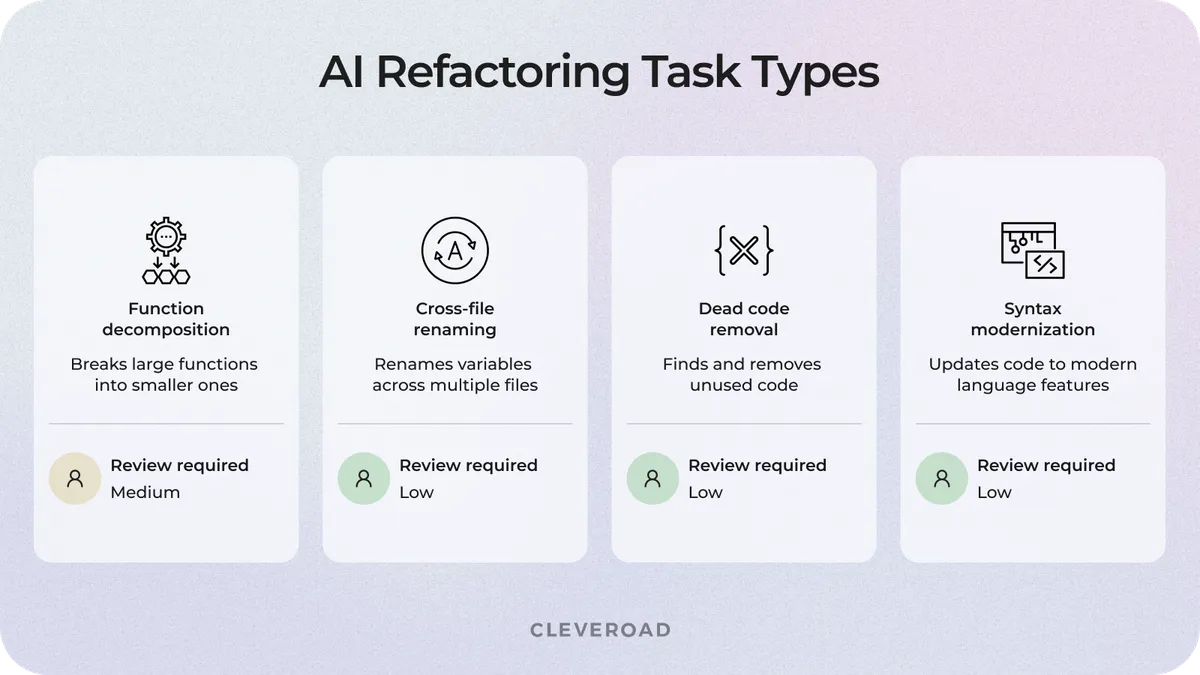
The four AI refactoring task types and the review requirement on each
Decomposing long functions
AI refactoring can break a large, monolithic method into smaller functions with clearer responsibilities. The model reads the existing logic, identifies the separate operations inside the long function, and proposes a split. It can also extract parameters, moving required variables into function arguments and updating the calls that depend on them. The original behavior survives, and the result is easier to read and to test.
A function that validates input, processes data, and saves results splits cleanly into three because those are real operations with different reasons to change.
Renaming and standardizing across files
AI tools can rename variables, parameters, functions, and classes consistently across a codebase without breaking existing references. Rather than replacing text matches, they analyze where each element is defined and where it is used before applying anything, so a rename in one module propagates to every call site and every import that depends on it. That is how you standardize naming across hundreds of files in an afternoon instead of a sprint. Some names carry business context, so a technically correct rename can still be wrong for the product domain.
Removing dead code
AI tools can find unused imports, unreachable branches, deprecated calls, and orphaned helper functions that no active module references. The model traces references and execution paths to identify elements that no longer contribute anything at runtime, including outdated Application Programming Interface (API) calls left over from a previous migration.
A cleaner codebase costs less to change, which is the whole return on this task. But engineers still validate these changes before merging, because some code only appears unused while supporting rare workflows, feature flags, or an unreleased feature branch.
Modernizing legacy syntax and frameworks
AI refactoring can translate outdated patterns into current syntax. Tools read older implementations and propose changes aligned with modern language features and the framework versions you actually run.
In practice, that means swapping deprecated framework methods for their supported replacements and preparing the code for a version migration. These changes let engineers modernize a codebase file by file instead of rewriting the application.
At Cleveroad, we use AI to document undocumented legacy logic before refactoring begins. Engineers get context on how a component actually works instead of guessing at the original implementation decisions. Our guide to AI legacy code modernization covers this process in more detail.
Where AI Refactoring Falls Short and How We Handle It
AI refactoring has clear limits. AI tools can struggle with architecture decisions and complex business logic, generate incorrect imports, or miss project-specific rules that are not visible in the code context. Three failure modes cause most of the damage in production, and each one needs its own control.
At Cleveroad, we reduce these risks with a controlled workflow. Engineers define the boundaries of what AI may touch, and every change passes human review before it reaches production. Each failure mode below maps to one specific control, and skipping the control is what turns a cosmetic risk into an outage.
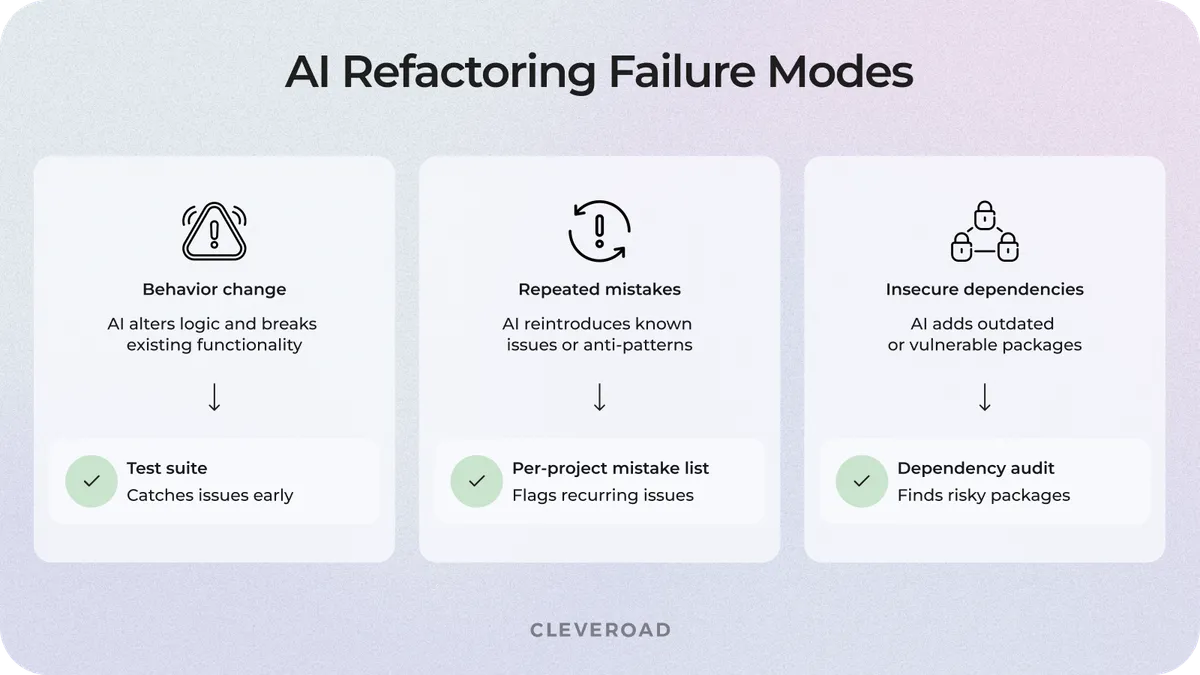
Three AI refactoring failure modes and the control that catches each
Behavioral regressions that look fine but fail in edge cases
AI-refactored code can look cleaner while quietly changing application behavior in rare scenarios. To prevent this, we only let AI refactor code that already has tests, or we write the tests first. After each refactoring step, the full suite runs, so unexpected behavior changes fail immediately instead of surfacing in production three weeks later.
Hallucinated imports and missing domain rules
AI can suggest incorrect imports or miss project-specific constraints hidden in business logic. At Cleveroad, we maintain a per-project list of the mistakes each codebase tends to induce, and a human engineer reads every diff before it merges. On the Proprio engagement, this kept bug counts flat across ten months of AI-assisted changes.
A November 2025 preprint on agentic refactoring makes the same point from the research side: validation mechanisms matter more as AI agents take on more of the edit. You can also read our guide to AI for application modernization for use cases and risks across a wider set of projects.
Legacy systems with unmapped dependencies
Legacy code hides dependencies that AI cannot see from limited context. If your system has grown for a decade without a current architecture diagram, a change that looks local can reach three modules you did not know were connected.
Before applying AI refactoring, we run a code audit that maps the dependency graph, flags the modules where a change is most likely to leak into other components, records current test coverage, and sets the quality baseline every later diff is measured against.
How to Refactor Code with AI Safely: A Step-by-Step Workflow
Using AI to refactor code safely depends on one principle: make small, tested, atomic changes that an engineer reviews before they reach production. Rather than asking AI to rewrite a subsystem in one pass, split the work into controlled steps with a validation point at each one.
We at Cleveroad approach AI-assisted development environments in the same way: every step below has a validation point an engineer signs off on before the change moves forward.
Start with a small, non-critical target
Pick a code area with limited product impact before you point AI at anything else. A utility function or an isolated module is a safer first target than a payment flow or authentication logic, where a debugging session costs you production traffic. A small scope keeps mistakes contained and lets you judge whether AI suggestions meet your code-quality bar before you widen the workflow.
A workable first target: under 300 lines, no external callers outside its own module, and existing tests you trust. If nothing in your codebase fits that description, the first task is writing tests, not refactoring.
Write or generate tests before refactoring
Create a behavior baseline before you change any structure. The rule we apply: AI touches a module only when that module's happy path and its two most common error paths are already covered by tests that fail if behavior changes. Line coverage percentage is the wrong target here, because a refactoring that preserves behavior can pass a high-coverage suite that never asserts on output.
Generating those tests is itself a good AI task. On one of the recent engagements, our Quality Assurance (QA) specialists generated Playwright end-to-end scripts from acceptance criteria, which cut script creation from a full working day to about two hours. An engineer still reads the generated assertions, because a test written from the same misunderstanding as the code will pass a broken refactoring.
Review every diff and keep changes around 200 lines
Small diffs are easier to understand, which makes them easier to reject. A human engineer approves every modification before it merges.
The threshold is not arbitrary. A SmartBear analysis of 2,500 code reviews at Cisco, covering 3.2 million lines and still the reference on review size, found that reviewers catch 70 to 90% of defects when a review covers 200 to 400 lines, with detection falling off sharply above 400. AI changes how fast the diff arrives. It does not change how much a reviewer can hold in their head.
Run the full test suite and connect it to CI/CD
Automated quality gates catch breaking changes before deployment. Connect the suite to your Continuous Integration and Continuous Delivery (CI/CD) pipeline so every AI-assisted change passes the same validation as human-written code.
Start in report-only mode, which surfaces issues without blocking delivery, then switch to blocking mode once the signal proves reliable. Teams that block from day one usually end up disabling the gate the first time it fires on a false positive.
Explore Cleveroad's AI-assisted development services to introduce AI refactoring with structured review and testing processes
What Results Can You Expect From AI Refactoring?
Results from AI refactoring fall into two buckets: what independent studies measure across many teams and what you measure in your own repository. The research from ARXIV agrees on where the gains sit, and it matches the boundary described above: repetitive, low-level work moves fast; architecture and business logic do not.
Market benchmarks for AI refactoring
Reported benchmarks cluster around two things: how fast a change clears review and how often it comes back as a regression. Whether you hit these figures depends on four controls: test coverage before the change, diff size, who signs off on the diff, and whether your quality gates block a merge or only report on it.
| Metric | Reported figure | Source |
|---|---|---|
Completed tasks with an AI coding assistant | +26% | The Effects of Generative AI on High-Skilled Work |
Task completion time on a standard development task | 21% faster, 96 minutes against 114 | How much does AI impact development speed? |
Agent commits that explicitly target refactoring | 26.1% | Agentic Refactoring: An Empirical Study of AI Coding Agents |
Most common agent refactorings | Change Variable Type 11.8%, Rename Parameter 10.4%, Rename Variable 8.5% | Agentic Refactoring: An Empirical Study of AI Coding Agents |
Stated motivation behind agent refactoring | Maintainability 52.5%, readability 28.1% | Agentic Refactoring: An Empirical Study of AI Coding Agents |
Based on three studies and one industry analysis covering randomized trials with 4,867 developers, a Google RCT with 96 engineers, 15,451 AI-assisted refactoring instances, and 2,500 Cisco code reviews used as a human-review baseline.
Our results on the Proprio Cloud Solutions engagement
Proprio Cloud Solutions is a Michigan Software-as-a-Service (SaaS) company running two product streams at once: its NetSuite-based Orion platform and a new Field Service mobile app. The team faced a release bottleneck because regression testing was fully manual, and each environment took a full day of QA checks, so covering three environments took three days.
We embedded a four-person AI-assisted team: a senior full-stack engineer, two QA specialists, and a project manager. They used Claude Code across the NetSuite Orion platform and the React Native mobile app. QA specialists replaced manual regression checks with automated Playwright tests wired into the CI/CD pipeline. Every AI-generated diff went through the same review gate as human-written code, with no separate fast path.
As a result of our cooperation, Proprio Cloud Solutions delivered four Orion releases on schedule and launched the Field Service Minimum Viable Product (MVP). Manual regression testing disappeared across all three environments, and test script creation dropped from a full working day to about two hours. Sprint output grew by 30–40% compared with a standard team of the same size.
- Read the full AI-assisted development for Proprio Cloud Solutions case study for how a four-person team matched the output of a larger one at the same code quality bar.
In the video below, Luke Abbott, CTO at Proprio Cloud Solutions, shares their experience working with Cleveroad and how our team supported the project through technical challenges and changing requirements.
Luke Abbott, CTO at Proprio Cloud Solutions: Feedback on Cleveroad AI-Assisted Development Services
Why Work With Cleveroad on AI-Assisted Refactoring
Cleveroad applies AI refactoring inside controlled engineering workflows, so you optimize existing software without losing control of code quality. Our AI engineers use Claude Code, the tool we standardize on, and review every generated change and validate it against product requirements before it merges.
Our legacy software modernization services include AI-assisted code refactoring, replacement of outdated stacks, architecture updates, and other changes needed to modernize an existing application.
Why companies choose Cleveroad for AI-assisted refactoring:
- We hold ISO 9001 certification for quality management and ISO 27001 for information security, which is what lets us run AI-assisted work on codebases under audit.
- We have a team of 280+ in-house engineers, with expertise backed by 15+ years and 200 delivered projects.
- Cleveroad holds AWS Select Tier Partner status within the AWS Partner Network, so cloud-side refactoring runs on a stack our engineers are certified on.
- Choose between a traditional engineering team, an AI-assisted team, or an AI-first team based on your delivery goals and preferred level of speed and AI involvement.
Refactor your codebase faster with AI
Cleveroad engineers can refactor your existing code with AI-assisted workflows that speed up delivery and fit into your current development process without disrupting active work
AI refactoring is most useful when engineers need to improve code quality at scale without changing product behavior. It helps teams reduce manual cleanup work, apply consistent patterns across the codebase, and focus review effort on higher-risk changes.
No, not safely, and the gap is narrow enough to name. Three conditions have to hold before an AI-generated change merges:
- The module already has tests that assert on behavior, not just execute lines.
- The diff stays under 200 lines, so a reviewer can hold all of it in their head.
- A named engineer approves it, and that approval is logged.
Drop any one of the three, and you are shipping unreviewed changes with extra steps.
The best AI refactoring tool depends on your codebase and your security requirements. Teams commonly use tools that combine code analysis, change suggestions, test generation, and repository-level understanding. At Cleveroad, we standardize on Claude Code with mandatory human review, because a consistent workflow and engineering oversight produce more predictable results than switching tools per task.
Depending on the project, enterprise teams typically use AI refactoring tools with stronger controls over source code, access, and review workflows:
- Claude Code. Fits complex refactoring where engineers need repository-wide context, controlled access, and human review before merge.
- GitHub Copilot Enterprise. Works well for teams that already use GitHub and want AI assistance inside existing pull request, review, and policy workflows.
- Cursor. Suits engineering teams that need fast multi-file refactoring and codebase-aware edits inside the IDE.
- Amazon Q Developer. Fits AWS-based environments where teams want AI assistance alongside existing cloud identity and security controls.
For regulated projects, the final choice should also depend on data retention terms, deployment options, access controls, auditability, and how easily the tool fits into your existing CI and code review process.
Yes, for one specific job, and it is the job most teams skip: documenting what the legacy code actually does. Before touching an undocumented module, we have AI produce a written description of its behavior and its callers, then an engineer checks that description against the running system. Only after that does refactoring start. Older systems hide dependencies and business rules that no test covers, so the audit comes first and the AI-generated changes come second.

Evgeniy Altynpara is a CTO and member of the Forbes Councils’ community of tech professionals. He is an expert in software development and technological entrepreneurship and has 10+years of experience in digital transformation consulting in Healthcare, FinTech, Supply Chain and Logistics
Give us your impressions about this article
Give us your impressions about this article