School Management App Development: Features, Cost, and How to Build One
18 Jun 2026
20 Min
106 Views
In many schools, daily operations still rely on tools that were never meant to work together: spreadsheets for attendance, separate chats for parent updates, manual payment tracking, disconnected gradebooks, and reports prepared only when staff have time to collect the data. This setup may work for a small team, but as the number of students, teachers, parents, and locations grows, school app development helps bring these workflows into one structured system with controlled access to records, payments, communication, and operational data.
At Cleveroad, we have over 15 years of experience delivering e-learning solutions for schools, universities, and other educational institutions. Based on this experience, we'll explain which features a school management app should include, how the development process works, which tech stack is best for this type of product, how much it may cost, and when custom development is worth choosing over SaaS or low-code tools.
Key takeaways:
- A school management app centralizes admissions, attendance, grading, communication, and fees across admin, teacher, student/parent, and finance roles.
- School management app development follows five main phases: workflow mapping, permission design, development, integrations, and compliance testing.
- The main school management software development cost drivers are user roles, platforms, Student Information System (SIS)/payment integrations, data migration, and Family Educational Rights and Privacy Act (FERPA), Children's Online Privacy Protection Act (COPPA), or General Data Protection Regulation (GDPR) compliance needs.
- Development costs range from $15,000-$50,000 for a Minimum Viable Product (MVP) to $80,000-$300,000+ for enterprise school management software.
- A realistic development timeline runs from 2-5 months for a pilot or MVP up to 18+ months for an enterprise or district-grade system, depending on modules, integrations, data complexity, and compliance scope.
What Is a School Management App?
A school management app is a digital platform that helps schools centralize operational workflows such as admissions, attendance, grading, scheduling, parent communication, tuition processing, and reporting. Instead of keeping data across paper records, spreadsheets, disconnected portals, and separate messaging tools, the school uses one controlled system with role-based access.
To properly understand school management app development, you first need to define what the product does in business terms. A well-designed school app is the operational layer that connects administrators, teachers, students, parents, and finance teams around one structured data model.
Core roles inside a school management app
When the app is designed correctly, each user gets only the functionality they need, while the institution keeps data consistent, traceable, and easier to manage. Below you can see the main user roles within the school app:
- Admin and staff: Manage admissions, student records, staff rosters, timetables, facilities, school announcements, analytics, and user permissions.
- Teacher: Logs attendance, adds absence reasons, corrects records when needed, enters grades, manages lesson plans, leaves behavioral notes, and communicates with parents or students.
- Student and parent: Accesses schedules, homework, report cards, calendars, lunch payments, notifications, school news, and teacher contacts.
- Finance: Manages tuition, fees, invoices, payment statuses, budget tracking, refunds, reminders, and financial reports.
What Does a School Management App Actually Do?
Once the basic product role is clear, the next step is understanding how specific modules map to users. Many competitors describe school app features as a long list, but this approach misses the point. A school management app works best when every module is connected to a role, a permission level, and a real workflow.
A school management app centralizes admissions, attendance, grading, communication, and fees across four role-based interfaces sharing one secure database. This shared backend matters because school data is highly connected.
The UK Department for Education's Technology in Schools Survey 2024 to 2025 found that school leaders said technology supports pupil/student data management well in 96% of cases and parental/carer engagement and communication well in 95% of cases. The same report also shows that technology was rated as supporting financial management well by 88% of primary leaders and 90% of secondary leaders.
In practice, attendance affects reports. Reports affect parent communication. Payments may affect student access to services. Schedules affect teachers, students, rooms, and school-wide planning. Let's review each essential part of a school management solution.
Admin and staff dashboard
The admin dashboard is the control center of the school management system. It usually covers admissions, staff rosters, timetabling, facility allocation, student records, announcements, permission management, and school-wide analytics.
For school leaders, the dashboard should not only display data. It should help them act on it. Principals and administrators need to see attendance patterns, engagement levels, overdue payments, staff workload, communication activity, and performance indicators without having to request manual reports from multiple departments.
At Cleveroad, we usually approach admin dashboards as configurable operational workspaces. For example, configurable dashboards can give principals real-time visibility into student engagement, attendance, and school performance. This helps school leaders identify issues earlier and reduce the amount of manual reporting staff do.
A reliable admin module may include:
- Student and family record management
- Staff and teacher profile management
- Admissions workflows
- Class and group management
- Timetable and facility planning
- Announcements and notification control
- Role and permission settings
- School-wide analytics and reports
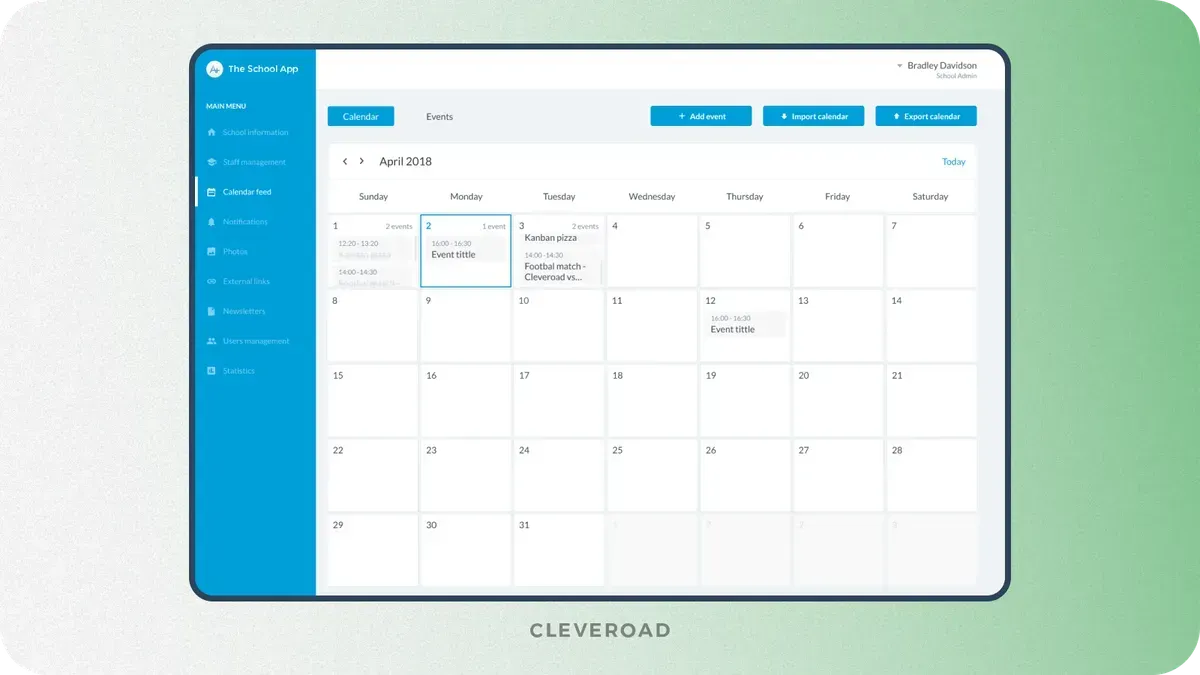
School app's admin interface designed by Cleveroad
The key challenge is that admin workflows differ from one institution to another. A private school, public district, international school, and EdTech SaaS product may all need "student management," but each will define records, permissions, reports, and approval flows differently. This is why requirement mapping before coding is critical.
Teacher portal
The teacher portal supports everyday classroom work. Teachers need to log attendance, enter grades, manage lesson plans, add behavioral notes, send updates, and quickly access relevant student information.
Attendance is a good example of hidden complexity. A basic app can let a teacher mark a student present or absent. A real school workflow may also require absence reasons, late-arrival tracking, early-pickup notes, parent confirmation, office corrections, and audit history. Without this logic, the school may still need manual corrections outside the system.
Grade entry can also vary. Some schools use points, others use letters, percentages, standards-based grading, weighted assignments, or term-specific reporting rules. During school administration app development, this logic should be documented before the gradebook module is built.
A useful teacher portal should reduce administrative burden. Teachers should not spend extra time duplicating records or searching for student data. The interface should make routine actions fast, especially attendance logging, homework updates, grading, and parent communication.
Check out education development services we provide at Cleveroad and how our subject matter experts can assist you in building an engaging and reliable e-learning solution
Student and parent app
The student and parent app gives families direct access to daily school information. It can include report cards, homework, schedules, school calendars, lunch payments, push notifications, newsletters, teacher contacts, and event updates.
For parents, the app should make school communication more seamless. They may open it to check whether lunch fees have been paid, whether the schedule has changed, whether a report card is available, or whether the school has sent an urgent notification. These actions must be simple because parent adoption often depends on speed and clarity.
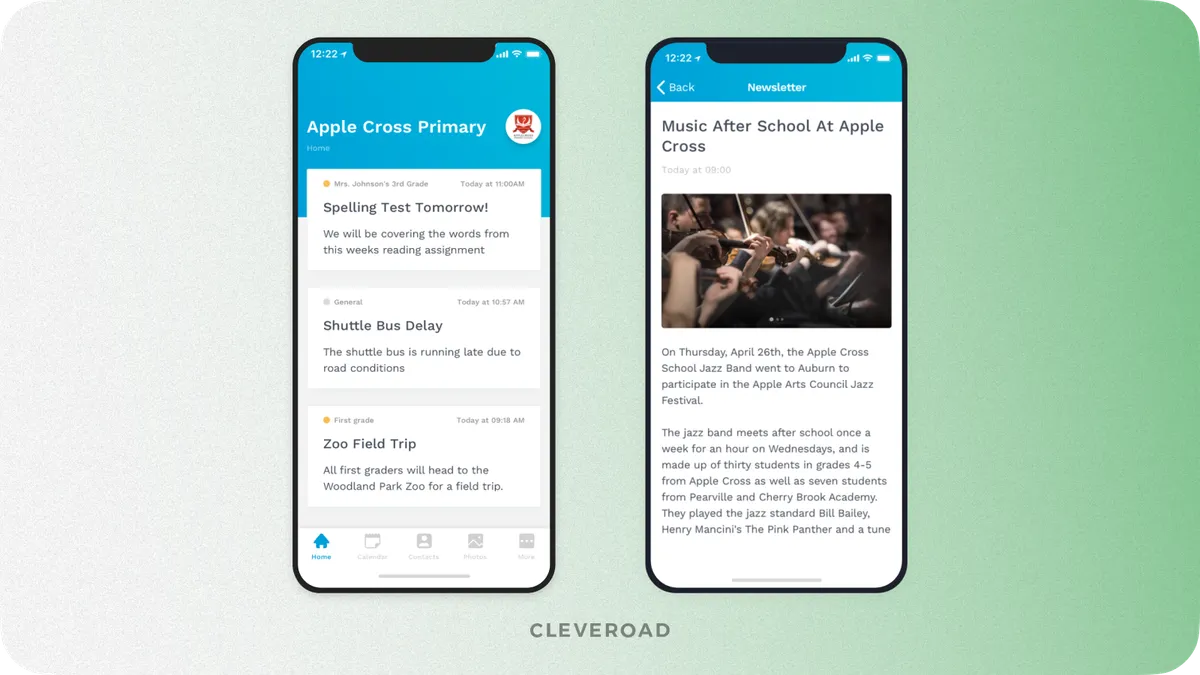
Student and parent school app interface designed by Cleveroad
Finance and fees module
The finance module supports tuition processing, automated invoicing, payment tracking, budget monitoring, lunch payments, activity fees, refunds, reminders, and financial reporting.
This module often looks simple from the outside, but it can become one of the most complex parts of school management app development. Payment gateway integration affects cost, testing scope, security controls, and Payment Card Industry (PCI) compliance-related decisions. If the school processes card payments, the development team should plan how payment data is handled, whether tokenization is used, and how much payment-related responsibility remains within the app.
A practical finance module may include:
- Tuition and fee setup
- Automated invoice generation
- Online payments
- Payment status tracking
- Refund workflows
- Lunch or activity payments
- Financial reports
- Export for accounting tools
Payment integration also affects user experience. Parents need clear payment status, receipts, reminders, and error messages. Finance teams need reconciliation and reporting. Administrators need visibility without direct access to sensitive payment details unless their role requires it.
If you are ready to scope a custom build, explore Cleveroad's school management software development services
How to Build a School Management App Step-by-Step
After defining what the product should do, you can move to the actual school management app development process. The safest sequence includes five stages:
- Mapping institution-specific workflows
- Designing the database and permissions
- Building the backend and interfaces
- Integrating third-party systems
- Testing the product before a phased rollout
The most important point is that requirement mapping, not coding, decides whether the budget holds. If the discovery stage overlooks grading logic, attendance correction rules, district reporting requirements, or payment workflows, these gaps will surface later as costly rework.
Step 1. Map institution-specific workflows
Before writing code, define how the school actually operates. This includes grading scales, attendance rules, reporting periods, district requirements, parent communication flows, tuition policies, approval chains, and staff responsibilities.
This stage should involve school administrators, IT decision-makers, teachers, finance staff, and sometimes parents or students. Each group sees different operational pain points.
Administrators may focus on reporting and compliance. Teachers may focus on time-consuming daily tasks. Parents may focus on communication clarity. Finance teams may focus on payment tracking and reconciliation.
At this stage, your team should clarify:
- Who will use the system every week?
- Which workflows are standard and which are unique?
- Which roles should access which records?
- Which integrations are required for MVP?
- Which compliance rules apply?
- Which features can wait for later releases?
- What data must be migrated from existing systems?
A clear discovery phase protects the project from scope creep. It also gives the vendor enough context to prepare a feature-by-feature estimate rather than a vague development range.
In Cleveroad's School App project, discovery lasted around two weeks and included about 20 stakeholder meetings before development started. The client already had the basics of the business model, an initial design concept, a desired feature list, and a release deadline, so our task was to turn this vision into a clear development scope.
Our dedicated Business Analyst worked with the client to clarify how the platform should support multiple schools, different user roles, parent and student onboarding, school events, schedules, newsletters, staff contacts, announcements, lunch payments, and fast communication between the school and its community.
As a result, our team prepared a software requirements specification, wireframes, a clickable prototype, and a project estimate. This provided the client with a validated product structure before full-scale development and gave our engineers a clear foundation for building mobile apps controlled via a web-based admin panel.

 USA
USA


Step 2. Design the database and role permissions
Once workflows are mapped, the next step is to design the database and permissions. A school management app needs a structured data model because student records, parents, classes, grades, attendance, teachers, schedules, payments, and notifications are all connected.
A relational database is usually a strong fit for school operations. It helps manage relationships such as student-to-class, teacher-to-class, student-to-parent, payment-to-student, and attendance-to-reporting-period. If these relationships are designed poorly, reporting becomes unreliable and future integrations become harder.
This stage should also define audit logs. A reliable school management system should record who viewed, changed, exported, or deleted sensitive data. Auditability is important for internal accountability and compliance.
Step 3. Build the backend, APIs, and interfaces
The development stage turns validated requirements into a working product. Backend engineers build the core business logic, APIs, authentication, permissions, notifications, integrations, data processing, and reporting flows. Frontend and mobile engineers create interfaces for administrators, teachers, students, parents, and finance staff.
A school management app may include several connected interfaces:
- Web admin panel for school staff
- Teacher portal or teacher app
- Student and parent mobile app
- Finance dashboard
- Shared backend and secure APIs
- Notification and communication logic
- Reporting and export tools
The backend must enforce role-based access. It is not enough to hide buttons or fields in the interface. Every API request should check whether the user is allowed to view or modify the requested data.
For parent and student apps, cross-platform development can reduce cost because one shared codebase can support iOS and Android. However, native development may still be preferable if the product needs advanced mobile performance, platform-specific capabilities, or a highly polished user experience.
If you want to see how AI can automate K-12 operational work beyond basic school management features, explore Cleveroad's case on an AI operations platform for a K-12 STEM provider.
Step 4. Integrate third-party systems
Most schools already use external tools. A school management app may need to connect with Google Workspace, Microsoft 365, student information systems, learning management systems, payment gateways, calendar APIs, email tools, accounting platforms, or identity providers.
Integrations are one of the top cost drivers because each one adds technical and operational complexity. The team must map data fields, handle authentication, manage API limits, test sync scenarios, process errors, and define what happens when an external system is unavailable.
For example, a payment gateway integration may require checkout flows, payment status updates, invoice matching, handling failed payments, receipts, refunds, and reconciliation. A calendar integration may require event creation, schedule synchronization, permission mapping, and conflict handling. SIS integration may require careful student record matching and data consistency rules.
During MVP planning, it is better to separate must-have integrations from later-stage integrations. This keeps the first release focused and helps your team avoid overloading the budget before the core workflows are validated.
Step 5. Test, ensure compliance, and roll out in phases
A reliable school management app requires functional testing, role and permission testing, integration testing, payment testing, notification testing, security testing, performance testing, and regression testing after updates.
At Cleveroad, we test our products both manually and automatically before production release. This matters because a school platform handles sensitive data, connects mobile apps with a web admin panel, and supports communication between students, parents, and school staff.
A phased rollout is usually safer than launching to the entire school or district at once. You can start with one school, one grade, one user group, or deploy only one module. After that, the team can collect feedback, fix usability issues, adjust workflows, train staff, and gradually scale adoption.
What Tech Stack Powers a School Management App?
A reliable school management app tech stack usually includes a mobile or web frontend, a secure API backend, a relational database, and cloud infrastructure. The best stack depends on the number of roles, expected load, integrations, compliance needs, and whether your product requires web-only access or mobile apps for students and parents.
- For a new school management app, cross-platform mobile technologies such as Flutter or React Native can be cost-effective when you need both iOS and Android apps.
- For backend development, Node.js is often a practical option because it supports real-time communication, scalable APIs, and fast development of role-based business logic. Python can also be useful for analytics-heavy systems or AI-enabled modules.
- For databases, PostgreSQL and MySQL are both common choices. The final decision should depend on reporting requirements, data structure, team experience, and long-term maintainability.
- For cloud infrastructure, AWS and GCP are common choices. Cloud services can support secure hosting, file storage, backups, monitoring, scaling, and content delivery.
Below is the production tech stack we use to build secure and scalable school management applications, covering mobile, web, backend, database, and cloud infrastructure.
| Layer | Cleveroad's usual tech stack |
|---|---|
Mobile | Swift for iOS, Java for Android |
Frontend web admin | Angular, JavaScript |
Backend | Express, Node.js |
Database | MySQL |
Cloud / infrastructure | AWS EC2, AWS S3 |
How Much Does School Management App Development Cost?
Once features, roles, and integrations are clear, estimating cost becomes easier. School management app development typically falls into three categories:
- $15,000-$50,000 for a pilot or MVP with core functionality and limited integrations
- $30,000-$80,000 for a mid-scope, multi-role platform with payments, reporting, and integrations
- $80,000-$300,000+ for an enterprise- or district-grade system with advanced architecture, analytics, compliance, and multi-school support
These numbers should be treated as planning ranges. The final cost of the education app depends on the number of platforms, the number of user roles, interface complexity, backend logic, integrations, data migration, compliance requirements, QA depth, cloud infrastructure, and post-launch support.
- A pilot or MVP is suitable when a school wants to test demand, validate workflows, or digitize one core area before investing in a full platform. This scope often works for a single school, a primary role, and a limited feature set.
- A mid-scope school management system is a more complete product. It usually includes admin, teacher, student/parent, and finance roles. It may support payments, SIS integration, reporting, push notifications, attendance workflows, grading, and role-based permissions.
- An enterprise or district-grade system is built for high load, multi-school administration, advanced analytics, AI features, deep compliance, data migration, and complex integrations. It may support thousands of students and advanced permission structures.
The main school management app development cost drivers are:
- Number of user roles
- Number of supported platforms
- Complexity of admin, teacher, parent, and finance workflows
- Payment gateway and SIS integrations
- Data migration from legacy systems
- Analytics and reporting depth
- Compliance requirements
- QA and security testing scope
- Cloud infrastructure and monitoring
- Post-launch support and maintenance
Below, you can examine an extensive comparison of school management system complexity, development time, and cost:
| School app scope | Typical features | Timeline (m) | Estimated cost ($) |
|---|---|---|---|
Pilot / MVP | Attendance, communication, basic admin, limited reporting | 2-5 months | $15,000-$50,000 |
Mid-scope platform | Four roles, payments, reporting, SIS integration, mobile apps | 5-10 months | $30,000-$80,000 |
Enterprise system | Multi-school administration, AI, advanced analytics, compliance, deep integrations | 10-18+ months | $80,000-$300,000+ |
How to Stay Compliant with FERPA, COPPA, and GDPR
Compliance should shape school management app development from the beginning. It is not something to add after the product is already built. Student records, parent contact data, attendance logs, grades, payments, behavior notes, and communication history all require careful access control and data protection.
The first step is understanding which law applies. FERPA applies to US education records. COPPA applies when online services collect personal information from children under 13. GDPR applies when the platform processes personal data of EU students, parents, or staff.
These rules affect product architecture. They influence consent flows, data minimization, audit logs, retention policies, data export, data deletion, data residency, access permissions, and security testing.
FERPA and student record access
FERPA protects student education records and gives parents certain rights related to those records. In school management software, FERPA-aware development means that access to student records must be controlled, documented, and limited to authorized users.
A FERPA-conscious school management app should include role-scoped access to education records, parent access to relevant student data, secure authentication, audit logs, permission testing, and controlled data export.
For example, a teacher may need access to student grades and attendance for assigned classes, but not finance records. Under the US Department of Education's FERPA guidance on student privacy, access to education records should be governed by user rights and institutional responsibilities. A parent may need access to their child's report card, but not class-wide student information, while an administrator may need broader visibility governed by permissions and audit trails.
COPPA and data from children under 13
COPPA matters when an online service collects personal information from children under 13. For school apps serving younger students, this affects registration, profile data, messaging, analytics, notifications, and any feature where a child may submit personal information.
A COPPA-compliant product should support verifiable parental consent when required, provide clear privacy notices, implement data minimization, ensure secure storage, and maintain deletion procedures. The app should not collect more child data than necessary for educational purposes.
Onboarding design also matters. In many school contexts, it is safer for accounts to be managed by the school or parent rather than allowing open child self-registration. This reduces risk, gives the institution stronger control over access, and helps align the product with the FTC's COPPA guidance for children's privacy.
GDPR for EU institutions
GDPR applies when the app processes personal data of people in the EU. For schools, this may include student records, parent contact information, staff data, grades, attendance, payment information, communication history, and device data.
GDPR affects architecture in several ways. The app may need consent records, data access workflows, correction workflows (where applicable), erasure workflows, retention settings, and transparent processing documentation. If data is transferred outside the EU, the school and vendor must also evaluate transfer safeguards.
At Cleveroad, we account for privacy and security controls during architecture planning, especially for products that handle sensitive or regulated data. Our ISO 27001-certified information security processes support secure handling of data, access control planning, and risk-aware delivery.
| Compliance area | Applies to | Product decisions it affects |
|---|---|---|
FERPA | US education records | Role-based access, parent rights, audit logs, record exports |
COPPA | Data from children under 13 | Parental consent, data minimization, child account flows |
GDPR | EU personal data | Consent records, data residency, erasure workflows, retention policies |
Build, Buy, or Go Low-Code: Which Route Fits Your School?
After feature and compliance planning, you need to choose the development route. The practical verdict is simple: SaaS works for standard needs, low-code works for basic pilots, and custom development fits schools, districts, or EdTech products with unique workflows, deep integrations, or long-term ownership requirements.
The cheapest launch option is not always the cheapest ownership option. A ready-made platform may reduce upfront cost, but it can limit customization. A low-code tool may work for a simple workflow, but it can become difficult to scale. Custom development requires more initial investment, but it gives you control over workflows, data, integrations, branding, and product roadmap.
Ready-made SaaS
Ready-made SaaS school systems can be useful when your school needs standard SIS or ERP functionality quickly. These tools may include attendance, grading, communication, basic reporting, and fee management out of the box.
The main benefit is speed. The vendor handles hosting, updates, and standard support. The school can start using the product faster than with custom development.
The limitation is product fit. If your institution has unique grading rules, district-specific reporting, custom parent communication flows, or unusual integration needs, you may need workarounds. Over time, these workarounds can create operational friction.
No-code and low-code
No-code and low-code tools can support simple internal workflows, prototypes, or small pilots. They may work for a form-based approval process, a simple attendance tracker, or a basic dashboard.
This route is useful when you need quick validation and do not yet need complex permissions, integrations, mobile UX, or compliance-heavy architecture. It becomes risky when the app is expected to support many users, connect with school systems, handle sensitive student data, or become a commercial EdTech product.
The main ceiling is flexibility. As requirements grow, low-code platforms may not provide sufficient backend control for advanced role logic, data synchronization, audit logging, or custom mobile experiences.
Custom development
Custom school management app development is the right route when your institution or product needs workflows that ready-made software cannot support. It also fits districts, private school networks, international schools, and EdTech founders building a scalable school operations product.
Custom development gives you full control over user roles, permissions, data structure, integrations, compliance, design, reporting, and monetization. It also allows you to build a platform around your own operational model rather than adapting your school to a vendor's predefined workflow.
The trade-off is a higher upfront cost and a longer development timeline. However, for complex or growing institutions, custom development can reduce long-term friction and avoid the need for migration later.
| Route | Best for | Trade-off |
|---|---|---|
Ready-made SaaS, such as eSkooly | Schools needing standard SIS or ERP functionality fast | Limited customization and recurring fees |
No-code / low-code | Basic pilots or single workflows | Hits a ceiling on scale, security, and integrations |
Custom development | Districts, unique pedagogy, deep integrations, or EdTech products | Higher upfront cost, full ownership |
How Cleveroad Builds School Management Software
Cleveroad is a custom software development company with 15+ years of experience building web, mobile, cloud, and AI-powered solutions. Since 2011, our team has helped startups, SMBs, and enterprises turn product ideas into scalable digital platforms.
One of the recent school management projects we’ve delivered is Betabox, a US-based STEM education platform . In this project, Cleveroad developed a custom platform to help the client manage educational resources, educator requests, approvals, scheduling, and administrative workflows within a single centralized environment.
As Betabox expanded, its team needed a more efficient way to manage educational resources, educator requests, approvals, scheduling, and internal operational tasks. Manual coordination was slowing daily workflows, so the company required a scalable digital foundation to support further growth across schools, districts, and learning programs.
The main goals the client set to us were:
- Centralize educator and administrator workflows in one web-based platform
- Automate educator requests, approvals, scheduling, and task generation
- Simplify access to STEM learning resources for schools and educators
- Reduce manual coordination across internal teams and programs
- Preserve the client's existing Airtable infrastructure while improving scalability
Cleveroad partnered with Betabox to build a custom web-based MVP within a six-month timeline before the academic year launch. The platform centralized educator and administrator workflows, automated request processing, Blueprint approvals, scheduling, task generation, and operational coordination, while integrating with the client's existing Airtable infrastructure.
As a result, Betabox received a launch-ready MVP that cut manual coordination across 1,000+ schools. The solution enabled a 100% submission success rate, accelerated educator request processing by 40%, and reduced the manual administrative workload by 3x.
See how Betabox Founder & CEO Sean Newman Maroni describes Cleveroad's Discovery process and EdTech development expertise in the video below:
Sean Newman Maroni, CEO at Betabox: Feedback on Cleveroad's EdTech Development Services
Why Choose Cleveroad as Your School Management App Partner
Cleveroad's school management app development services cover the full delivery path: discovery, UI/UX design, architecture, development, QA, DevOps, deployment, and post-launch support.
By choosing Cleveroad for school management app development, you gain access to the following benefits:
- EdTech domain expertise: our team understands school software, LMS platforms, e-learning flows, role-based access, parent communication, and education-specific integrations.
- Structured discovery process: our Business Analysts and Solution Architects help define workflows, user roles, MVP scope, risks, integrations, and realistic estimates before development starts.
- Strong technical compliance focus: we design school software with access control, auditability, secure architecture, GDPR-aware workflows, and information security principles in mind.
- ISO 9001:2015 and ISO/IEC 27001:2013-certified processes: our delivery approach supports quality management and information security for software projects that handle sensitive data.
- AWS expertise: as an AWS Partner, our team builds scalable cloud infrastructure with services such as EC2, S3, monitoring, backups, and performance optimization.
- Flexible engagement models: we can provide a dedicated team, staff augmentation, end-to-end product development, or AI-assisted team depending on your internal resources and project maturity.
Build your school management app with a clear budget and roadmap
Contact the Cleveroad team. Our EdTech experts will review your requirements and help you build a reliable school management app aligned with your business goals, timeline, and budget
School management app development is the process of designing, building, testing, and launching software that helps schools manage daily operations. It usually includes modules for attendance, grading, admissions, schedules, parent communication, payments, reporting, and role-based access.
A modern school management app helps administrators, teachers, students, parents, and finance teams work with a single secure data layer rather than disconnected tools. The goal is to reduce manual work, improve communication, protect student data, and make school operations easier to manage.
A school management app usually takes 2 to 18 months to develop, depending on the scope. A pilot or MVP with attendance, communication, and a basic admin panel may take several months. A mid-scope platform with four roles, payments, reporting, integrations, and mobile apps takes longer. A district-grade system with multi-school administration, AI features, compliance controls, and data migration may require 12-18 months or more.
The timeline depends on the number of user roles, platforms, integrations, approval cycles, data migration needs, QA depth, and compliance requirements.
In 2026, school management app development may cost $15,000-$50,000 for a pilot or MVP, $30,000-$80,000 for a mid-scope multi-role platform, and $80,000-$300,000+ for an enterprise or district-grade system.
The final cost depends on user roles, supported platforms, UI/UX complexity, backend logic, integrations, payment functionality, data migration, reporting, security, compliance, and post-launch support.
You should use a ready-made SaaS if your school has standard workflows and needs quick implementation. SaaS is usually cheaper upfront and easier to launch, but it limits customization and creates recurring subscription costs.
You should build a custom school app if your institution has unique workflows, deep integration needs, district-level complexity, strict compliance requirements, or long-term product ownership goals. Custom development costs more upfront, but it gives you control over functionality, data, architecture, roadmap, and scalability.
A school management app should include admin, teacher, student/parent, and finance modules. Core features usually include student records, attendance, grading, schedules, homework, calendars, report cards, announcements, push notifications, staff contacts, tuition processing, automated invoicing, payment tracking, analytics, and role-based permissions.
Advanced platforms may also include SIS integration, LMS integration, payment gateway integration, Google Workspace or Microsoft 365 integration, AI-powered automation, audit logs, multi-school administration, data export, and advanced analytics.
You keep student data compliant by designing privacy and security into the architecture from the beginning. This includes role-based access control, secure authentication, audit logs, encryption, permission testing, data minimization, consent records, retention rules, and controlled data export or deletion workflows.
For FERPA, the platform should protect education records and support parent access rights. For GDPR, it should support transparent processing, consent where required, access and correction workflows, erasure where applicable, retention settings, and proper handling of EU personal data. For COPPA, apps that collect data from children under 13 must account for parental consent and data minimization.

Evgeniy Altynpara is a CTO and member of the Forbes Councils’ community of tech professionals. He is an expert in software development and technological entrepreneurship and has 10+years of experience in digital transformation consulting in Healthcare, FinTech, Supply Chain and Logistics
Give us your impressions about this article
Give us your impressions about this article