Warehouse Automation: Types and Actual Trends for 2026
Updated 25 Nov 2025
16 Min
7611 Views
Warehouse automation solutions became widely recognized over the last few years. Manual operations go hand in hand with human errors resulting in delays, improper time and resource management, low productivity and margin. All this ultimately leads to unsatisfied business partners and customers. And while some think of automation as applying autonomous vehicles and robots, others choose to start with software. As always, the truth is somewhere in between.
Full automation requires covering many aspects and operations, from automatic data entry to goods storage and delivery. Drawing on our expertise as a logistics solutions vendor, we've created this warehouse automation guide to cover its key aspects—automation fundamentals, hardware and software solutions, their benefits, and real-life case studies for reference.
What is Warehouse Automation?
Warehouse automation is all about uncovering repetitive tasks and finding ways to automate them. Modern warehouses are full of cases – from manual data entry to picking, storing and shipping of goods done by hand.
A large part of retail companies’ success lies in their ability to create effective supply chains, cut costs and thus expenses. In turn, this can be achieved with the help of an automation in warehouse management covering the most important operations. They often include inventory and back-office management, picking and delivery, barcodes scanning, handling charges, etc.
So far, we can define four layers of automated warehouse management:
- Basic automation (use of specific scanners, applications, printed papers)
- System automation (use of WMS, mobile radio frequency, voice-directed technologies)
- Mechanized automation (conveyors, AS/RS)
- Advanced automation (automatic sorters, palletizer, robotic picking, AGVs, and AGV software)
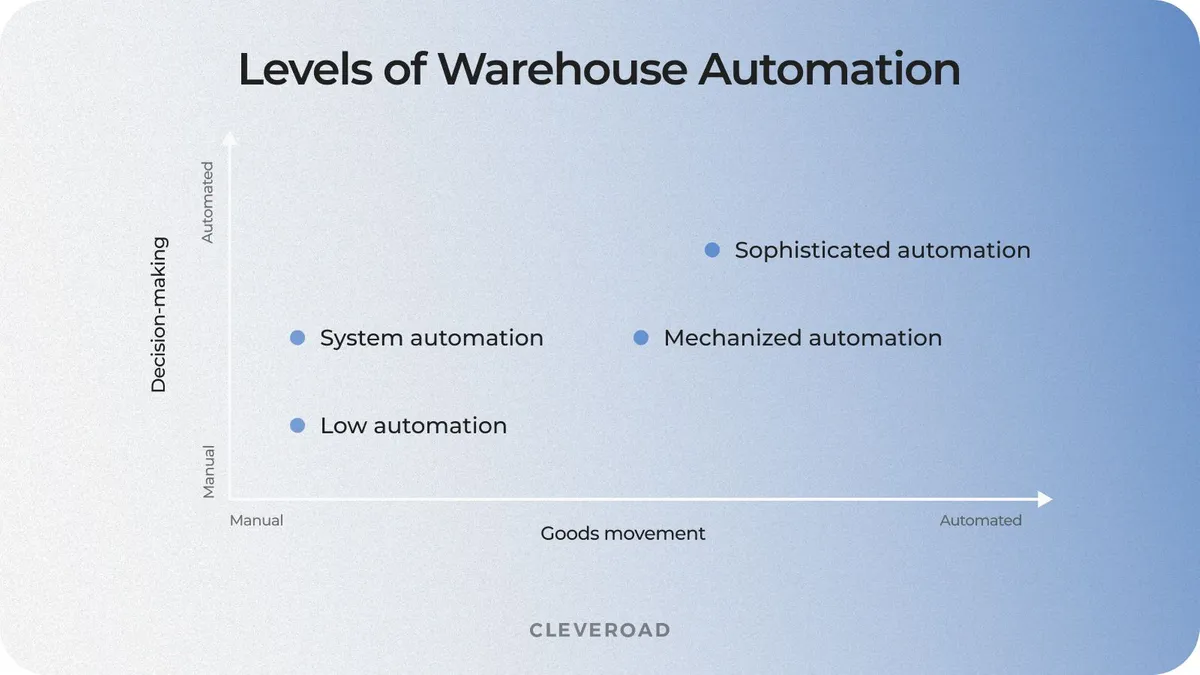
Four layers of warehouses automation (Source: Westernacher Consulting)
As you see, there are various automation solutions, some of which we're going to review later on. So to choose the right automated warehouse software, you need to be fully aware of the company's current baseline, future goals, and budget limits. Moreover, such solutions refer to Logistics. It’s a time-consuming and specific area, requiring unique expertise. So it’s better to turn to a software development company experienced in the warehouse automatization niche.
How do automated warehouses work?
Let’s say, operators load a robot with large bundles. The warehouse automatic robot takes the cargo from one point of the warehouse to the dispatching zone and warehouse software tracks the cargo’s movement, updating data regularly. However, not all warehouse solutions need robotic automation. In some cases, they are limited to utilizing automated warehouse software to replace manual tasks.
Warehouse automation technologies intend to guarantee that the enterprise-strategic operations of your company satisfy consumers’ demands. All the repetitive tasks, data gathering, inventory control, and maintenance data analysis are automated by a warehouse management system (WMS). These systems easily integrate with different solutions (e.g. warehouse inventory management software) to computerize and handle supply-chain workflows.
Warehouse automation technology processes
The powerful warehouse management software development process enables you to cover every aspect of the order lifecycle. But how exactly does automation impact different warehouse processes? Let’s see.
- Receiving: Use smartphones to gather data and integrated software to manage automated workflows, ensuring a seamless level of warehouse automation.
- Returns: Automate sorting and restocking with autonomous vehicles like lifters or conveyors, streamlining automated sortation processes.
- Putaway: Transition goods from receiving to storage with an automated system, simplifying cross-docking and optimizing throughput.
- Picking: Reduce operator travel time throughout the warehouse with mobile robots, boosting order fulfillment speed.
- Sorting: Implement AS/RS systems to automate inventory sorting, improving control and handling of small stocks.
- Replenishment: WMS systems auto-generate dispatch requests to maintain stock levels, preventing overstocking and reducing costs.
- Packaging: Leverage algorithms in automated WMS to optimize freight packaging based on product attributes and sustainability factors.
What Are the Different Types of Warehouse Automation?
There are various types of warehouse automation technologies designed to assist employees in managing logistics-related tasks more efficiently. We've compiled a list of trending solutions to enhance your supply chain processes. These include innovations in warehouse picking and advanced software systems, all aimed at optimizing your warehouse activities.
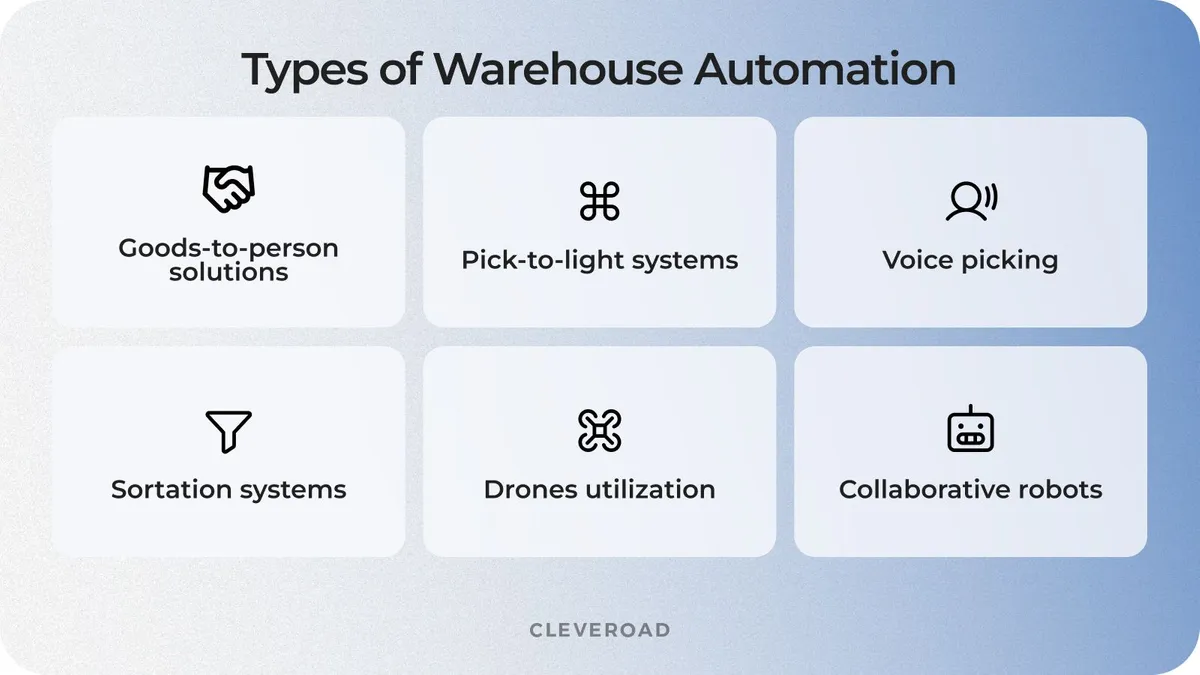
Major types of warehouse automation
Goods-to-person solutions
Goods-to-person (GTP) technologies are designed to help managers assemble and pack goods. All the needed materials are brought by robots. Such solutions encompass automated storage and retrieval systems or AS/RS systems. They consist of machines that move up and down storage aisles, placing or retrieving items. These systems help save on inventory storage, as a better-staffed warehouse — both vertically and horizontally — results in better storage density.
Pick-to-light systems
Such warehouse automation solutions help operators find the right items to carry out the orders. How does it work? The worker scans the barcode attached to the shipping cartons. Then, the system lights the path to lead the worker to the stated storage location. After the manager picks the needed items and puts them in the container, they press the confirm picking button. Pick-to-light systems enhance employees’ productivity since it allows managers to locate the goods faster.
Voice picking
Voice picking, also known as voice-directed warehousing (VDW), is a technology that streamlines operations within the warehouse environment by enabling efficient communication between pickers and operators. Using wireless headsets and mobile devices, taskers guide workers to the right warehouse location for fulfilling picking tasks.
This approach integrates seamlessly with automated sortation systems to optimize workflow and accuracy. Since automation involves enhancing human performance through guided instructions, voice picking ensures operators complete tasks efficiently while minimizing errors.
Sortation systems
Sortation systems involve mobile sort stations composed of smart kiosks, mobile put-to-light systems, and robots. Such solutions allow warehouse associates to pick and sort the incoming goods for returns, picking, or packing. Once the operator scans the item’s barcode, the system’s alphanumeric display illuminates, lighting up the correct shelf or bins to place the item.
Drones
Drones, set up with barcode scanners, are used in distribution warehouse automation to run inventory counts and alert the associates about the items that need to be restocked or relocated. Besides, some logistics companies consider using drones and unmanned aerial vehicles for deliveries.
Collaborative robots
Collaborative robots, or cobots, are a type of warehouse automation designed to work alongside human operators rather than replacing them. Technology like cobots enhances efficiency by handling repetitive or physically demanding tasks, such as picking and placing items or transporting goods.
It allows warehouse operators to focus on more complex and strategic activities, improving overall productivity. While cobots can complement automated sortation systems, they excel in environments where automation involves tasks requiring flexibility and adaptability.
Even though different technological solutions are created to accelerate warehouse processes, the final choice will depend on your business goals. When it comes to software, warehouse automation has a case by case basis. For example, ready-made applications often miss features like printing barcode labels, bulk options or integration with other systems. And that’s the time for custom software development to take the lead.
So the best way to start and – what’s more important – successfully finish warehouse automation is to contact an experienced vendor and discuss your plans and ideas with them.
Core Warehouse Automation Benefits
Let’s find out the crucial benefits in warehouse automation you will obtain if you implement this technology:
- Enhanced operational speed
- Optimized space use
- Inventory precision
- Improved safety
Let’s talk more about each of those advantages of automating your warehouse.
Enhanced operational speed
Implementing an automated warehouse system significantly increases operational speed by enabling operators to locate items in seconds. Advanced solutions, such as WMS integrated with digital automation tools, streamline critical processes like order fulfillment and inventory tracking. This type of automation boosts your employee productivity and efficiency, providing a competitive edge for logistics and transportation companies.
Optimized space use
Automation in warehouse operations maximizes capacity by leveraging your logistics systems like AS/RS (Automated Storage and Retrieval Systems) and warehouse robotics, which efficiently handle product storage and retrieval. Additionally, incorporating a conveyor system reduces the need for wide aisles, enabling better use of available space and improving overall layout.
Inventory precision
By minimizing manual intervention, a fully automated warehouse ensures more accurate inventory counts and enhanced inventory management. These solutions allow you to maintain precise inventory data, reducing errors and optimizing stock levels. Partnering with an experienced logistics software vendor ensures seamless integration and maximum efficiency for your supply chain flows.
Improved safety
Automation reduces the number of employees and equipment operating on the warehouse floor, significantly enhancing workplace safety. With warehouse robotics and software delivering products directly to managers, you can minimize the risks associated with traditional manual processes, creating a safer and more efficient environment.
When to Perform Warehouse Automation
While the benefits of warehouse automation are undeniable for logistics businesses, there are challenges associated with its implementation that require careful planning and strategic solutions. For instance, implementing automation demands significant investments and specialized expertise for setup and ongoing maintenance, which some organizations may need to outsource. Additionally, physical automation systems can encounter equipment failures, leading to downtime and repair expenses.
To overcome these obstacles and create an advanced warehouse, it’s essential to follow proven strategies and best practices. Below, we explore how to effectively implement a warehouse automation system and address the key challenges that may arise during the process.
Warehouse management system integration
Automation in warehouse is the process of enhancing operational efficiency, but improper integration may lead to data inconsistencies and miscommunication between systems. This challenge is especially critical for businesses managing many warehouse locations, where seamless data sharing is crucial.
Cleveroad can help design and implement robust integration strategies tailored to your business needs. Leveraging shipping API and middleware solutions, we ensure compatibility between automation tools and existing warehouse management systems. This automation creates a unified platform that minimizes risks and ensures your warehouse management systems work seamlessly.
Balancing scalability with upfront investment
Implementing automation solutions often requires significant upfront investment in hardware, software, and training. The challenge lies in ensuring these systems are scalable, accommodating business growth without needing frequent, costly upgrades. This is particularly demanding for businesses transitioning from a simple warehouse setup to a more advanced one.
Cleveroad provides cost-effective, scalable solutions that grow with your business. We recommend new automation tools that can be incrementally expanded, such as modular robotics and cloud-based platforms. It allows you to invest gradually, avoiding overcapitalization while ensuring readiness for future growth. By tailoring automation strategies to your specific needs, you can achieve long-term scalability without overspending.
In order to effectively automate your warehouse operations, you should choose the logistics software solution fitting to your particular business needs (e.g., warehouse management system or electronic resource planning software). Understanding the differences between a WMS vs. ERP system is crucial in this transition, as each plays a distinct role in streamlining operations and ensuring scalability.
Know more about WMS and ERP systems and the difference between them in our article!
Managing inventory through automated cycle counts
Cycle counting is essential for maintaining inventory accuracy, but manual methods are time-consuming and prone to errors. Automating this process can be challenging, especially if the inventory data isn’t synchronized across systems. Errors in automating inventory management system functions can result in discrepancies that disrupt operations. Additionally, scaling cycle counts across many warehouse locations adds to the complexity.
Cleveroad designs automated cycle counting systems integrated with inventory management tools, using RFID and IoT sensors for real-time updates and reduced manual processes. Intuitive dashboards and analytics ensure accurate inventory data, enhancing warehouse efficiency and minimizing disruptions.
Optimizing receiving processes
Receiving is a foundational process in warehouse operations, but inefficiencies in data capture and sorting can create bottlenecks. Businesses often struggle to implement automation to streamline receiving workflows due to incompatible systems or outdated tools. Mismanaged receiving processes can delay downstream operations, impacting overall productivity. For businesses handling large volumes, these inefficiencies can be especially costly.
Cleveroad can help you optimize your warehouse automation receiving processes by developing custom solutions tailored to your specific needs. Our team can design and implement advanced tools like mobile scanning apps and integrated WMS platforms to ensure smooth and accurate data capture at the receiving stage. These systems automate product identification, sorting, and storage assignment, reducing delays and improving overall warehouse efficiency.
To successfully navigate the complexities of warehouse automation, it’s essential to focus on key considerations that ensure smooth implementation, scalability, and long-term efficiency. Below, we delve into the critical factors to address when automating your warehouse.
How to Automate Your Warehouse Step-by-Step
Now, let’s discuss what steps you should follow for accomplishing automation of the warehouse for your business.
Build an implementation board
Create an advisory group familiar with current warehouse operations, its capabilities, and potential risks. This team should also address the existing digital gap. It's crucial to involve third-party specialists with expertise in supply chain automation to navigate the complexities of implementing advanced systems such as a warehouse management system (WMS) and ensure smooth operations.
Gather critical data
Warehouse automation technology relies heavily on accurate data about your distribution chain and strategic warehouse processes. Establish a reliable data-gathering workflow and assess your existing infrastructure before automating. Incorporating technologies like barcode labeling as the foundation of inventory tracking ensures real-time updates and minimizes errors, paving the way for more advanced automation solutions.
For seamless integration, consider delegating data migration and system setup to experienced IT vendors like Cleveroad, who specialize in warehouse automation through custom software solutions, ensuring efficient workflows, minimized downtime, and tailored system configurations to meet your unique operational needs..
Learn how Enterprise Data Warehouses lead to effective and fast data processing and how to create your own EDW software in our related article
Assess your inventory controls
Inventory management forms the backbone of warehouse automation. Start by refining your standard operating procedures (SOPs) for inventory optimization, such as purchasing, dispatching, receiving, and inventory loss prevention. Barcode labeling technology can enhance inventory tracking, ensuring accurate data across all operational stages.
Additionally, identify key performance indicators (KPIs) to measure the efficiency of your automated inventory management system and evaluate how automation will impact your existing inventory accounting methods.
Find and retain skilled experts
Selecting the right IT partner is crucial for the success of your automated warehouse management. Look for vendors with proven technical expertise in software solutions like WMS, WCS, or custom automation tools, as well as industry-specific knowledge of compliance and logistics regulatory standards.
Their ability to provide a consistent, experienced team throughout the project is essential for smooth implementation and long-term collaboration. Additionally, ensure they uphold high security and quality standards, such as ISO 27001-certified security management and ISO 9001-certified quality processes, to guarantee robust data protection and a structured project management approach.
Cleveroad team offers you expert warehouse management software development services to assist in your seamless warehouse automation
Adopt a warehouse management system
When implementing warehouse automation, careful planning is essential. For example, you may aim to optimize manual data entry, reduce employment costs associated with accounting, or prepare for warehouse expansion or new distribution points. Introducing solutions like goods-to-person (GTP) systems enables process automation, streamlining physical operations and accelerating business workflows. The chosen system must align with your enterprise objectives and market demands.
To answer what is WMS system are, it is crucial to say about that it integrates software and processes to effectively manage goods within the warehouse, providing warehouse workers with tools to control and monitor inventory, oversee automated equipment, and reduce labor costs by minimizing manual involvement.
Automation in warehouse helps improve operational efficiency and enhance customer service. Modern WMS solutions are designed to integrate seamlessly with smartphones and existing enterprise software, ensuring compatibility and scalability directly to warehouse operations.
Warehouse Automation Technology Trends
Warehouse automation is the process of implementing advanced technologies to streamline and optimize warehouse operations, ensuring greater efficiency and accuracy across various processes.
AI and Machine Learning
AI and Machine Learning (ML) play a crucial role in warehouse automation by enabling predictive analytics and intelligent decision-making. AI-driven warehouse automation together with ML help optimize warehouse operations by analyzing vast amounts of data to improve inventory management, reduce errors, and enhance overall productivity. Automated guided vehicles (AGVs) and robotic systems powered by AI are increasingly being used for autonomous material handling, further streamlining warehouse operations.
Blockchain implementation
Blockchain technology is revolutionizing warehouse automation by ensuring secure and transparent record-keeping. With its decentralized nature, Blockchain provides an immutable ledger for tracking goods across the supply chain, improving traceability and reducing fraud. Warehouse automation is the use of smart contracts and Blockchain-enabled solutions to streamline operations and enhance collaboration between partners.
Our Blockchain in logistics software development services help streamline operations and improve data security. Learn how you can leverage our expertise to automate your warehouse!
Internet of Things integration
The Internet of Things (IoT) integration enhances warehouse automation by connecting various devices and systems to provide real-time data. Through IoT, warehouse managers can monitor the movement of goods within the warehouse, track asset locations, and optimize warehouse processes. Sensors and smart devices facilitate seamless communication between equipment, allowing for efficient inventory tracking and resource utilization.
Digital Twin technology
Digital Twin technology enables warehouse managers to create virtual replicas of physical warehouses to simulate and analyze real-time operations. By using digital models, warehouse managers can test new workflows, optimize warehouse layouts, and improve decision-making processes. This technology helps automate storage and retrieval solutions, ensuring efficient resource allocation and reducing operational downtime.
Implementing these technologies in your warehouse to achieve automation requires selecting the right vendor for success. As a trusted logistics software development partner, Cleveroad is ready to provide expert solutions tailored to your needs.
How Cleveroad Can Help You With Warehouse Automation Technology Implementation
Cleveroad is skilled logistics software development company located in the CEE region. With over 12+ years in logistics software development, we provide custom warehouse tech solutions help logistics and supply chain businesses to create any-scale software solutions. Our WMS solutions optimize our clients’ workflows and enhance cooperation between all parties involved.
Working with our experts, you will get:
- Development and successful delivery of innovative Warehouse Management Systems (WMS) to improve resource planning, order picking and fulfillment operations, or lowering operating costs
- Top-class warehouse automation services: custom software development, modernization of the existing warehouse digital products, third-party integrations, and so on
- Collaboration with an ISO-certified organization that applies ISO:27001 security standards and ISO:9001 quality management systems
- Signing an NDA per your request to safeguard internal company data and your warehouse management software concept
- Post-development support, maintenance to keep your warehouse software functional and up-to-date
For this time, our team developed and released many software solutions for logistics companies. The latest one is a SaaS retail operations platform called RetailOps.
RetailOps is an intuitive and unified SaaS platform for back-office. Offering WMS, IMS, PMS, and other solutions. Its main features include warehouse management, inventory management, tracking, receiving, and many more.
We've integrated the platform with the Socket Mobile barcode scanner, connected printers available on PCs to portable data terminals. And ensured inventory tracking – from the moment it arrives in a warehouse to the minute it ships.
Read the review of Daniel Norman to know more about their cooperation with Cleveroad developers on RetailOps development:

 USA
USA


When it comes to software, warehouse automation has a case by case basis. For example, ready-made applications often miss features like printing barcode labels, bulk options or integration with other systems. And that’s the time for custom software development to take the lead.
So the best way to start and – what’s more important – successfully finish warehouse automation is to contact an experienced vendor and discuss your plans and ideas as to warehouse automated technology implementation with them.
Start working with qualified WMS vendor
Get a robust and secure WMS to automate your workflow! We'll guide your product creation from planning to integration
Warehouse automation involves integrating advanced technologies and systems to streamline operations and improve efficiency. Various types of automated solutions, such as robotic systems and automated storage and retrieval systems, can handle tasks like sorting, picking, and transporting items in the warehouse. By adopting these technologies, warehouse processes can be automated to reduce errors, save time, and enhance overall productivity.
Yes, a warehouse can be fully automated with the implementation of advanced technologies. Warehouse automation encompasses robotics, AI-driven systems, and IoT solutions that manage tasks like sorting, picking, and inventory tracking with minimal human intervention.
While automation helps streamline operations and improve accuracy, the future of warehouse automation also emphasizes collaboration, where systems provide key benefits of warehouse automation while supporting tasks directly to warehouse workers, ensuring a balanced and efficient workflow.
The best time to automate a warehouse is when your business faces inefficiencies, high labor costs, or growing demand that exceeds manual capacity. There are many types of warehouse automation to consider, from robotic sorting systems to warehouse drones equipped with advanced tracking capabilities for inventory management.
However, implementing warehouse automation requires careful planning to ensure the chosen solution aligns with your business needs, as the ultimate goal of warehouse automation is to increase efficiency and streamline operations.
To automate warehouse processes effectively, start by exploring the various types of automation solutions, like warehouse management systems, robotic systems, and automated storage and retrieval solutions.
Implementing warehouse automation that aligns with your business goals can significantly increase efficiency and enhance productivity within the warehouse. Advanced tools, such as warehouse drones equipped with sensors and cameras, further optimize operations by streamlining inventory tracking and reducing manual tasks.
Warehouse automation encompasses a range of processes designed to improve operational efficiency. For example, warehouse drones are equipped to conduct inventory checks quickly and accurately, reducing manual labor. Automating your warehouse operations with different types of automated systems, such as robotic sorters and conveyor belts, ensures streamlined workflows and increases efficiency across the supply chain.

Evgeniy Altynpara is a CTO and member of the Forbes Councils’ community of tech professionals. He is an expert in software development and technological entrepreneurship and has 10+years of experience in digital transformation consulting in Healthcare, FinTech, Supply Chain and Logistics
Give us your impressions about this article
Give us your impressions about this article